Working from my home office, I use both a corporate Mac and a personal Mac. Since I share the same Apple Magic Keyboard and Magic Mouse between both machines, switching between them used to be a bit annoying. The easiest way was to connect the cable to the Mac I wanted to use and wait for the devices to switch over. My new "AKeyboardSwitcher" application is the new version of my older "MonkeySwitcher".
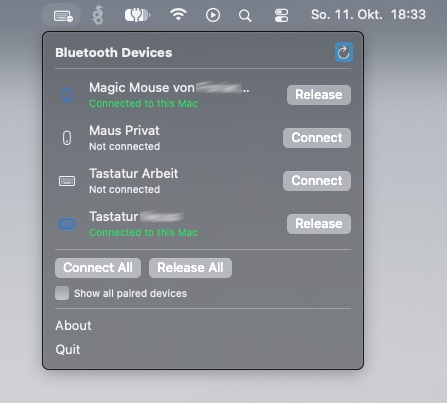
That’s why I started working on A Keyboard Switcher, a small, open-source macOS menu bar application that makes switching Bluetooth input devices between Macs much easier.
Switching with a Single Click
Instead of plugging in a cable every time I want to switch machines, I can now simply click the application in the macOS menu bar and connect or release my devices. The application provides an overview of my paired devices and allows me to switch individual devices or all of them at once.
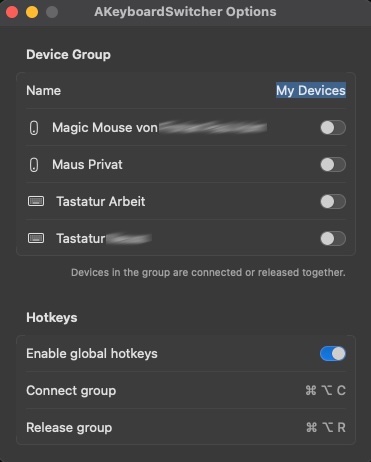
Since I often switch between my keyboard and mouse together, I also added device groups. This allows me to group multiple devices and connect or release them with a single action. Global hotkeys are supported as well, so I can switch between my Macs without having to open the menu.
Features
- Overview of all paired devices or only currently connected devices.
- Quickly connect or release individual Bluetooth devices.
- Connect or release all listed devices at once.
- Group multiple devices, such as a Magic Keyboard and Magic Mouse, for easier switching.
- Global hotkey support for connecting and releasing device groups.
- Option to display all paired Bluetooth devices, including non-input devices such as headphones.
- Native macOS menu bar integration.
- Open-source and available on GitHub.
Keeping It Simple
The goal was to build a small tool that solves a problem I run into every day without adding unnecessary complexity. A Keyboard Switcher runs directly in the macOS menu bar and does exactly what I need it to do.
The application requires macOS 13 or newer and can be built locally using the Swift toolchain. The source code and build instructions are available in the project repository.
Download
A Keyboard Switcher is an open-source project. Feel free to check out the source code, build the application yourself, report issues or contribute improvements. If you use multiple Macs and share your Magic Keyboard, Mouse or Trackpad between them, give it a try. Feedback and contributions are always welcome.