BackupPilot brings the Proxmox Backup Server to the Linux Desktop! For many years, Proxmox Backup Server (PBS) has established itself as one of the most efficient and reliable backup solutions in the open-source ecosystem. It is widely used alongside Proxmox VE to protect virtual machines and containers through fast, incremental, and deduplicated backups.
However, the Proxmox ecosystem is not limited to servers and virtualization hosts. Many users also want to protect their workstations, laptops, and personal files using the same centralized backup infrastructure. While this has always been possible through the official proxmox-backup-client, the solution has traditionally required command-line knowledge and manual configuration.

This is where BackupPilot (by OneSystems GmbH) comes in. BackupPilot is completely open-source (source-code) provides a modern and user-friendly desktop application that makes it easy to integrate Linux desktops and laptops into an existing Proxmox Backup Server environment. By building upon the official Proxmox Backup Agent, BackupPilot removes the complexity of command-line operations and delivers a seamless graphical experience.
The Idea Behind Proxmox Backup Server and the Backup Agent
Proxmox Backup Server was originally designed as a centralized backup platform for Proxmox VE environments. It offers incremental backups, global deduplication, data verification, compression, encryption, and efficient storage utilization. In many organizations, PBS has become the central location where all critical infrastructure backups are stored and managed.
Beyond virtual machines and containers, Proxmox also provides the proxmox-backup-client, often referred to as the Proxmox Backup Agent. This client allows any Linux system to send file-level backups directly to a Proxmox Backup Server datastore. As a result, administrators can protect physical servers, workstations, developer machines, and laptops using the same backup platform that already safeguards their virtual infrastructure.
The concept is simple but powerful: instead of maintaining separate backup solutions for servers, virtual machines, and desktops, everything can be consolidated into a single centralized backup platform. This reduces administrative overhead while providing consistent retention policies, monitoring, and recovery procedures across the entire environment.
The challenge has always been usability. While the Proxmox Backup Agent is extremely capable, it is exclusively operated through the command line. For many users, especially those less familiar with Linux administration, this creates a barrier to adoption.
The Goal of BackupPilot
BackupPilot was created to bridge the gap between the powerful capabilities of the Proxmox Backup Agent and the usability expectations of modern desktop users.
Rather than replacing the official backup client, BackupPilot acts as a graphical frontend that leverages the existing proxmox-backup-client underneath. This ensures full compatibility with Proxmox Backup Server while making backup management significantly easier.
The goal is straightforward: allow users to configure, monitor, schedule, and restore backups through an intuitive graphical interface without ever having to open a terminal. Whether it is a home user protecting personal files or an organization looking to integrate employee workstations into a centralized backup strategy, BackupPilot makes the process accessible to everyone.
At the same time, BackupPilot preserves the advanced capabilities that make Proxmox Backup Server attractive. Users continue to benefit from efficient incremental backups, centralized storage, and optional end-to-end encryption that ensures sensitive data remains protected before it ever leaves the client system.
Features of BackupPilot
- Modern GTK4 and Libadwaita desktop application for Linux
- Integration with the official proxmox-backup-client
- Multiple independent backup profiles
- Incremental backups to Proxmox Backup Server
- Flexible scheduling options including hourly, daily, weekly, login-based, and custom cron schedules
- Background service for automated backup execution
- Snapshot browsing and file-level restore functionality
- Restore to original or alternative locations with overwrite protection
- Optional client-side encryption support
- Per-profile bandwidth limitations
- Preflight checks for network connectivity and PBS availability
- Backup health monitoring with overdue backup warnings
- Detailed activity history and log viewer
- System tray integration, desktop notifications, and quick actions
- Multilingual support including English, German, French, and Italian
Installation
Getting started with BackupPilot is straightforward. The application is available in several package formats to support a wide range of Linux distributions.
Users of Debian, Ubuntu, and related distributions can install the provided .deb package. Fedora, openSUSE, and RHEL-compatible systems are supported through .rpm packages. For users who prefer a sandboxed deployment model, BackupPilot is also available as a Flatpak package. Ready to use packages can be found right here:
- Official Releases
- Debian (.deb) Packages on cdn.gyptazy.com
- RedHat (.rpm) Packages on cdn.gyptazy.com
After downloading and installing the appropriate package, BackupPilot can be launched directly from the desktop application menu. The installation also deploys the backuppilot-daemon, a user service responsible for handling scheduled backup jobs in the background.
Before creating backups, users should ensure that the official proxmox-backup-client is installed on their system. This can also be directly performed form BackupPilot, where it offers to do this automatically or provides your the required commands to copy & paste.
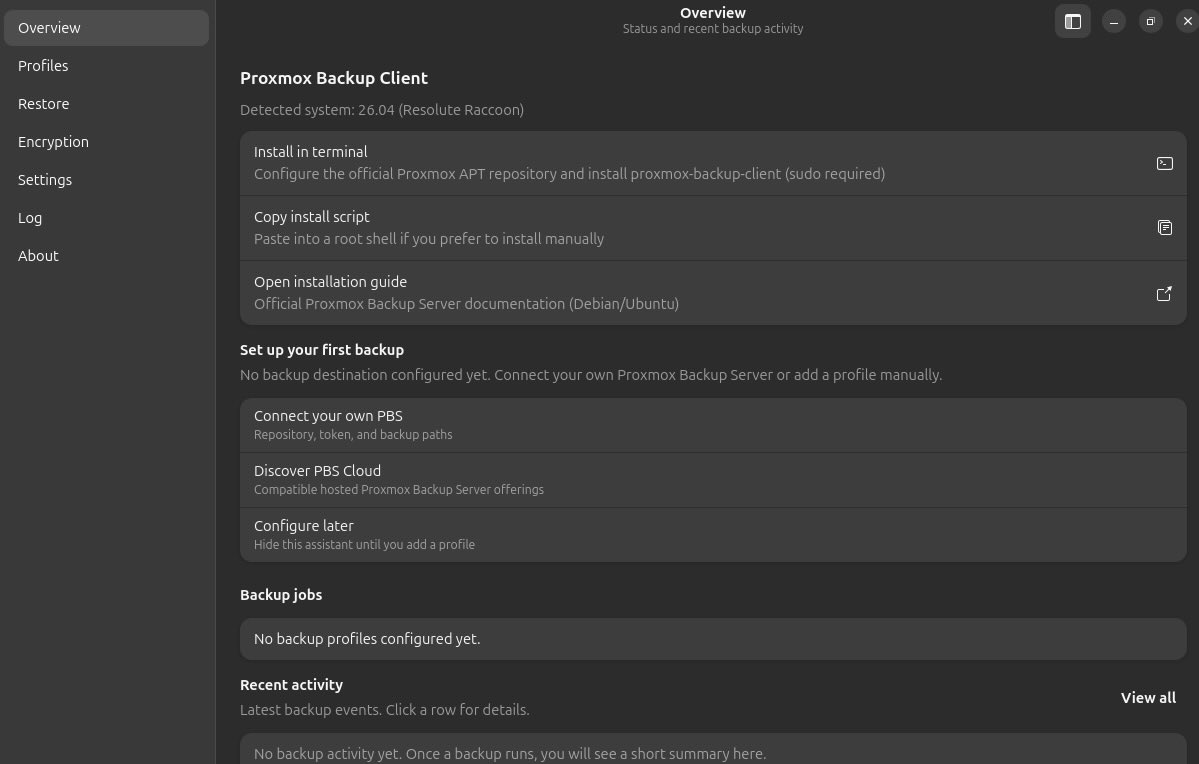
Once available, BackupPilot guides the user through the setup process, including the configuration of Proxmox Backup Server repositories, authentication credentials, backup schedules, encryption settings, and bandwidth controls.
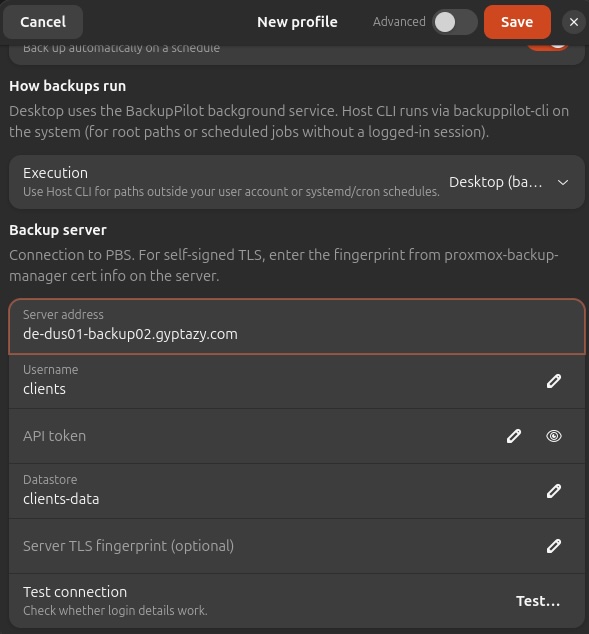
Within just a few minutes, a Linux workstation can become part of a centralized Proxmox Backup Server infrastructure, benefiting from the same reliable backup technology that organizations already use to protect their virtual environments.
Conclusion
BackupPilot finally brings the power of Proxmox Backup Server to Linux desktop users in a way that is accessible, modern, and easy to manage. By building upon the official Proxmox Backup Agent, it provides a seamless graphical experience while maintaining full compatibility with the underlying Proxmox backup ecosystem.
For users and organizations already relying on Proxmox Backup Server, BackupPilot offers an elegant way to extend centralized backup coverage beyond virtual machines and containers to include workstations, laptops, and other Linux systems. The result is a unified backup strategy that is both powerful and easy to use. If you're looking for some kind of support, they're also open for feeback and bug reports within this thread in the Proxmox forums. At the next Virtualization Gathering at credativ GmbH (11th of Jun, 2026), I'll also show a live demo of BackupPilot next to my talk about the S3 datastore integration within the Proxmox Backup Server. You can join this event for free!