PegaProx was originally designed as a centralized control platform for Proxmox VE based infrastructures. Pegaprox's goal has always been to bring together complex virtualization environments into a single management interface that simplifies daily operations and reduces administrative overhead. While the last upgrades added support for additional features, like EntraID / OIDC support, the latest development milestone of version 0.9.1, PegaProx now takes an important step forward by expanding beyond a single hypervisor ecosystem.
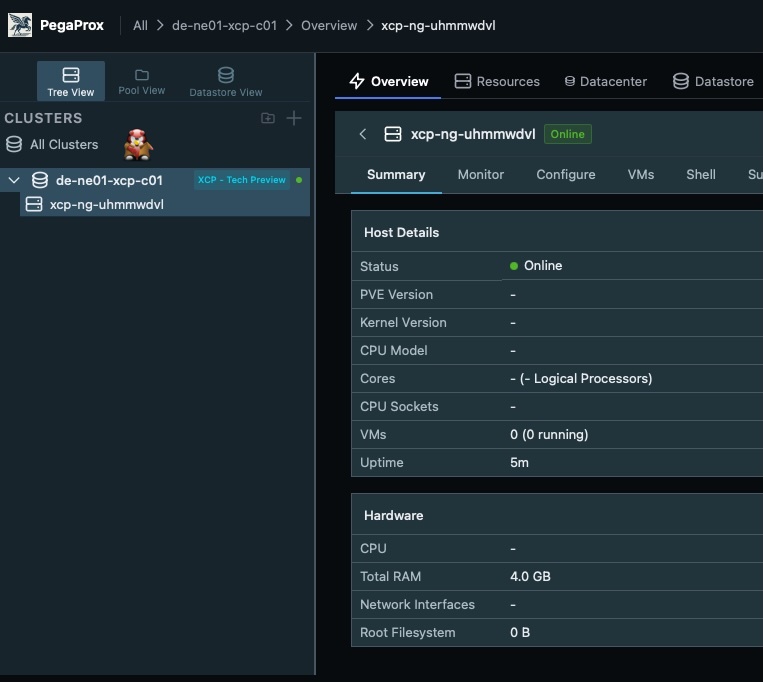
The platform now introduces XCP-ng (from Vates) as a technical preview, allowing administrators to connect and manage XCP-ng pools directly alongside existing Proxmox clusters. This marks the beginning of PegaProx evolving into a true multi-hypervisor datacenter management platform.
Many datacenters operate mixed virtualization environments for historical, technical, or strategic reasons. While Proxmox VE has become increasingly popular, a significant number of infrastructures still run workloads on Xen-based platforms such as XCP-ng. Managing these environments often requires switching between multiple management tools and interfaces. PegaProx addresses this fragmentation by bringing both ecosystems together in a unified operational view.
Why Multi-Hypervisor Management Matters
Modern datacenters rarely remain static. Over time, organizations adopt new technologies, migrate workloads, or run different hypervisors depending on operational requirements. As a result, administrators frequently face environments where multiple virtualization platforms coexist.
Operating separate management tools for each platform introduces several challenges:
- Fragmented monitoring and operational visibility
- Different workflows for similar management tasks
- Increased operational complexity for administrators
- Higher risk of configuration inconsistencies
- Limited automation across platforms
PegaProx aims to solve these challenges by providing a single operational layer above multiple virtualization platforms. Instead of treating hypervisors as isolated systems, they become part of a unified infrastructure that can be monitored and managed centrally.
The initial integration focuses on bringing core XCP-ng management capabilities into the PegaProx interface while maintaining the same philosophy that already applies to Proxmox environments: simplicity, visibility, and operational safety.
XCP-ng Integration (Tech Preview)
The XCP-ng integration is currently available as a technical preview. While still evolving, it already provides a strong foundation for managing Xen-based virtualization environments directly within PegaProx.
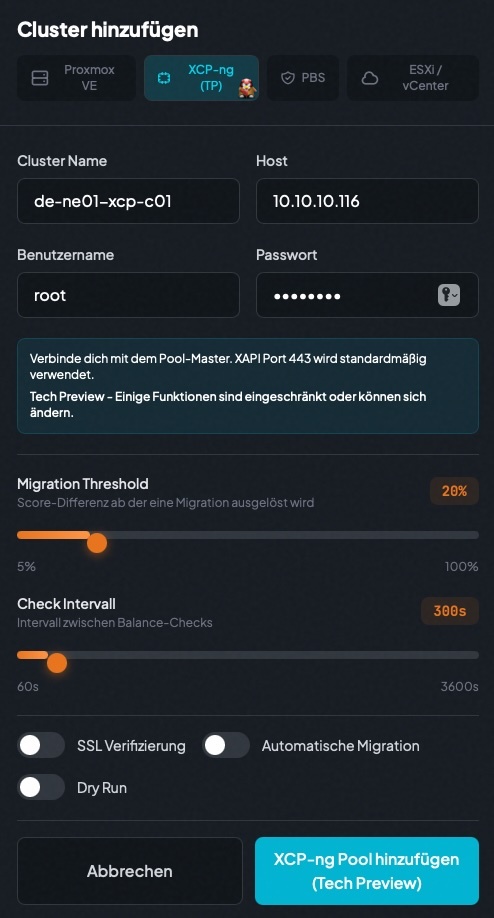
Administrators can connect existing XCP-ng pools using the native XAPI interface, allowing PegaProx to retrieve information about hosts, storage, and virtual machines. Once connected, these pools appear alongside Proxmox clusters within the unified dashboard.
This unified view enables operators to manage virtual machines, monitor host status, and perform common administrative tasks without leaving the PegaProx interface.
Supported Features
- XCP-ng Pool Support — Connect Xen-based XCP-ng pools alongside Proxmox clusters
- VM Power Actions — Start, stop, shutdown, reboot, suspend, and resume virtual machines
- VNC Console Access — Remote console connectivity using the native XAPI RFB protocol
- Disk Management — Add, resize, remove, or move virtual disks
- Network Management — Create, update, or remove virtual network interfaces
- CD-ROM Management — Mount and unmount ISO images from storage repositories
- Node Details & Maintenance Mode — View host details and place nodes into maintenance mode with VM evacuation
- Storage Uploads — Upload ISO images and templates directly to XCP-ng storage repositories
These features allow administrators to perform many of the most common day to day operational tasks for XCP-ng environments without switching tools.
Unified Virtual Machine Operations
One of the most practical advantages of the XCP-ng integration is the ability to manage virtual machines from different hypervisor platforms using the same interface.
Operators can start, stop, reboot, suspend, or resume virtual machines regardless of whether they run on Proxmox VE or XCP-ng. The interface presents these operations in a consistent and predictable way, reducing the learning curve for teams responsible for mixed infrastructures.
This consistency becomes especially valuable in operational environments where administrators must quickly react to incidents or perform routine maintenance tasks. Instead of remembering different command sets or navigating multiple interfaces, common actions remain accessible from a single control plane.
Remote Console Access
Accessing the console of a virtual machine is often required during troubleshooting or operating system installation. PegaProx integrates VNC console support for XCP-ng virtual machines using the XAPI RFB protocol.
This allows administrators to open a direct console session from within the PegaProx interface, eliminating the need to switch to the XCP-ng Center or other management tools. Console access is fully integrated into the existing workflow and behaves similarly to the console experience already available for Proxmox virtual machines.
Storage and Disk Management
Managing storage resources is a critical part of virtualization operations. The XCP-ng integration includes support for several disk related tasks that administrators commonly perform when maintaining virtual machines.
- Add new virtual disks to existing VMs
- Resize existing virtual disks
- Remove unused disks
- Move disks between storage repositories
In addition to disk operations, PegaProx also allows uploading ISO images and templates directly to XCP-ng storage repositories. This simplifies tasks such as operating system installations or template distribution within the environment.
Network Interface Management
Network configuration is another essential aspect of virtual machine management. Within PegaProx, administrators can manage network interfaces for XCP-ng virtual machines directly from the unified interface.
- Add new virtual network interfaces
- Modify existing network interface configurations
- Remove unused interfaces
These capabilities ensure that networking tasks remain consistent across hypervisor platforms and can be handled within the same operational workflow.
Host Maintenance and Node Operations
Maintenance workflows are critical in production virtualization environments. Hardware upgrades, security updates, or troubleshooting often require temporarily removing a node from active workloads.
PegaProx allows administrators to place XCP-ng hosts into maintenance mode directly from the interface. When entering maintenance mode, virtual machines can be evacuated automatically, ensuring that workloads continue running on other hosts within the pool.
Operators can also inspect node details such as host status, resource availability, and storage connections, providing clear insights into the health of the underlying infrastructure.
The Road Towards True Multi-Hypervisor Datacenter Management
The addition of XCP-ng support represents a major milestone in the evolution of PegaProx. While the current implementation is still considered a technical preview, it demonstrates the broader vision of the platform: creating a unified management layer across multiple virtualization ecosystems.
By integrating both Proxmox VE clusters and XCP-ng pools into a single interface, PegaProx enables administrators to operate heterogeneous infrastructures with far less complexity. Monitoring, virtual machine operations, storage management, and maintenance workflows can all be performed from a centralized control plane.
As the integration matures, additional features and deeper platform capabilities will continue to expand the scope of multi-hypervisor management. The long term vision is clear: enabling operators to manage diverse virtualization environments with the same level of simplicity and reliability that PegaProx already delivers for Proxmox based infrastructures.
For organizations running mixed virtualization stacks today—or planning future migrations—this approach provides a powerful path toward unified infrastructure management without forcing a single hypervisor choice.
More information about the platform can be found on the official project website at pegaprox.com or at the GitHub repository at github.com/PegaProx/project-pegaprox. You can also join the community chat in Discord.