With Proxmox Backup Server 4, a long-awaited feature has finally arrived: native support for S3-compatible object storage as a datastore. This fundamentally expands how backups can be designed, stored, and scaled in Proxmox environments.
Until now, Proxmox Backup Server required local disks or locally attached storage to host datastores. With version 4, this limitation is gone. Datastores can now be backed by any S3-compatible backend, making it possible to use self-hosted object storage solutions such as MinIO, SeaweedFS, or Garage, as well as public or private S3 offerings, while still benefiting from all core PBS features like deduplication, compression, encryption, pruning, verification, and garbage collection.
One of the biggest advantages of this approach is that no local storage is required on the Proxmox Backup Server itself anymore. PBS becomes a lightweight, stateless service layer that handles backup orchestration and metadata, while the actual backup data resides in object storage. This dramatically simplifies scaling, hardware planning, and redundancy strategies.
Because PBS relies on standard S3 APIs, you are not locked into a specific vendor or product. Any S3-compatible backend can be used, whether it runs on-premises, across multiple sites, or in the cloud.
In this how-to, we walk through creating a bucket in Garage, defining access keys and permissions, briefly using nginx as a reverse proxy, and finally adding and configuring the S3 datastore in Proxmox Backup Server via CLI and GUI.
By the end, you will have a fully functional Proxmox Backup Server datastore backed by S3 object storage, ready for production use without any local disks attached to PBS itself.
Prerequisites
This guide assumes that all core components are already deployed and operational. Before configuring an S3-backed datastore in Proxmox Backup Server, ensure that Proxmox Backup Server 4.x is installed, Garage or another S3-compatible storage is available, an nginx reverse proxy is set up, and DNS and network connectivity are working correctly.
Configuration
This section walks through all configuration steps required to make this setup work.
S3 Storage (Garage)
In this section, Garage is prepared as an S3-compatible storage backend for Proxmox Backup Server. These steps are only required if Garage has not been initialized before.
First, the current state of the Garage node is verified and the storage layout is applied so the node is ready to accept data.
Initialize Garage Node
Initializing of Garage is mentioned to deliver a fully comprehensive guide. If your instance is already running, do NOT perform those tasks.
./garage status
./garage layout assign -z dc1 -c 1G 27120d333af0da3c
./garage layout apply --version 1
Create S3 Bucket in Garage for PBS
Once Garage is initialized, an S3 bucket for Proxmox Backup Server is created along with a dedicated access key. The required permissions are granted so the key has full access to the bucket.
Important: Note down the secret key, as it will not be shown again.
./garage bucket create gyptazy-pbs
./garage key create gyptazy-pbs-app-key
./garage bucket allow --read --write --owner gyptazy-pbs --key gyptazy-pbs-app-key
At this point, the S3 bucket and credentials are ready to be used in Proxmox Backup Server.
Nginx Webserver
Create SSL Certificate
To securely expose the Garage S3 endpoint over HTTPS, nginx is used as a reverse proxy. For testing purposes, a self-signed certificate is sufficient.
openssl req -x509 -nodes -days 3650 -newkey rsa:4096 -keyout /etc/ssl/private/garage.gyptazy.com.key -out /etc/ssl/certs/garage.gyptazy.com.crt -subj "/CN=garage.gyptazy.com"
Create VHost Configuration
After creating the certificate, nginx can be configured to forward HTTPS traffic to the Garage backend.
server {
 listen 443 ssl http2;
 server_name garage.gyptazy.com;
 ssl_certificate /etc/ssl/certs/garage.gyptazy.com.crt;
 ssl_certificate_key /etc/ssl/private/garage.gyptazy.com.key;
 location / {
 proxy_pass http://127.0.0.1:9000;
 }
}
After enabling the virtual host and verifying DNS resolution, the Garage S3 endpoint is ready for use.
Proxmox Backup Server
With all components in place, the Proxmox Backup Server can now be configured. This requires Proxmox Backup Server version 4.x or newer.
Get Fingerprint of SSL Certificate
When using a self-signed certificate, Proxmox Backup Server requires the SHA-256 fingerprint of the certificate to establish trust.
openssl s_client -connect garage.gyptazy.com:443 -servername garage.gyptazy.com </dev/null | openssl x509 -noout -fingerprint -sha256
Copy the displayed fingerprint exactly as shown.
PBS Web UI
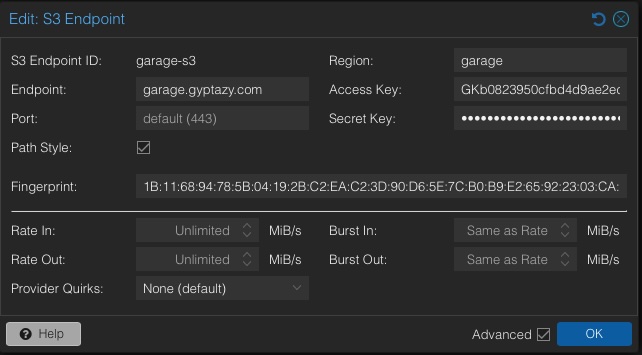
In the Proxmox Backup Server web interface, navigate to Configuration, add a new S3 endpoint, and enter the hostname, access key, secret key, and fingerprint.
Afterwards, create a new datastore of type S3 and select the created bucket.
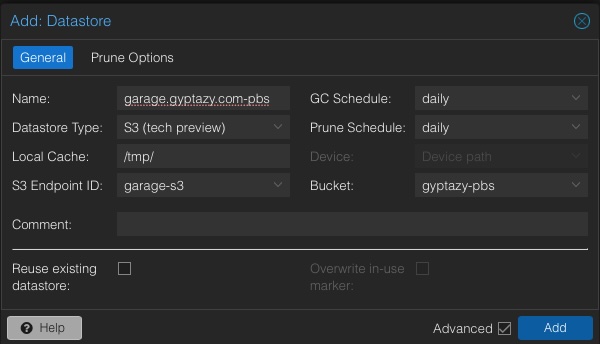
Adding S3 storage to your Proxmox Backup Server via the Web-UI is only one way, but can also fully be done on the cli or even in an automated way.
PBS CLI
Alternatively, the S3 endpoint and datastore can be configured via the command line.
proxmox-backup-manager s3 endpoint create garage.gyptazy.com-pbs --endpoint garage.gyptazy.com --access-key ACCESSKEY --secret-key SECRETKEY --region garage
proxmox-backup-manager datastore create gyptazy-pbs --type s3 --s3-endpoint garage.gyptazy.com-pbs --s3-bucket gyptazy-pbs
After successful validation, the datastore is ready for use.
Summary
With S3-backed datastores in Proxmox Backup Server 4, backup architectures become far more flexible and future-proof. By combining PBS with self-hosted S3-compatible storage like Garage, backups are fully decoupled from local disks. This makes it possible to run Proxmox Backup Server completely diskless using S3-compatible object storage. This guide covered preparing object storage, exposing it securely via nginx, and integrating it into Proxmox Backup Server using both GUI and CLI. The result is a scalable, vendor-independent backup solution that leverages open standards and the strengths of the open-source ecosystem.