Restoring individual files from a backup directly back into a guest VM has been one of the often-requested features for Proxmox VE and PegaProx. With my latest addition into PegaProx, this is finally becoming a reality!
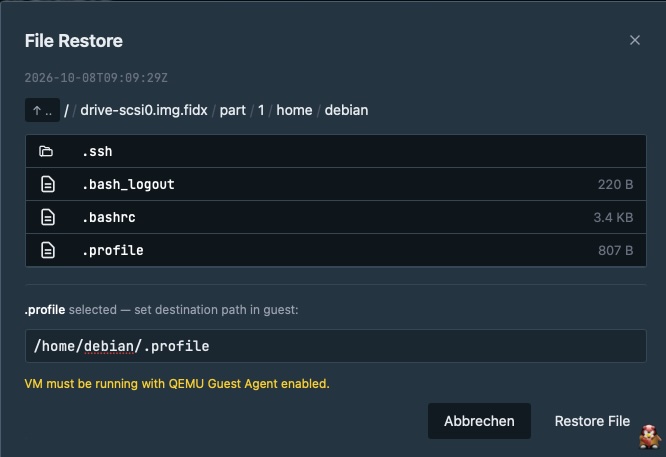
Instead of downloading files from a backup to the local system first and then manually uploading them back into the virtual machine, PegaProx can now restore selected files directly into the guest VM.
Restore files directly into your VM
The new file-level restore functionality allows operators and, depending on their assigned permissions, end users to select a guest VM and one of its available backups. Individual files can then be selected and restored directly into the running VM. This makes the entire restore process significantly easier. There is no need to download the files to a workstation, find the correct destination inside the guest, and manually transfer the files back into the VM. PegaProx handles the restore workflow and transfers the selected files directly into the guest instance.
How it works for Users
The functionality builds on the existing file-level restore capabilities provided by Proxmox Backup Server. PegaProx uses the backup stored on PBS as the source and restores the requested files into the selected guest VM. The workflow is intentionally simple: select the guest, select the relevant backup, choose the files you want to restore, and start the restore operation. The files are then transferred directly into the VM instead of being presented as a download to the user. You can also find a demo of this workflow at YouTube.
How it works technically
The file-level restore feature uses the existing file-restore API provided by Proxmox VE and transfers the selected files directly into the target guest. The process differs slightly between QEMU virtual machines and LXC containers, but the workflow remains the same: select a backup, choose a file, specify its destination, and start the restore.
Browsing Backups
Users can browse the contents of a backup through the GET /backups/files endpoint. PegaProx validates the backup volume ID and checks that the selected backup is stored on Proxmox Backup Server (PBS). VMA and tar archives are rejected because they are not supported by this implementation.
For supported backups, PegaProx forwards the request to the Proxmox VE file-restore/list API. Paths are passed in base64-encoded form where required. The returned directory listing is sent to the frontend, which displays the backup contents as a file tree.
Users can navigate through directories and select the file they want to restore without downloading it to their local machine.
Permission Checks
Before allowing access to a backup or starting a restore, PegaProx checks the user's permissions. This includes access to the cluster, the target guest, and the VM associated with the source backup.
- Cluster access is checked first.
- The user must have the required target VM permissions, including vm.view and vm.backup.
- Permissions for the source backup's VM are checked to prevent users from restoring files from backups they are not authorized to access.
- Administrators are exempt from the source VM permission check.
The permissions are checked again when the restore request is submitted. Access granted during the browsing phase is not sufficient on its own to start a restore.
Starting a Restore
Once a file has been selected, the user specifies an absolute destination path inside the target guest and submits the request through POST /backups/file-restore.
PegaProx validates the permissions again and retrieves the selected file through the Proxmox VE file-restore/download API. The file is downloaded in 65 KB chunks before being transferred into the guest.
The maximum file size is limited to 50 MB. The feature is intended for individual files, such as configuration files or documents, rather than large data transfers.
Restoring Files to QEMU Virtual Machines
For QEMU virtual machines, the QEMU Guest Agent must be installed, enabled, and running inside the guest.
PegaProx encodes the file content using base64 and sends it to the VM through the QEMU Guest Agent's file-write API endpoint. The agent decodes the content and writes it to the requested destination, using its atomic-write functionality.
No SSH connection to the guest is required. The transfer takes place through the QEMU Guest Agent, so the VM only needs to be running and meet the agent requirements.
Restoring Files to LXC Containers
LXC containers use a different approach because the QEMU Guest Agent is not available for them. Instead, PegaProx connects to the Proxmox VE node hosting the container over SSH.
SSH key authentication is attempted first, with password authentication used as a fallback. Once connected, PegaProx executes pct exec to run a command inside the container. The file content is piped to the command through standard input and written to the specified destination.
This means there is no need to run an SSH server inside the container. PegaProx only needs SSH access to the host node and sufficient permissions to execute commands inside the container.
Audit Logging
After a successful restore, PegaProx records an audit event containing the user, source backup volume ID, source file path, target guest, and destination path. The API returns a success response to the frontend once the operation has completed.
This gives administrators a record of who restored a file, where it came from, and where it was written.
Requirements and limitations
The initial implementation has a few requirements and limitations:
- Backups must be stored on a Proxmox Backup Server. Local backups are currently not supported.
- The VM must have the QEMU Guest Agent installed and enabled.
- The VM must be running while the restore operation is performed.
For operators and end users
One of the main goals of this feature is to make file restores useful not only for infrastructure operators, but also for users of PegaProx. Depending on the permissions assigned to an account, users can perform file-level restores themselves without requiring an administrator to manually download and transfer the files.
This can be particularly useful in environments where PegaProx is used as a central management platform for multiple Proxmox VE clusters and where different users or teams are responsible for their own virtual machines.
No more download and re-upload
Previously, restoring an individual file typically meant downloading the file from the backup to the local system. The user then had to establish another connection to the VM and upload the file to its destination. This additional step is not only inconvenient, but can also become problematic when restoring larger files or when the user's workstation is not located close to the infrastructure. With direct file-level restore, the workstation is no longer used as an intermediate transfer point. PegaProx can restore the selected files directly into the guest VM.
Coming to PegaProx
With my latest addition, PegaProx makes another part of the Proxmox Backup Server workflow available directly through its management interface which becomes available with version 1.4.0. Operators can restore individual files when needed, while delegated users can perform restores themselves when their permissions allow it.
The feature is currently limited to PBS-backed backups, running QEMU guests, and VMs with the QEMU Guest Agent available. These requirements are intentional for the initial implementation and provide the foundation for further improvements in the future.
Direct file-level restore is another step towards making backup management in PegaProx not only powerful for administrators, but also simple and accessible for the users operating their own virtual machines.