Finally, shared block storage with LVM thin provisioning and snapshot support is available in Proxmox VE 9! Proxmox Virtual Environment (PVE) has become a serious alternative to established enterprise virtualization platforms. However, one topic has repeatedly caused discussions when it comes to enterprise adoption: shared-block storage.
During Proxday 2026, I spoke with many people who were considering switching to Proxmox VE while keeping their existing storage infrastructure. Many of them rely on technologies such as iSCSI, Fibre Channel (FC), or NVMe over Fabrics (NVMe-oF). For these environments, replacing the virtualization platform should not necessarily mean replacing the entire storage architecture.
One of the recurring concerns was the lack of a straightforward solution combining shared-block storage, thin provisioning, and native VM snapshots. In particular, the prospect of using thick-provisioned virtual disks makes capacity planning and storage utilization a major concern for larger environments. Over the last few days, I have been working on a new storage plugin for Proxmox VE 9.x that aims to address these concerns: my LvmThinSharedStoragePlugin plugin.
The Shared-Block Storage Challenge
Shared-block storage is widely used in enterprise environments. Storage arrays expose block devices to multiple hypervisor nodes, allowing virtual machines to access their disks independently of the physical node on which they run. Technologies such as iSCSI, FC, and NVMe-oF provide the underlying connectivity. On top of these devices, administrators can create LVM volume groups and allocate logical volumes for virtual disks.
Proxmox VE already offers two LVM based storage types: classic LVM, which can be shared between cluster nodes but has no thin provisioning, and LVM-Thin, which supports thin provisioning, snapshots and linked clones but can only be used locally. Neither of them covers what many enterprises are looking for.
The reason is how thin pools work. A thin pool keeps its own metadata about which blocks belong to which thin volume. This metadata is loaded into the kernel (device mapper) of the host that activates the pool. If two nodes activated the same thin pool at the same time, both would write to the metadata independently and corrupt the pool within seconds. Simply presenting the same thin pool to every node does not make it safe for concurrent use.
At the same time, thick provisioning is often unattractive for enterprise deployments. If a virtual machine is configured with a 500 GB disk, a thick-provisioned setup reserves the full capacity immediately, even when the guest only uses a fraction of it. This can lead to inefficient storage utilization, additional capacity requirements, and more complicated planning as an environment grows.
Snapshots add another important requirement. They are commonly used for operational recovery, maintenance workflows, and automation. For many organizations, a storage solution that cannot provide the required snapshot functionality is simply not an option.
A Different Approach: One Thin Pool per Guest
The new plugin takes a different approach. Instead of trying to operate one shared LVM-thin pool across all cluster nodes, it creates a dedicated, small thin pool for each guest within the shared LVM volume group. A guest only ever runs on a single node, so its thin pool only ever needs to be active on that node.
The guest's virtual disks are created as thin logical volumes inside its dedicated pool. The underlying volume group remains available across the cluster, while the individual thin pool is activated only on the node currently running the guest. Inside the volume group, the layout looks like this:
- lvmth-<vmid> – the thin pool of a guest, tagged with pve-sid-<storage-id>
- vm-<vmid>-disk-<n> – the thin volumes (disks) of the guest, tagged with pve-vm-<vmid>
- base-<vmid>-disk-<n> – read-only disks of templates
- snap_<volume>_<snapshot> – thin snapshots of a disk
Rather than relying on a shared thin pool or introducing a workaround based on a volume chain, the plugin separates the thin-pool lifecycle at the guest level. This preserves the advantages of thin provisioning while allowing the plugin to integrate with Proxmox VE's native storage operations.
High-Level Architecture
+----------------------------------------------------+
| Proxmox VE Cluster |
| |
| +----------------+ +----------------+ |
| | PVE Node 1 | | PVE Node 2 | |
| | | | | |
| | Running VM | | Other VMs | |
| | | | | | | |
| | VM thin pool | | VM thin pools | |
| | | | | | | |
| +-------+--------+ +-------+--------+ |
| | | |
+----------+---------------------------+-------------+
 | |
 +-------------+-------------+
 |
 Shared LVM Volume Group
 |
 Shared Block Storage LUNs
 |
 +-----------------+-----------------+
 | | |
 iSCSI FC NVMe-oF
 | | |
 +-----------------+-----------------+
 |
 Storage Array
The diagram illustrates the logical layout. The storage array presents shared block devices to the cluster. These devices provide the physical backing for an LVM volume group, which contains the per-guest thin pools and their virtual disks.
Technically, the plugin is a regular Proxmox VE custom storage plugin written in Perl (PVE::Storage::Custom::LvmThinSharedStoragePlugin) that builds on top of the existing LVM plugin of Proxmox VE. It hooks into the usual lifecycle of a guest disk:
- Allocation: When a disk is created, the plugin creates the guest's thin pool if it does not exist yet (or grows it so the new disk fits) and creates a thin volume inside it. Pools and volumes are created inactive, so they are not bound to any node.
- Activation: When a guest starts or is migrated to a node, that node activates the guest's thin pool and then the requested volumes. LVM monitoring is enabled for the pool, so it can grow on demand.
- Deactivation: When the last volume of a pool is deactivated (guest stopped or migrated away), the pool itself is deactivated as well. Only now can another node take it over. This hand-over is what makes migrations between nodes possible without the pool ever being active on two nodes.
- Removal: Deleting a disk removes its snapshots and the thin volume. Once a pool is empty, the pool is removed too and its space is returned to the volume group.
How Thin Provisioning Works
Consider a virtual machine configured with a 500 GB virtual disk. With thin provisioning, the virtual disk can expose its configured capacity to the guest without immediately consuming the entire 500 GB of physical storage. Physical capacity is consumed as data is written. This allows administrators to make more efficient use of available storage and allocate virtual disk capacity according to application requirements.
Since every thin pool starts small, it has to grow when the guest writes data. On local storage, LVM's dmeventd extends a pool automatically once it crosses a usage threshold. On a shared volume group, this is dangerous: two nodes could try to allocate the same free extents of the volume group at the same time.
The plugin therefore ships its own dmeventd hook (LvmThinSharedStorageMonitor.pl). When a pool owned by this storage crosses 80% data or metadata usage, the hook reads the storage ID from the pool's pve-sid- tag, takes the cluster-wide lock of that storage and only then extends the pool. Other thin pools on the host are extended exactly like LVM would do by default. The same cluster lock also protects snapshot operations and disk resizes, since they change the metadata of the shared volume group as well.
Thin provisioning does not eliminate the need to monitor capacity. Administrators must still plan for physical storage consumption and ensure that the underlying storage has enough free space for actual writes.
Snapshots Without Thick-Provisioned Disks
Snapshots are one of the central goals of this implementation. The plugin implements snapshot operations using LVM's thin-provisioning capabilities, rather than depending on a storage backend that exposes its own snapshot integration to Proxmox VE. This means virtual machines can use snapshots while keeping their virtual disks thin-provisioned. Snapshots can be created, deleted, renamed and rolled back through the native Proxmox VE storage integration.
Snapshots are native LVM thin snapshots inside the guest's own pool. Since thin snapshots are independent of each other, a rollback to any snapshot is possible, not only to the latest one.
Templates and linked clones are supported as well. Converting a guest into a template renames its disks from vm- to base-, marks them read-only and keeps the template's pool offline. A linked clone is a thin snapshot of the template disk that is placed directly into the thin pool of the new guest. Full clones, disk resizing, renaming and imports (e.g. during a migration or a backup restore) are also supported.
Native Proxmox VE Integration
Another important goal is keeping the installation and administration straightforward. The functionality should be accessible through both the command-line interface and the familiar Proxmox VE GUI.
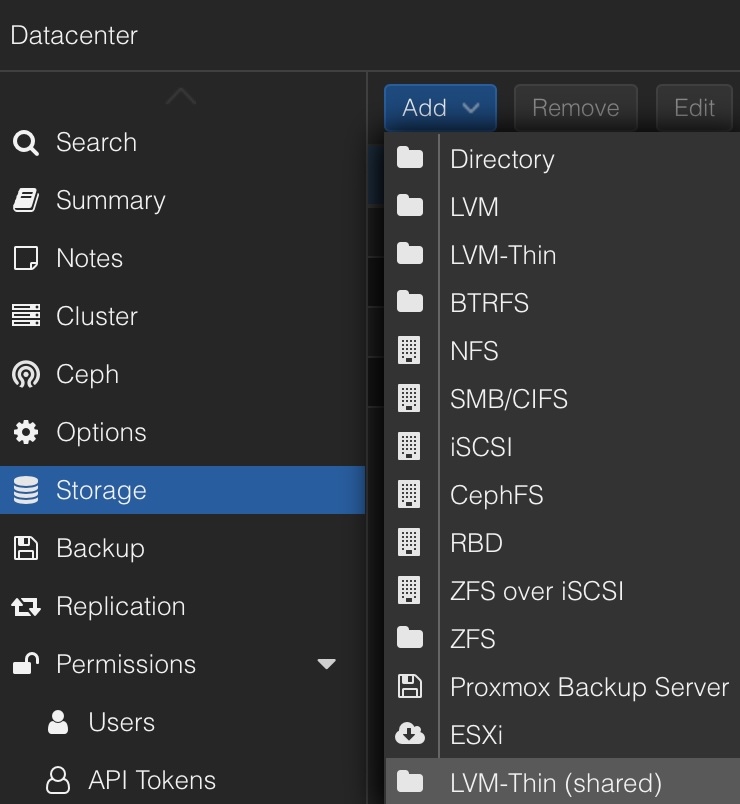
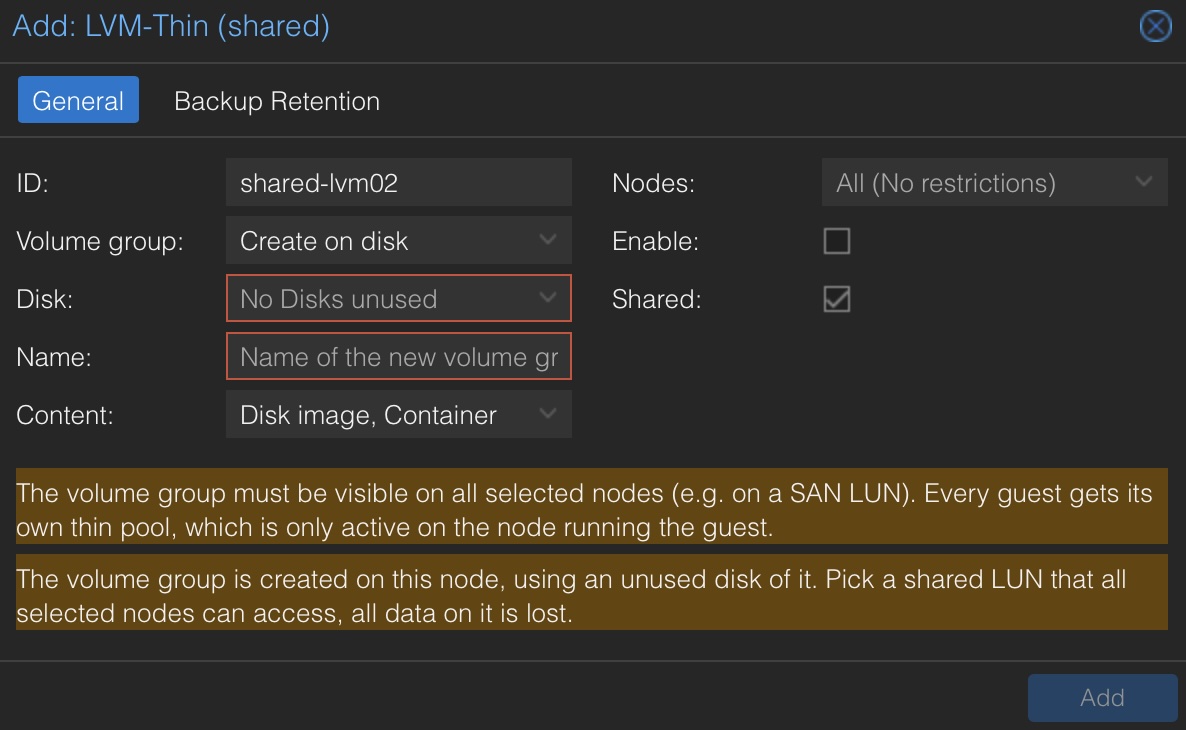
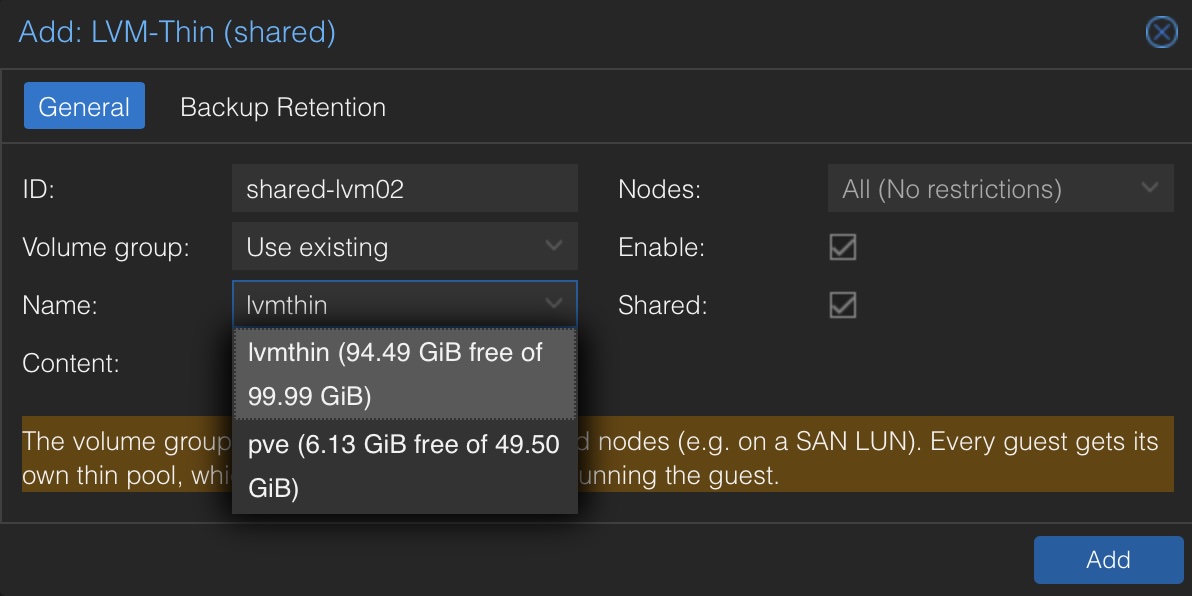
Proxmox VE does not yet provide an extension point for custom storage plugins in its web interface. The optional UI integration therefore adds a small ExtJS extension that registers LVM-Thin (shared) under Datacenter → Storage → Add, including an editor for existing entries. The dialog can also create the volume group directly on an unused disk of the node, using the node's native disk API.
The extension is loaded by a <script> tag that a helper script (ui-integration.sh) inserts into the web UI template of pveproxy. Since every pve-manager update replaces that template, an apt hook re-runs the helper after every package operation and puts the tag back. A checksum in the script URL makes sure browsers pick up a new version of the extension right after an update. If interested, you can also find a full installation and configuration demo in my video at YouTube. This explains the whole installation, configuration including the block-storage and demo of a thin-provisioned VM on this LVM.
Installation
The plugin must be installed on every node of the cluster, and the shared volume group (e.g. on an iSCSI, FC or NVMe-oF LUN) must be visible on all nodes that should use the storage.
Packages
The plugin is going to be shipped in two Debian packages:
- pve-storage-lvmthinshared – the storage plugin itself, including the dmeventd hook. This is all you need to manage the storage on the command line with pvesm or via the API.
- pve-storage-lvmthinshared-ui – the optional integration into the native Proxmox VE web interface. It depends on the storage plugin package.
Until the split is done, a single package pve-storage-lvmthinshared ships both parts.
Option 1: Installation from the Debian Repository
Add the repository at packages.gyptazy.com and its signing key on every node:
curl https://packages.gyptazy.com/api/packages/gyptazy/debian/repository.key -o /etc/apt/keyrings/gyptazy.asc
echo "deb [signed-by=/etc/apt/keyrings/gyptazy.asc] https://packages.gyptazy.com/api/packages/gyptazy/debian trixie main" | sudo tee -a /etc/apt/sources.list.d/gyptazy.list
apt-get update
Then install the storage plugin and, if you want to manage the storage from the web interface, the UI integration:
apt-get install pve-storage-lvmthinshared
# Optionally the UI integration for the Proxmox VE web-UI
apt-get install pve-storage-lvmthinshared-ui
Future updates are installed with the regular apt-get update && apt-get upgrade.
Option 2: Installation from a .deb File
Download the .deb files of the latest release and copy them to every node. Install them with apt, which also resolves the dependencies:
apt-get install ./pve-storage-lvmthinshared*.deb
# Optionally the UI integration for the Proxmox VE web-UI
apt-get install ./pve-storage-lvmthinshared-ui*.deb
You can also build the package yourself from the source repository, either on a Debian / Proxmox VE system with make deb or on any other system with Docker using make deb-docker. The resulting package is placed in the build/ directory.
Note: The plugin has not been publicly released yet!
Configuration
The package reloads the Proxmox VE daemons (pvedaemon, pveproxy, pvestatd and pvescheduler) so they load the new storage type. The UI package additionally hooks the extension into the web interface; reload the browser tab afterwards. To verify that the plugin is loaded, run:
/usr/share/lvmthinsharedstorage/ui-integration.sh check
To let thin pools grow automatically, point the dmeventd hook in /etc/lvm/lvm.conf to the monitor script on every node:
dmeventd {
 thin_command = "/usr/share/perl5/PVE/Storage/Custom/LvmThinSharedStorageMonitor.pl"
}
Finally, add the storage either in the web interface via Datacenter → Storage → Add → LVM-Thin (shared) or on the command line:
pvesm add lvmthinsharedstorage <storage-id> --vgname <vgname> --shared 1
Who Is This For?
The plugin is primarily aimed at administrators and enterprises that want to adopt Proxmox VE without abandoning an existing shared-block storage infrastructure.
- Organizations using iSCSI, Fibre Channel, or NVMe-oF storage.
- Environments that want thin-provisioned virtual disks instead of reserving the full configured capacity upfront.
- Administrators who require VM snapshots and rollback workflows.
- Teams looking for an integration with the native Proxmox VE storage configuration and web interface.
Conclusion
Shared-block storage should not automatically be a reason to rule out Proxmox VE. For many organizations, keeping their existing storage infrastructure is an important part of a virtualization migration.
With this new LVM-thin shared-storage plugin for Proxmox VE 9.x, I want to provide another option for environments that need shared block devices, thin provisioning, and snapshot support without relying on a single thin pool being active across multiple cluster nodes.
The project is an ongoing development effort, and compatibility, operational behavior, and recovery procedures should be validated carefully before production deployment. In particular, cluster failover, storage fencing, multipath behavior, and physical capacity monitoring remain important considerations for any shared-storage design.
My goal is simple: make it easier for enterprises to consider Proxmox VE while retaining the storage technologies they already trust. I will probably provide more information and a live demo at the next Virtualization Gathering at credativ GmbH!