Search results for tag #freebsd
![[?]](https://assets.chaos.social/accounts/avatars/115/802/539/298/863/349/original/dea5b89096c9e913.png)
I run most of my stuff on Debian LXCs inside Proxmox.
For some things I would like a VM more, but since Debian 10 I have not had a Debian Upgrade that didn't broke my installation.
I am now looking at FreeBSD for VMs, trying out a lot, and seeing that most of my usecases work flawless.
Will upgrades for FreeBSD still brick my installs?
![[?]](https://littleone.littlefedi.social/media/019fd4a4-05ad-7098-a107-950078945e1d/image.jpg)
#FreeBSD jail
trying to update - upgrade pkg, get new package FreeBSD-clibs-lib32: 15.1p2 [FreeBSD-base]
oke nice, lets start...then
pkg: Failed to create temporary file for /usr/lib32/libc++.so.1:Read-only file system
😐
![[?]](https://files.mastodon.social/accounts/avatars/110/662/945/383/057/056/original/cc002a859516e0d4.jpg)
Today, I'm releasing FastViewer Lite as an open-source macOS app. It was originally inspired by feh on FreeBSD. I've always wanted a similar, super-fast image viewer with keyboard navigation on macOS. With the help of Codex, we can now have it.
Build it, use it, modify it, sell it, do whatever you want! Have fun!
![[?]](https://media.beige.party/accounts/avatars/115/957/508/953/244/678/original/b5f143d453624b1f.webp)
Feeling anti-AI? Got a Reddit account? Got something to say?
Interested in FreeBSD?
https://www.reddit.com/r/freebsd/comments/1vtgx7t/antiai_open_source_has_an_enemy_in_common_but/ @lproven
― Anti-AI open source has an enemy in common, but almost nothing else
Get in there!
Be nice.
![[?]](https://littleone.littlefedi.social/media/019fd566-518c-7d61-9639-c1420bf0ae07/image.png)
![[?]](https://polymaths.social/fileserver/01HCMX6M1CZNEVJ4F5H58TT5XJ/attachment/original/01JHC5KM5K0V0J0436SPD3F86H.jpeg)


 🍵
🍵  [
[The constant arms race between #google and #yt-dlp is amusing to watch, in a tragic sense.
Came very close to running the somewhat scary "curl ${some_url} |sh" install "procedure" for #deno on my #devuan box until I saw that yt-dlp had been updated only yesterday.
I don't know why #debian (upstream) doesn't package Deno like #FreeBSD does.
![[?]](https://media.bsd.cafe/bsdmmedia01/accounts/avatars/114/439/967/181/871/365/original/9c94f4a4076e444d.jpg)
![[?]](https://media.bsd.network/accounts/avatars/000/003/085/original/cdce9be2c9129966.png)
You know the feeling when you know you've asked this question before and you've searched for the answer, but cannot find it?
That's me, right now.
I recall someone pointing to a #FreeBSD man page which explained these packages such as this:
FreeBSD-kerberos-lib-backup-libkrb5profile.so.122-20260717171225 ? orphaned: base/FreeBSD-kerberos-lib-backup-libkrb5profile.so.122
I seem to recall that during the upgrade process, certain base packages are retained, just in case.
![[?]](https://media.bsd.cafe/bsdmmedia01/accounts/avatars/110/896/104/742/825/185/original/3ea0586dd0f0f5b9.png)
RE: https://mastodon.bsd.cafe/@grahamperrin/116701238275715568
pkg.conf(5)
BACKUP_LIBRARIES
<https://man.freebsd.org/cgi/man.cgi?query=pkg.conf&sektion=5&manpath=freebsd-ports>
Things are somewhat mysterious (the Reddit post in June, and so on). I can't think much about it at the moment but I suspect that mysteries can deepen with --rootdir in the mix.
![[?]](https://media.bsd.cafe/bsdmmedia01/accounts/avatars/115/015/302/977/472/157/original/42ad1d8b0f4dbf22.png)
 [
[#cwm #screenshot #FreeBSD #Emacs #XTerm
Alt...
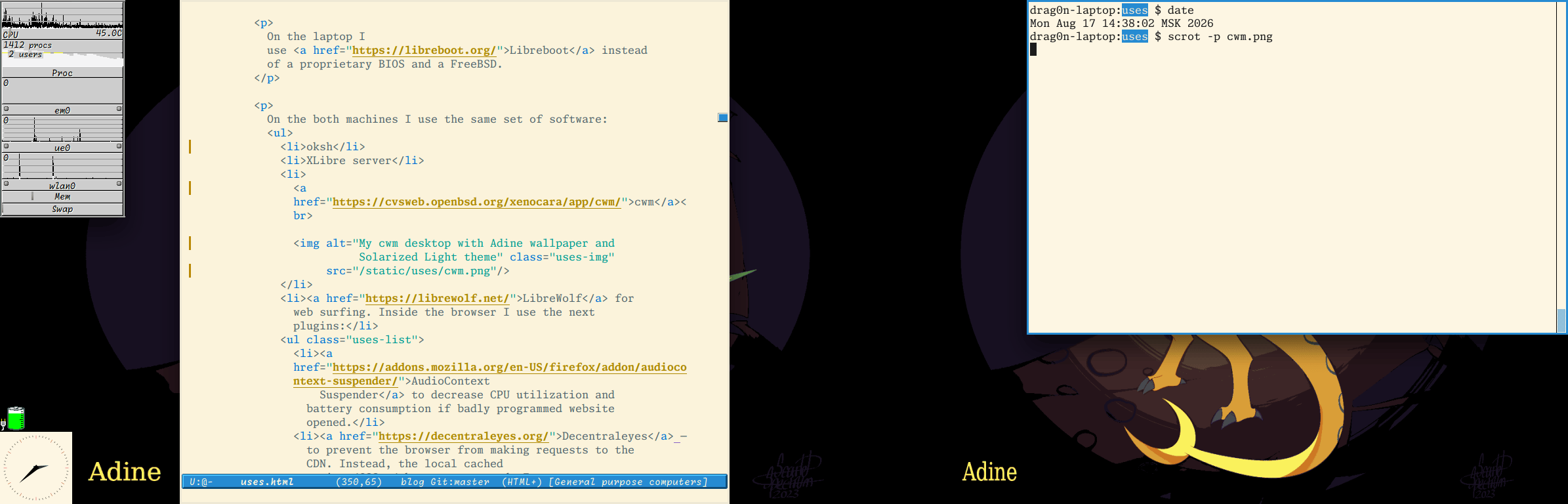
CWM running with two physical monitors. There are two windows: Emacs and Xterm.
Xterm window has a thick blue border. Inside there is an oksh with date output and scrot -p cwm.png command. Used colorscheme: Solarized Light, ised font: Monaspace Xenon.
The Emacs frame uses the same font and colorscheme. It displays an opened uses.html files, with some changes highlighted by orange stripes on the left fringe. There is a blue blocky modeline with Monaspace Radon font and the same scrollbar.
On the left there are few X widgets: xclock (using Solarized Light color scheme and a red ticks), xbatt and a gkrellm (it showing CPU load and temp, memory consumption and em0, ue0, wlan0 interface stats).
There is a yellow wyvern (Adine from Angels With Scaly Wings) on the background (set as a desktop wallpaper).
![[?]](https://cdn.masto.host/retrogaidencom/accounts/avatars/116/366/512/369/498/550/original/d98212f49153ec47.png)
Tried two games with the Linux port under Ghostbsd.
- Gladius: relics of war, caused a crash of the entire session and I got kicked to the login manager...
Great.
https://store.steampowered.com/app/489630/Warhammer_40000_Gladius__Relics_of_War/
- Legend of Keepers: career of a dungeon master, is deceptively plain 2d game that doesn't sounds intensive to give problems, but it is an Unity game.
And it runs really poorly, you have like 1-2 FPS at best under compatibility layer.
Same as Stellaris, the sound is fine, and also the underlying engine runs without breaking; are the graphic libraries that are too slow to make it unusable.
https://store.steampowered.com/app/978520/Legend_of_Keepers_Career_of_a_Dungeon_Manager/
These tests however shows a "reassuring" thing.
The real weakness in the compatibility layer seems lie mostly in the graphic libraries. I had met two cases where the program crashes, one is Gladius and the other I'm going to write about another time, and for Gladius I think could be tracked again in the graphic part.
I think, if FreeBSD will get some improvements with the graphic support, would be fine to run also games without rely on the Wine versions.
Eh, I do not expect FreeBSD to get the best gaming platform ever, but the overall experience isn't so disastrous as some comments around would make think, and has edge to be used for a desktop over linux if you are comfortable with the shell, and this is the big factor.
There are need a lot of progresses to let some games running fine enough to get playable, but it works and I could hope in future improvements.
I didn't tried yet Wine for time issues.
Under Freebsd you haven't to deal with some shortcomings of various linux distros where if you haven't stuff in your repository, you have to rely on extra solutions that adds their layer on complexity, aka Flatpak, Snap, extra repos, expecially if you use a Debian.
Fedora based have less troubles but you have to deal with Red Hat, that alone is a minus for me... :P
On Arch/Gentoo you have stuff updated but you have to work on them more than set up Freebsd...
If your hardware is supported, I find the BSDs a better sweet spot for desktop use, without need the extra layers, repos, utility that fills Linux.
The ports are usually well updated and are part of Freebsd itself, both if you run the binary or compile them.
Compiling if needed is a lot painless in comparison of what you have on some linux distros.
At difference of linux distros, the BSD systems split the base system from applications...
![[?]](https://cdn.fosstodon.org/accounts/avatars/110/655/896/230/332/963/original/3b8e664c8bcb2453.png)
![[?]](https://media.bsd.network/accounts/avatars/000/001/285/original/f9255f9b1a538310.jpg)
For the interested, you can read a preprint of our latest #research on the #OpenBSD -fret-clean flag here:
https://briancallahan.net/preprints/Callahan_Shaikh_IEEE_CARS_2026.pdf
#freebsd #netbsd #dragonflybsd #bsd #linux #unix #solaris #illumos #compiler #compilers #llvm #gcc #rop #cybersecurity #cybersec #cyber #security #infosec #informationsecurity
![[?]](https://cdn.masto.host/livellosegretoit/accounts/avatars/108/202/997/491/510/917/original/40e5c669384607f7.png)
Ho trovato 16GB di ram usata a 50€ e montata su questo vecchio laptop HP di 8 anni fa.
Poi c’è FreeBSD che fa la magia
Macchina perfettamente funzionante per qualsiasi attività desktop. #bsd #FreeBSD
![Un'immagine di uno schermo che mostra una finestra di terminale con l'outpu l'output del programma "fastfetch". Nella parte superiore della finestra sono presenti due schede etichettate "Nuova scheda" e "Vista divisa". Il contenuto è suddiviso in un logo realizzato con arte ASCII sulla sinistra e un elenco di informazioni di sistema sulla destra. Sotto l'intestazione "simone[@]Faramir", il testo riporta esattamente:
Host: HP Laptop 15s-eq0xxx Kernel: FreeBSD 15.1-RELEASE-p2 Uptime: 49 mins Shell: zsh 5.9.1 Display (CMM1567): 1920x1080 in 16", 60 Hz DE: KDE Plasma 6.6.6 WM: KWin (X11) WM Theme: Breeze Theme: Breeze (Light) [Qt], Breeze [GTK2/3] Icons: breeze [qt], breeze [GTK2/3] Font: Noto Sans (10pt) [Qt], Noto Sans (10pt) [GTK2/3] Cursor: breeze (24px) Terminal: konsole 26.4.3 Terminal Font: Hack (10pt) CPU: AMD Ryzen 5 3500U (8) [@] 2.10 GHz GPU: AMD Radeon Vega 8 Graphics Memory: 3.43 GiB / 13.87 GiB (25%) Swap: 0 B / 8.00 GiB (0%) Disk (/): 13.38 GiB / 452.93 GiB (3%) - zfs Disk (/zroot): 96.00 KiB / 439.55 GiB (0%) - zfs Local IP (wlan0): 192.168.1.33/24 Locale: it_IT.UTF-8](https://cdn.masto.host/livellosegretoit/media_attachments/files/117/122/094/197/906/007/original/06cfde12d5ee5fbe.jpeg "Un'immagine di uno schermo che mostra una finestra di terminale con l'outpu l'output del programma \"fastfetch\". Nella parte superiore della finestra sono presenti due schede etichettate \"Nuova scheda\" e \"Vista divisa\". Il contenuto è suddiviso in un logo realizzato con arte ASCII sulla sinistra e un elenco di informazioni di sistema sulla destra. Sotto l'intestazione \"simone[@]Faramir\", il testo riporta esattamente:
Host: HP Laptop 15s-eq0xxx Kernel: FreeBSD 15.1-RELEASE-p2 Uptime: 49 mins Shell: zsh 5.9.1 Display (CMM1567): 1920x1080 in 16\", 60 Hz DE: KDE Plasma 6.6.6 WM: KWin (X11) WM Theme: Breeze Theme: Breeze (Light) [Qt], Breeze [GTK2/3] Icons: breeze [qt], breeze [GTK2/3] Font: Noto Sans (10pt) [Qt], Noto Sans (10pt) [GTK2/3] Cursor: breeze (24px) Terminal: konsole 26.4.3 Terminal Font: Hack (10pt) CPU: AMD Ryzen 5 3500U (8) [@] 2.10 GHz GPU: AMD Radeon Vega 8 Graphics Memory: 3.43 GiB / 13.87 GiB (25%) Swap: 0 B / 8.00 GiB (0%) Disk (/): 13.38 GiB / 452.93 GiB (3%) - zfs Disk (/zroot): 96.00 KiB / 439.55 GiB (0%) - zfs Local IP (wlan0): 192.168.1.33/24 Locale: it_IT.UTF-8")
Alt...
Un'immagine di uno schermo che mostra una finestra di terminale con l'outpu l'output del programma "fastfetch". Nella parte superiore della finestra sono presenti due schede etichettate "Nuova scheda" e "Vista divisa". Il contenuto è suddiviso in un logo realizzato con arte ASCII sulla sinistra e un elenco di informazioni di sistema sulla destra. Sotto l'intestazione "simone[@]Faramir", il testo riporta esattamente:
Host: HP Laptop 15s-eq0xxx Kernel: FreeBSD 15.1-RELEASE-p2 Uptime: 49 mins Shell: zsh 5.9.1 Display (CMM1567): 1920x1080 in 16", 60 Hz DE: KDE Plasma 6.6.6 WM: KWin (X11) WM Theme: Breeze Theme: Breeze (Light) [Qt], Breeze [GTK2/3] Icons: breeze [qt], breeze [GTK2/3] Font: Noto Sans (10pt) [Qt], Noto Sans (10pt) [GTK2/3] Cursor: breeze (24px) Terminal: konsole 26.4.3 Terminal Font: Hack (10pt) CPU: AMD Ryzen 5 3500U (8) [@] 2.10 GHz GPU: AMD Radeon Vega 8 Graphics Memory: 3.43 GiB / 13.87 GiB (25%) Swap: 0 B / 8.00 GiB (0%) Disk (/): 13.38 GiB / 452.93 GiB (3%) - zfs Disk (/zroot): 96.00 KiB / 439.55 GiB (0%) - zfs Local IP (wlan0): 192.168.1.33/24 Locale: it_IT.UTF-8
![[?]](https://files.mastodon.social/accounts/avatars/111/228/343/080/661/940/original/c3720e26cb4e4a8b.png)
Call for FreeBSD Talk Proposals – SCaLE 24x (Southern California Linux Expo)
SCaLE is back for 2027, and the Call for Presentations is now open!
If you've been working on something exciting in the FreeBSD world, this is a great opportunity to share your project, research, or real-world experience with one of the largest open-source communities in North America.
📅 Conference: April 1–4, 2027
🗓️ Proposal Deadline: November 1, 2026
Submit your proposal:
https://www.socallinuxexpo.org/scale/24x/cfp

![[?]](https://mastodon.me.uk/system/accounts/avatars/000/020/097/original/129d9b4605b29eaa.jpg)
![[?]](https://cdn.fosstodon.org/accounts/avatars/000/186/507/original/d6235003bb2d678e.jpg)

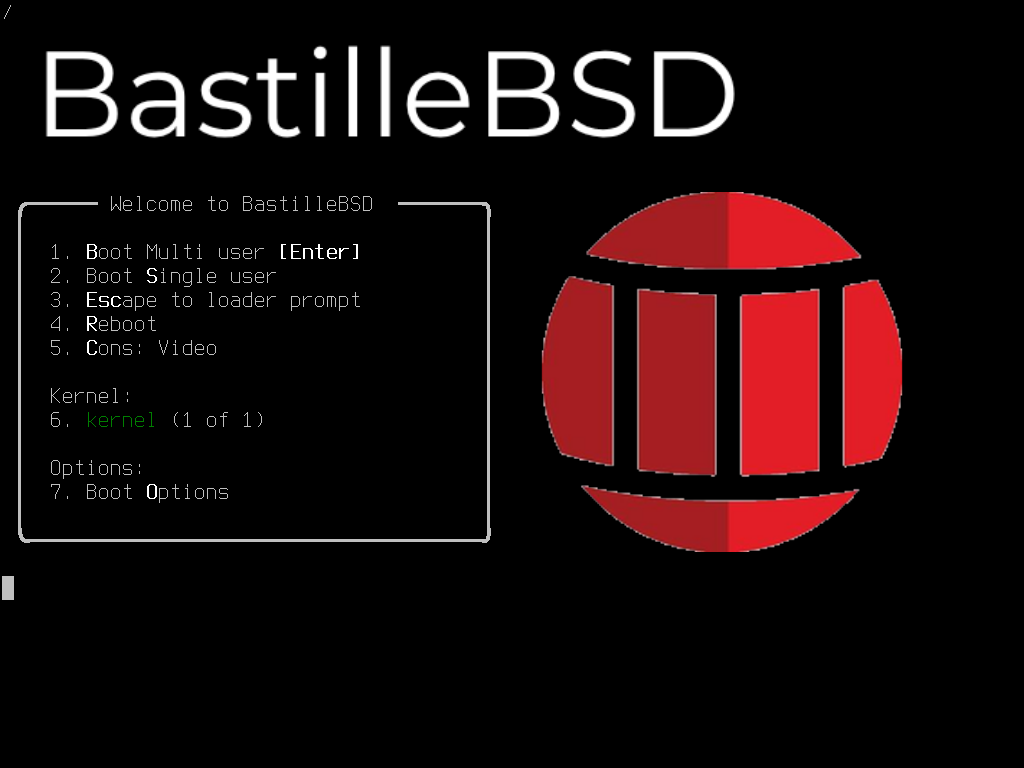
Learn more about our security-and-automation focused FreeBSD distribution: BastilleBSD
A FreeBSD 15.1-RELEASE distribution with Bastille and Rocinante pre-installed, hardened defaults, and containers ready on first boot.
https://bastillebsd.org/projects/bastillebsd/
![[?]](https://media.bsd.cafe/bsdmmedia01/accounts/avatars/113/673/890/154/879/794/original/19e9c7fddf97bdbf.jpg)
Does anyone have any recommendations for a good #wiki software to host in a #FreeBSD jail?
There was an article floating around 3-4 months ago about installing one in a FreeBSD jail but Mastodon is so horrendously bad at search, I can't find it.
Bonus if it doesn't use PHP and is lightweight!
Thanks muchly!!
![[?]](https://media.bsd.cafe/bsdmmedia01/accounts/avatars/115/831/158/931/920/733/original/9b0c6a6b396fa42f.png)
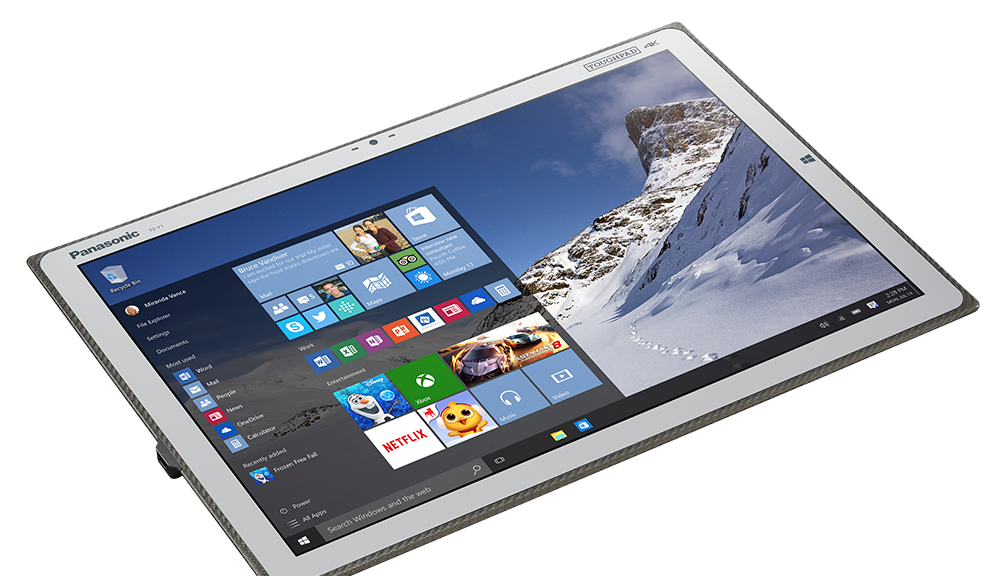
PANASONIC Toughpad 4K FZ-Y1 And most of the Toughpad serie are hardware that PANASONIC left to rot.
The computer is windows only, has a great screen. But will gaslight you to update windows, just to tell you that you can't because you have old version of the hardware.
So over the past months, i got all drivers in #FREEBSD , and the quirks.
And i #corebooted it.
Now the tablet boot in 7 seconds to userland in 4k.
The coreboot port still has some glitches that i'm trying to fix.
![[?]](https://files.mastodon.social/accounts/avatars/000/037/590/original/85ea96e995c1e301.png)
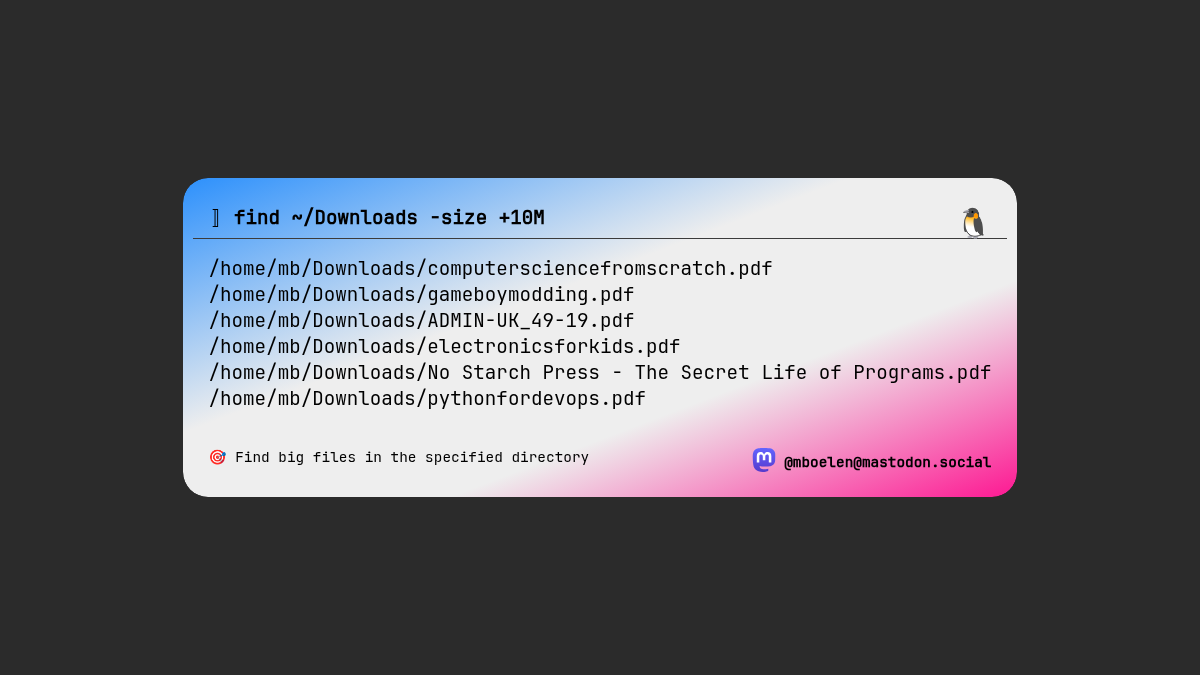
🔎 You already know which directory takes up a lot of disk space and want to clean out? With 'find' you you can search for files bigger than a specific size.
⚠️ The size option of find is different for #OpenBSD, #FreeBSD, and others.
find / -size +10000000c
💡 In my Linux example I used mebibytes. Yes, that silly name thing where we sometimes use 1000 and sometimes binary 2^10 (1024).
https://en.wikipedia.org/wiki/Megabyte
#Linux #LinuxTips #commandline #files
Alt...
Output of the find command search for files bigger than 10 MiB
![[?]](https://cdn.masto.host/indiewebsocial/accounts/avatars/112/536/017/792/352/435/original/a87e9128d6303e02.png)
⚡️ The Data Copy That Lies — Vivian Voss
「 Every discussion of ZFS eventually produces somebody saying it needs a gigabyte of RAM per terabyte of storage. This is the most durable piece of misinformation in the field, and it comes from a real recommendation that has been detached from its context 」
![[?]](https://snac.bsd.cafe/kaixin/s/cc35d4b8e796c869289176c383aa3da3.png)
#Unix #Sreenshot #Xorg #pfetch #FunNixExperience

![[?]](https://cdn.bsdlab.au/db7ba96f97f9fce453308d2ddad311872fa9e22e0d6847ba5b36af5f02c8ef15.jpg)
In some cases DAD may need to be disabled to ensure services come up if you run services within the jail and have set an address manually:
Add to /etc/sysctl.conf:
net.inet6.ip6.dad_count=0
Or per interface on startup by adding the option: no_dad
Or slow the jail down on start up (a tip from @dvl ):
exec.start = "/bin/sleep 5";
exec.start += "/bin/sh /etc/rc";
#FreeBSD
https://www.reddit.com/r/freebsd/comments/1vryen7/coffeebsd_an_aifree_fork_of_freebsd/
CoffeeBSD ― an AI-free fork of FreeBSD
![[?]](https://static.piaille.fr/accounts/avatars/109/270/440/383/710/359/original/37f84169cb378067.jpg)
I'd like my next job to have something more than Linux, yes, I'm looking at your FreeBSD.
#runbsd #freebsd #getfedihired
↩ Ludovic Hirlimann :
"I can work in both French and English. I'm interested in infrastructure roles.
#infrastructure #sysadmin #sre"
[via Ponos] https://ponos.fr/thread/clf364ichbjbh9c9vb4nu8d4d
![[?]](https://media.bsd.cafe/bsdmmedia01/accounts/avatars/116/623/464/239/450/556/original/39451234193e9fcc.jpg)
Thanks everyone for helping me find the right hardware!
I went with a T640, two Intel Xeon Gold 6248R, 192GB ram, 10gbit sfp+ networking, HBA330 and redundant 1100W PSUs.
It's not the newest hardware out there, but the spare parts are cheap enough and it has more than enough power for my needs.
Jails, VMs, Storage (if there is need for more than 8x3.5 HDDs, I'll go JBOD).
I'll update as soon as I have put everything together and moved over all VMs, storage and jails. It'll be great to free up one Lenovo m75q Gen5, one Lenovo 720q and to decommission the "old" N100 32GB RAM NAS hardware (a friend will most likely take it).
![[?]](https://media.bsd.network/accounts/avatars/108/202/994/748/870/675/original/d2dc42e9893b7a76.jpg)
Dockerbox: an open-source Project to provide docker on FreeBSD by running dockerd (docker daemon) inside a Linux Bhyve VM #Docker #FreeBSD https://github.com/leafoliage/freebsd-dockerbox
You have a dual-stack #FreeBSD server. You already have IPv4 working fine on it. The jails are the classic/original NAT type (not VNET, no bridges or any of that stuff)
You want to add IPv6 to the jails. Your hosting provider gives you a /64.
What kind of IPs do you use on the jails?
| Unique Local Address (ULA) (fd00::): | 21 |
| Link Local Address (fe80::): | 2 |
| Something else (please comment!): | 14 |
Closed