Search results for tag #bsd
![[?]](https://cdn.bsdlab.au/db7ba96f97f9fce453308d2ddad311872fa9e22e0d6847ba5b36af5f02c8ef15.jpg)
![[?]](https://media.bsd.cafe/bsdmmedia01/accounts/avatars/110/753/691/400/011/788/original/7decba5a2514dda4.png)
Latest 𝗩𝗮𝗹𝘂𝗮𝗯𝗹𝗲 𝗡𝗲𝘄𝘀 - 𝟮𝟬𝟮𝟲/𝟭𝟬/𝟭𝟵 (Valuable News - 2026/10/19) available.
https://vermaden.wordpress.com/2026/10/19/valuable-news-2026-10-19/
Past releases: https://vermaden.wordpress.com/news/
#verblog #vernews #news #bsd #freebsd #openbsd #netbsd #linux #unix #zfs #opnsense #ghostbsd #solaris #vermadenday
![[?]](https://media.bsd.cafe/bsdmmedia01/accounts/avatars/113/669/805/004/044/990/original/1d8537dc414c57ea.png)
Is it okay that I look at the vast number of people coming over from #Linux to #BSD and my gut reaction is.... "Fine, but you need to leave some expectations and demands at the fucking door."
Because most of us have no want, nor need to see systemd brought over. Don't even get me started on Wayland, and graphical installers.
You are welcome, but you are in our house now. In this house, we still read the fucking manual.
*I do not speak for any BSD community member. I am simply speaking from the viewpoint of a looooongtime BSD user.
I have donated money, and I have supported many projects that need BSD to survive. And I have commited far too much to this world for it to become the Linux fallout shelter.
We do some things differently here. We aren't going to become more Linux like willingly. Y'all need to become more BSD like, or GTFO.
![[?]](https://cdn.masto.host/topspicysocial/accounts/avatars/109/279/799/788/906/711/original/1f988542ffa577c2.png)
I’d like to experiment with a #BSD. The only laptop available for this is ancient, though: almost 20 years old now. I got Alpine Linux & LXQt working well on it, for comparison.
Any suggestions what to try?
![[?]](https://mastodon.sdf.org/system/accounts/avatars/109/564/857/456/913/094/original/651ab60302ce5d82.png)
I doubt it is fully Linus, in the Old Days I could see him avoiding #ai
But the Linux Foundation (LF) is owned by the Large Corporations pushing #ai and the LF Pays Linus and some #Linux Developers. Since that is the case, I would expect this decision came directly from LF via the corporations.
But I agree, #linux + #ai is bothering me a lot. FWIW, posted using #NetBSD 11.0 via #firefox on a Thinkpad T430 :)
![[?]](https://media.bsd.cafe/bsdmmedia01/accounts/avatars/117/006/199/875/207/359/original/dfd5a542d6917324.jpeg)
![[?]](https://justfollow.me.uk/system/accounts/avatars/109/320/306/219/107/803/original/abdeb1bbb89e40f5.jpg)
@BoydStephenSmithJr My company provides #NetBSD VPS as our first choice (and other #BSD and #Linux if needed). Plenty of IPv4 addresses available
![[?]](https://pxscdn.com/cache/avatars/789980589548961657/avatar_4v14.jpg)
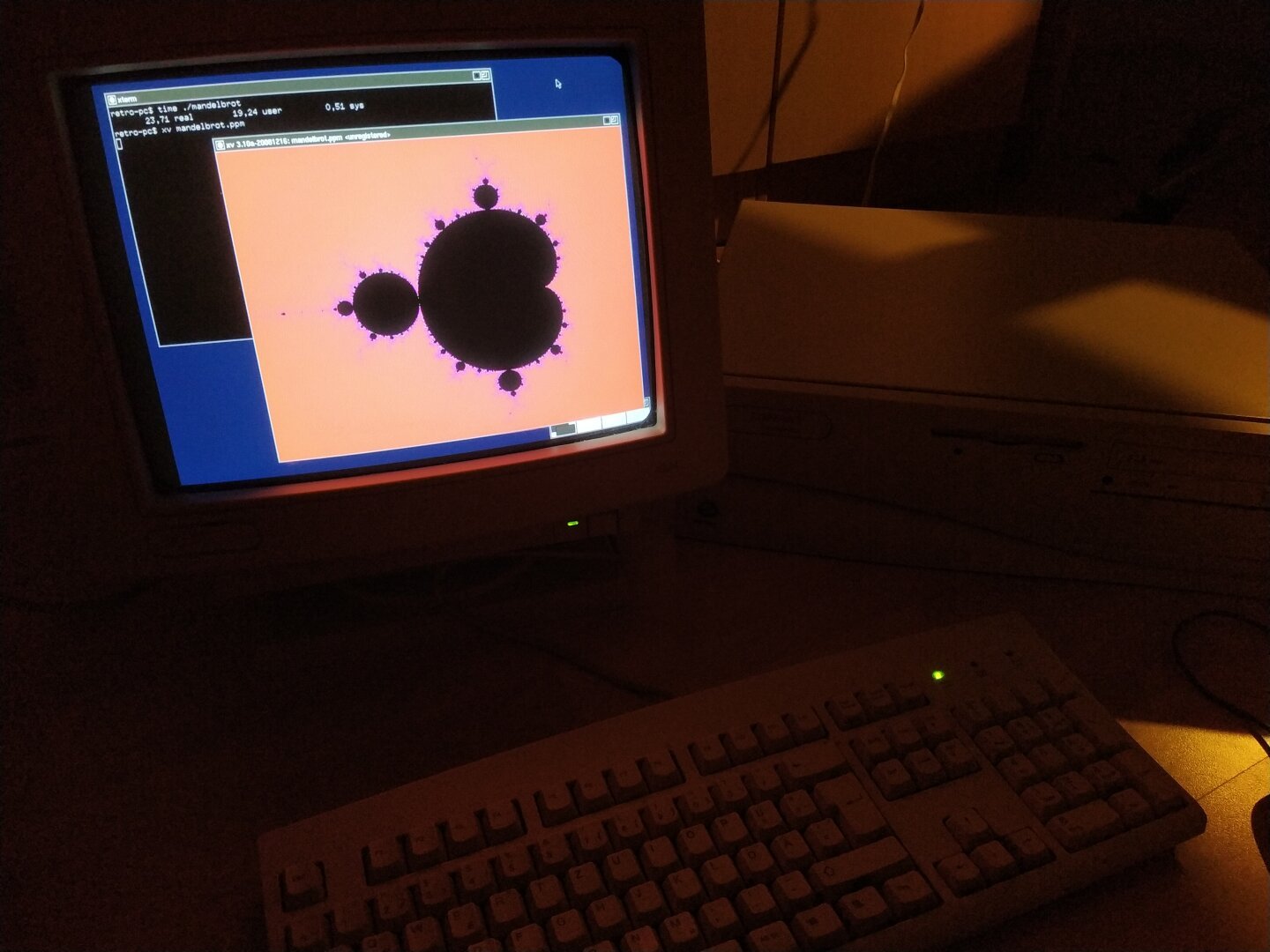
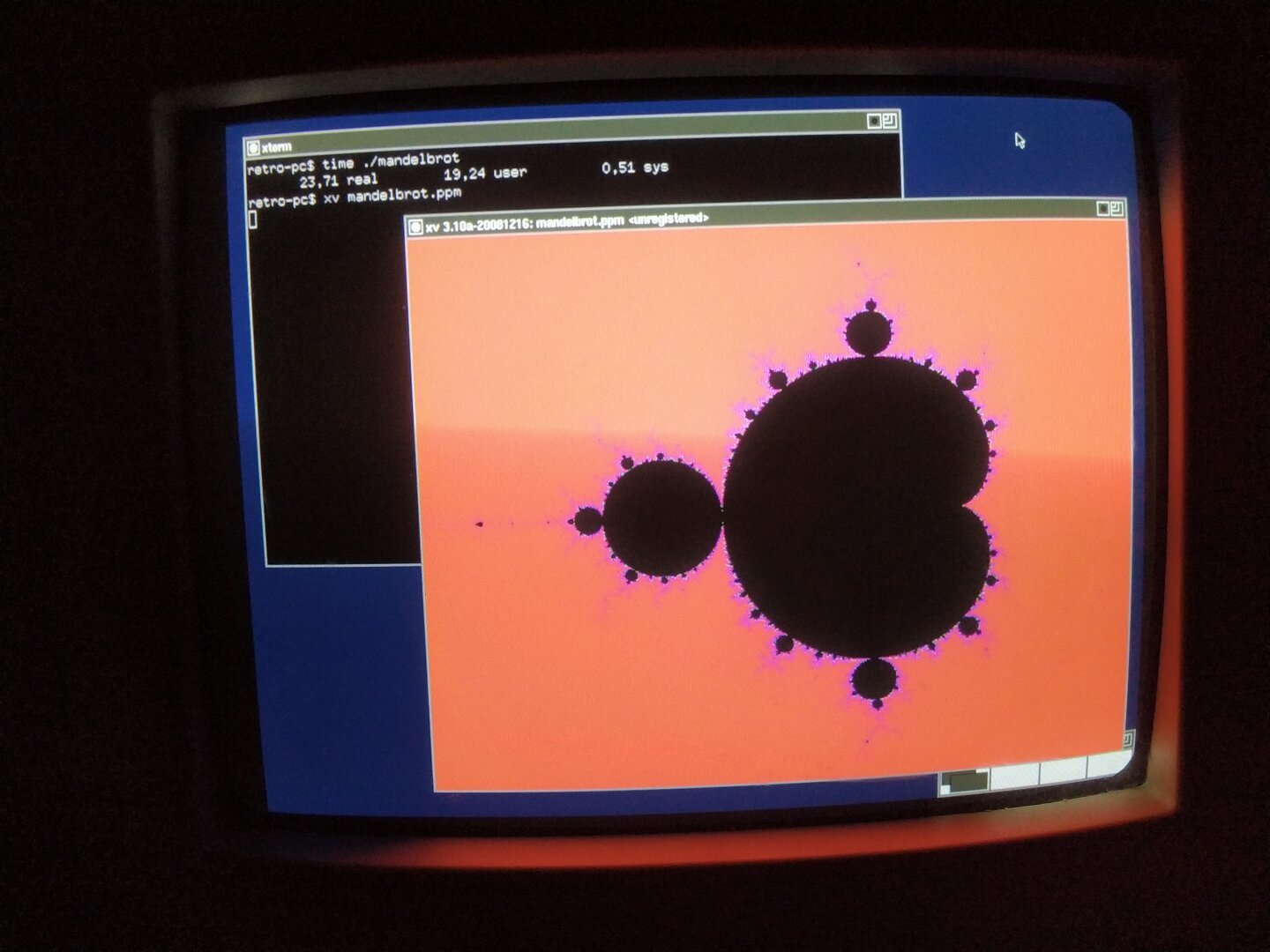
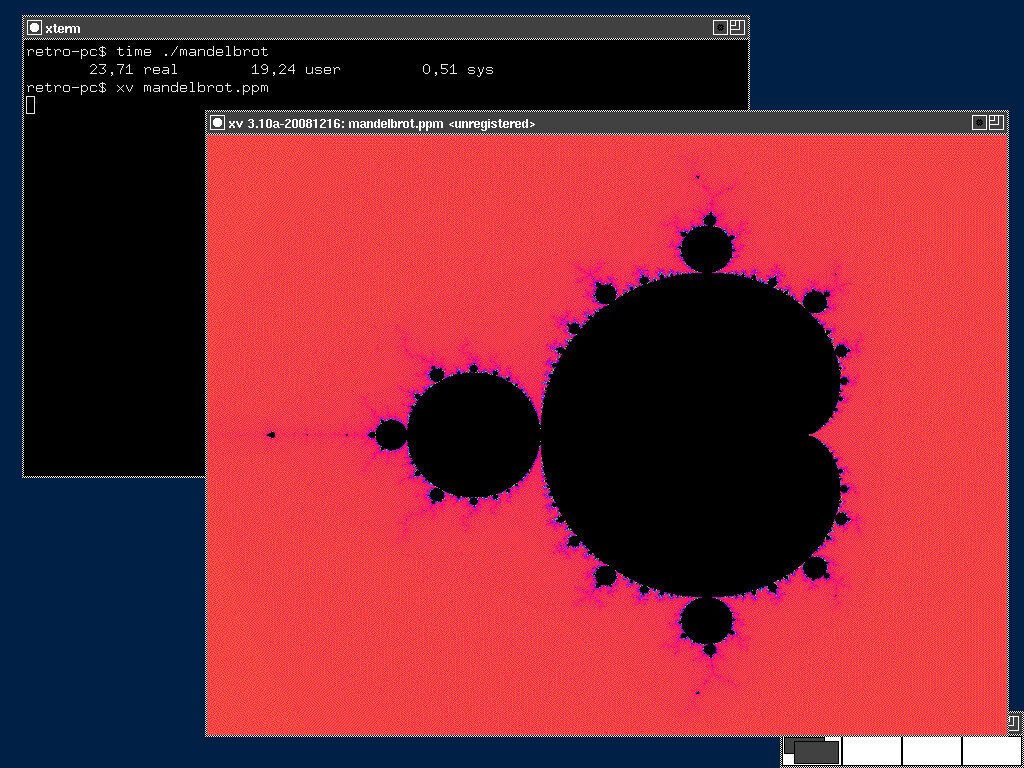
The Mandelbrot set is a great fit for this: it is generated entirely from a simple mathematical iteration, but produces a surprisingly complex and colorful result.
I wrote a small C program using only the standard library and double-precision floating-point arithmetic. For every pixel, the program iterates the Mandelbrot equation and counts how many iterations are needed for the sequence to escape. This iteration count is then mapped to a color.
The result is written as a PPM image and displayed directly on the Pentium using XV, an old X11 image viewer. I could have used feh, which was already available, but I wanted to build something myself. Since no binary package was available for XV, I built it from pkgsrc in a NetBSD build VM and then transferred the resulting package to the Pentium.
Rendering at 800×600 with 500 iterations per pixel took 23.71 seconds.
#RetroComputing #RetroPC #Pentium #Pentium1 #Pentium166 #NetBSD #NetBSD11 #BSD #i386 #X11 #XOrg #CProgramming #C #Fractals #Mandelbrot #MandelbrotSet #NumericalComputing #ScientificComputing #OpenSource #FOSS #FreeSoftware #VintageComputing #OldComputers #RetroTechnology #ComputerHistory #CPU #SoftwareRendering

![[?]](https://files.sueden.social/accounts/avatars/110/215/853/631/484/521/original/054991cf7a6d1691.png)
Dear BSD community,
I've got to reduce my number of books so here are some BSD related books I'd like to give away for free.
If you're in the EU and would like to have one, please reply. Can send them to you if you pay the shipping costs
#OpenBSD #BSD #FreeBSD #NetBSD

Alt...
The book of PF
Absolute OpenBSD
![[?]](https://mastodon.uy/system/accounts/avatars/000/000/003/original/f5baa4af59d10487.jpg)
Yo solo quiero saber si Slackware Linux va a tomar una postura definida en contra de la IA o si va a terminar siendo NetBSD la última reserva moral de los sistemas operativos tipo Unix... veremos #linux #slackware #netbsd #bsd #IA
RE: https://mastodon.sdf.org/@netbsd/117455748417638482
During episode 132 of Linux After Dark from @latenightlinux, the hosts talked about how they could recapture the passion they once had for computers and technology. This episode got me thinking quite a lot. I've been a Linux user for more than 30 years and, admittedly, my excitement for tech was dying. Actually, it had been dying for a few years. Shitty comments from Torvalds, many projects embracing AI, and maybe even the fact that I had been using Linux for so many years, contributed to my, well, less that excited feelings about all of it. I know that I needed a change.
I may have found something that has rekindled my love and excitement. And that something is BSD. After a few months of struggling to get a BSD installed on my hardware (laptop and desktop), with the help of many here in the Fediverse over the past month or so, I finally got NetBSD installed on my laptop and desktop. It was exciting! I'm actually feeling the way I did when I first started using Linux all those years ago. I have to work a bit to get some hardware working, I have to do a lot of reading and research, and I've even joined some IRC channels and forums. Forums. Remember those?
I'm leaving Linux behind and moving on after more than 30 years. This isn't a decision that I take lightly. Quite the contrary. It's one of the hardest decisions that I've ever had to make. I spent those 30+ years preaching about how great Linux was and even moved a lot of people away from Windows to Linux and Open Source software over the years. And for a lack of a better description, I feel betrayed by the Linux kernel project and all of the open source projects who have decided to embrace AI, even with all of terrible ethical issues.
Well, anyway, I didn't write this to bash on Linux. I wrote this because I'm starting to feel excited about tech again. I may even start writing about my move from Linux BSD and how it's all going. The good things. The struggles. And everything in between.
Okay, I've put enough people to sleep with this post. I have a long road ahead of me before I feel as comfortable with BSD as I do with Linux, but I think that is where all the excitement is.
#bsd #netbsd #freebsd #openbsd #linux #noAI
Some #NetBSD questions that keep coming up.
We don't use modules for HW drivers in the default install. All baked into the kernel. If you're curious about desktop hardware, for x86 there are lists https://wiki.netbsd.org/laptops/ https://wiki.netbsd.org/gpus/ (and the pci/usb manual pages)
x86 virtual machines. https://www.netbsd.org/docs/guide/en/chap-virt.html#chap-virt-guest
For disk encryption there's different options, such as creating a small root with the installer, then adding encrypted partitions later (see man cgdconfig). Also: cgdroot.
![[?]](https://mastodon.sdf.org/system/accounts/avatars/108/233/134/134/174/252/original/75cf6c02b16edbb2.png)
With the help from some great folks here in the Fediverse, I was finally able to get @netbsd installed on both my desktop (Dell Optiplex) and laptop (Lenovo ThinkPad T14). I'm posting this from the desktop! Still unable to to get wireless working on the laptop but I am sure a USB wireless adapter will resolve this. I'm going to give this a try later today.
My move away from my beloved Linux is moving forward. Thank you to Torvalds and other projects who have ruined it for me after 30+ years. It's sad that I'm moving away, but I know it's the right decision (for me, anyway).
Updates coming, and will probably bore you to death.
![[?]](https://polymaths.social/fileserver/01HCMX6M1CZNEVJ4F5H58TT5XJ/attachment/original/01M4GVVZSEWT13KC280GWBJSF8.png)


 🍵
🍵  [
[Hey #NetBSD guys,
How do you set up #WireGuard? wg-quick isn't available for NetBSD from what I can tell. I got wireguard-go to create the tun0 interface, but when I try to feed the config file to it, I get a parsing error:
rld@discovery:~$ doas wg setconf tun0 /etc/wireguard/protonvpn.conf
Line unrecognized: `Address=10.~~~.~~~.~~~/32,2a07:~~~~::2:2/128'
Configuration parsing error
rld@discovery:~$
(~~~=redacted)
![[?]](https://media.bsd.cafe/bsdmmedia01/accounts/avatars/117/230/143/862/280/275/original/a62dee3e69e032a8.jpg)
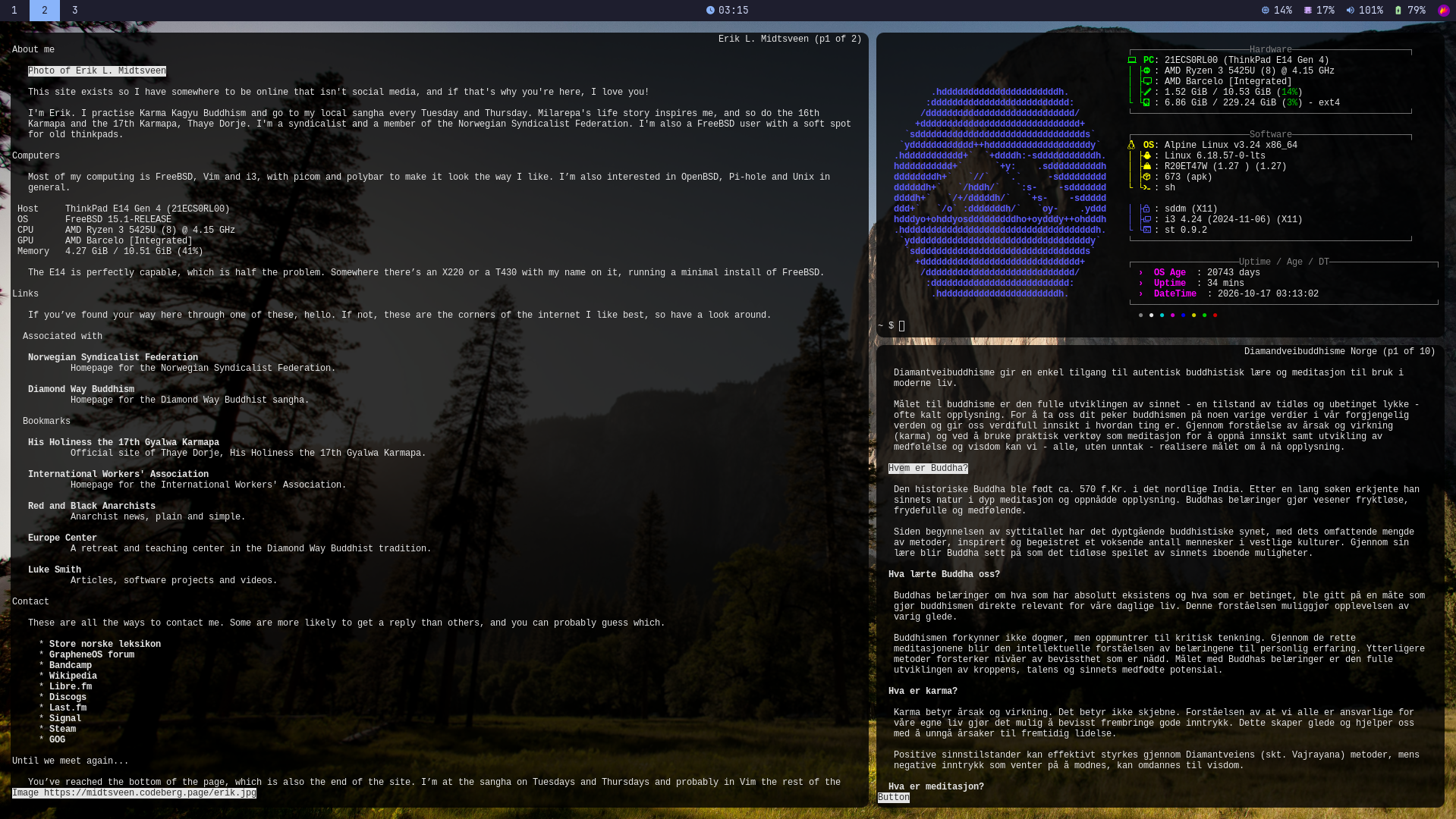
Oh no, I installed #AlpineLinux! 😈 
#Linux #BSD #Unix #Simplicity #Minimalism #
Alt...
Screenshot of a dark-themed desktop with a three-workspace bar at the top. The screen is divided into panels: a large left pane displays a personal homepage with sections titled “About me,” “Computers,” “Links,” “Bookmarks,” and “Contact,” over a forest background. The upper-right pane shows a terminal with a blue ASCII Linux logo and system information. The lower-right pane displays a Norwegian-language article about Diamond Way Buddhism. The desktop uses small monospaced text, translucent dark panels, and a minimalist Linux environment.
![[?]](https://media.bsd.cafe/bsdmmedia01/accounts/avatars/113/033/293/822/670/571/original/436dcf170cc75fdc.png)

I went to drop off a load of old crap at the computer recycling place yesterday with my #EuroBSDCon2026 T-shirt on and got asked, "Is that an #OpenBSD shirt?". I then got into the whole "How's the #BSD world? I haven't looked at it for 20 years" discussion, followed by "Is Theo still Theo?".
![[?]](https://media.bsd.cafe/bsdmmedia01/accounts/avatars/110/901/147/484/217/272/original/42dd588e37bcd14e.png)
New blog post! I'm sharing some personal notes from my experiments with FreeBSD and the HumanWare BrailleNote Apex.
These are just personal notes, but I hope they may also be useful to others who want to start connecting a Braille display to FreeBSD, or to curious developers who want to understand how their software is used by people relying on screen readers and other assistive technologies.
Article: https://alfonsosiciliano.gitlab.io/posts/2026-10-15-freebsd-apex.html
#FreeBSD #Accessibility #A11y #UNIX #OpenSource #Braille #Coding #DeviceDrivers #AssistiveTechnology #ScreenReaders #OpenSourceHardware #BSD
![[?]](https://media.bsd.cafe/bsdmmedia01/accounts/avatars/116/916/392/971/982/972/original/b4c387d7a9a1a14c.png)
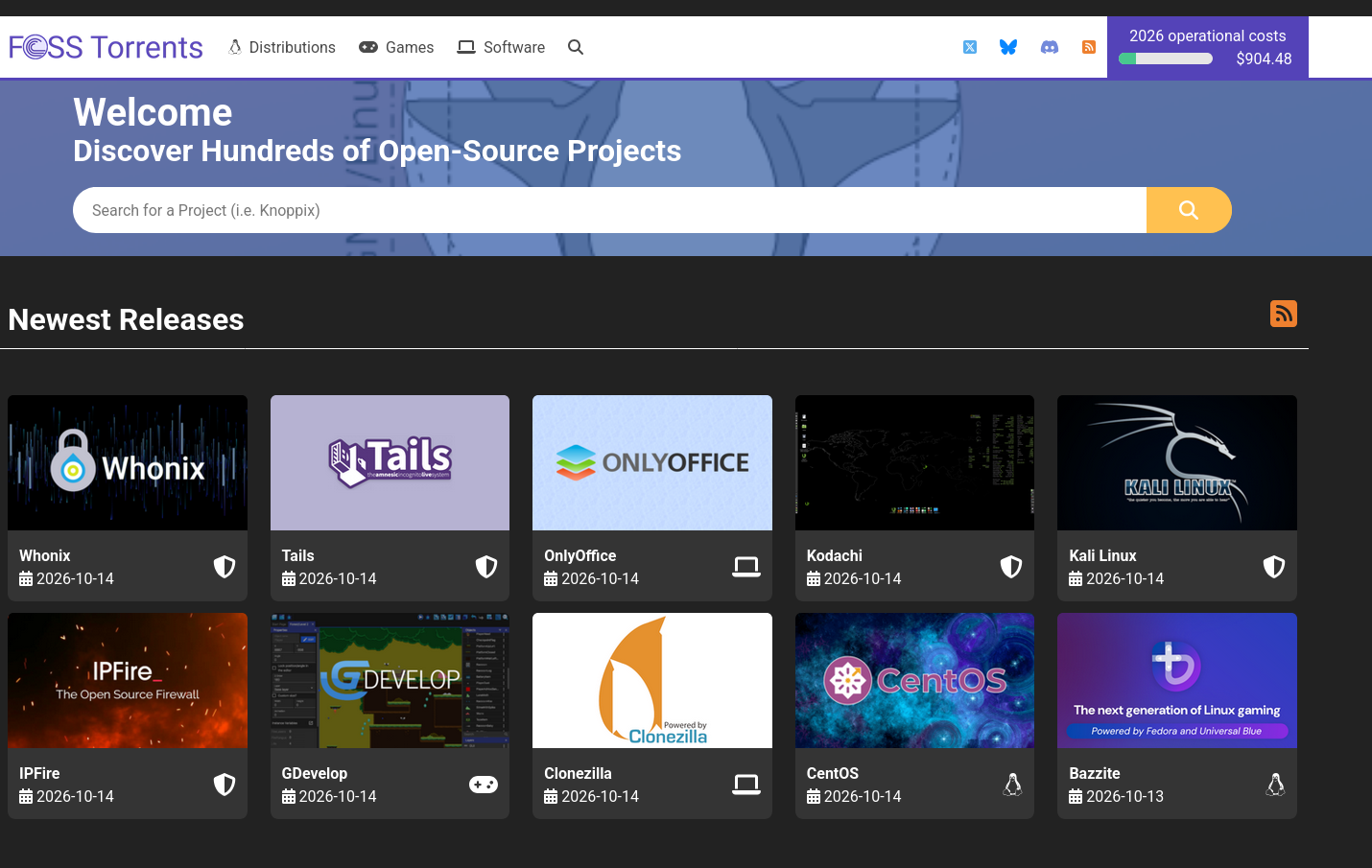
I would like to remind you again that #FOSSTorrents has got torrents for many #opensource games, softwares and operating systems.
They have the #BSD family, #Linux distros, softwares like #LibreOffice, #Blender and also games like #wesnoth #warzone2100 #supertuxkart among tons of others.
If you have the disk space and spare bandwidth, consider seeding the #torrent of your choice.
And if you have enough money in your pocket, consider donating to them!
Boosts appreciated!
Alt...
A partial screenshot from fosstorrents.com.
The header, from the left, has got their logo and in the menu there are items "Distributions", "Games" and "Software". On the right side of the menu, there are social links for X, Bluesky, Discord and RSS. And on the most right part, there is a progress bar showing how much operational costs of 2026 is covered. Currently it's ~900 USD and only like 1/5 is covered.
Below the menu, there is a search box. And below it, there is a gallery of the "Newest releases"
![[?]](https://media.mastodon.scot/accounts/avatars/109/252/274/874/045/781/original/172e8f7530627e87.png)
Thinking about switching to #NetBSD to avoid #Linux #AI tainted kernel, and the thing that is worrying me most is package managers. I've been using #Debian and derivatives for about twenty years mainly because of its excellent package manager. Is there anything which does similar dependency tracking in the #BSD world?
Is anyone running GhostBSD? I thought I would give it a shot and the Mate release installed effortlessly on my ThinkPad L14. Wireless didn't work but when I inserted an Edimax USB device, it picked it right up and wireless was working. Just not sure what FreeBSD release this is built on? I'm thinking of giving the Xfce release a try, as well.
![[?]](https://media.burningboard.net/accounts/avatars/109/892/422/024/311/931/original/f22e604f554272c0.png)

My old ThinkPad T480 is back in daily use, running FreeBSD 15.1. 
Xfce, 5 GHz Wi-Fi, hardware video decoding in Firefox and Chromium (checked in the decoder, not just a capabilities page), a webcam that survived a 45-minute Zoom call, a Bluetooth speaker via virtual_oss, and SSH and Git signing from a smart card.
It's boring now. That's the point.
https://blog.hofstede.it/the-t480-is-back-my-freebsd-151-laptop-from-boot-to-browser/
![[?]](https://cdn.fosstodon.org/accounts/avatars/109/366/856/446/242/299/original/1cc13c1ce46c76d0.jpg)
I'm thinking of replacing an old laptop's Windows 10 system with a #BSD system instead of #Linux.
Most of the articles I see on the BSDs tend to downplay user interface. I'm very comfortable with the command line, but I want my GUI too.
Has anyone had any daily experience with this sort of setup? I am leaning towards #FreeBSD or #DragonflyBSD but I don't know about the available desktops.
![[?]](https://cdn.masto.host/mastodongamedevplace/accounts/avatars/109/246/276/757/677/263/original/e86349d503620c7b.png)
![[?]](https://media.bsd.cafe/bsdmmedia01/accounts/avatars/115/276/840/417/131/111/original/507e2134cf9f2a8d.webp)
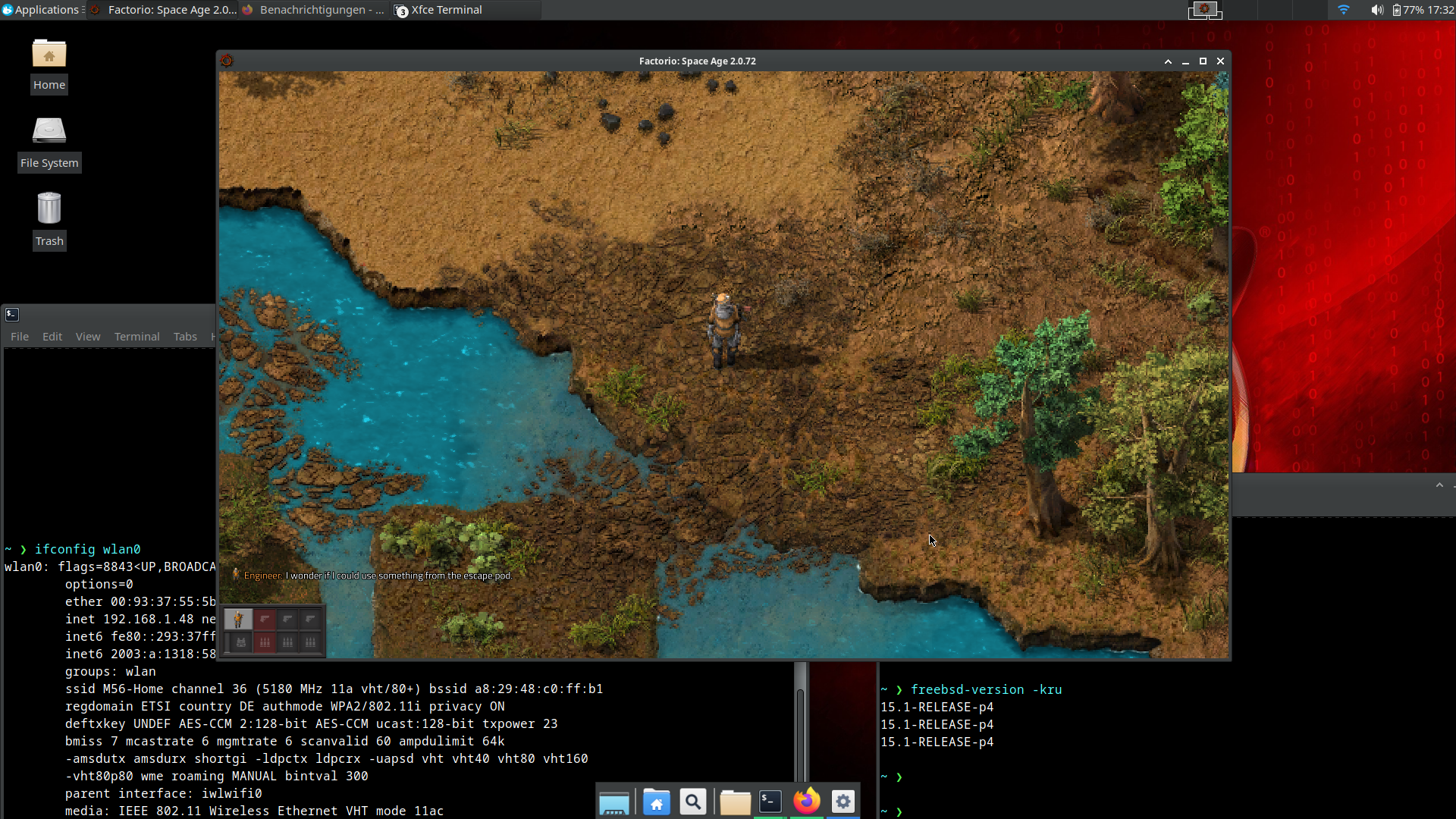
"FreeBSD is only for servers" needs to be permanently retired.
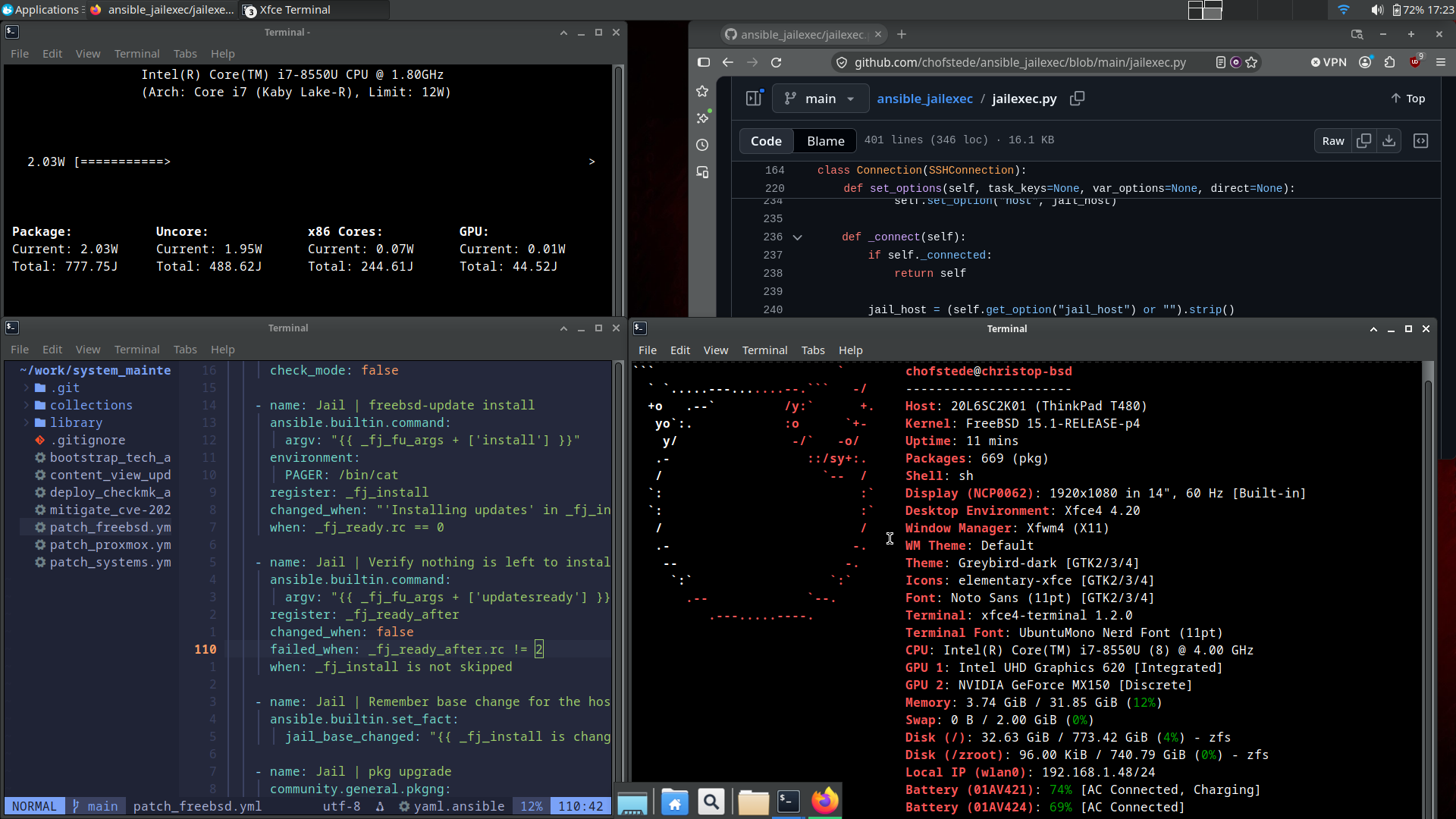
Running FreeBSD 15.1 on the trusty ThinkPad T480, and the desktop experience is outright sublime:
- Idle power draw: hovering at an absurd ~2.0W package power
- Wi-Fi: 802.11ax rock-solid
- Hardware video acceleration: fully working in both Firefox and Chrome
- Webcam and audio: working flawlessly
- Productivity: Xfce 4.20 on X11 flying along on ZFS
- Yes, even Factorio runs like a dream
Between the battery efficiency, sane base system, and native ZFS, this machine feels faster and quieter than it has in years.
2026 really is the year of the BSD desktop.
#FreeBSD #ThinkPad #T480 #Unix #BSD #OpenSource #Xfce #Factorio
![[?]](https://files.mastodon.online/accounts/avatars/109/277/927/349/683/391/original/aac58e481bc1a913.png)
On the plane, #ThinkPads shed their layer of finger-cheese and inventory tags. They drift to a good home, then take root and undergo a remarkable transformation. As polyps they break into an array of genders, most in the categories of #Linux or #BSD.
The polyp phase can last for many years, and usually only terminates as a new polyp is established in the home. At this point they enter the Ephyra stage, rapidly cycling through operating systems, drifting and developing a layer of dust.
2/3
![[?]](https://cdn.masto.host/mastohackerstown/accounts/avatars/114/325/360/956/460/049/original/2630509f2d432d2d.jpeg)
So the only time I tried a #BSD was a brief dalliance back when PC-BSD was a thing. Even then game compatibility was better under Linux, but I am once again pondering my next dual boot setup. It won’t be Linux. Is there a similar “entry-level” BSD available in 2026?
![[?]](https://media.bsd.cafe/bsdmmedia01/accounts/avatars/113/698/673/569/488/272/original/1fc827cf6cff37d6.png)
@marocddot How can you miss it? It is still there. I believe it is in all distros of #linux and all #bsd's by default.
![[?]](https://media.bsd.network/accounts/avatars/000/000/496/original/d00f73155d2462ba.jpg)
![[?]](https://media.bsd.cafe/bsdmmedia01/accounts/avatars/112/228/761/649/521/436/original/845b520185b335ee.jpg)
Did you notice? The registration at @BoxyBSD was open and we welcomed several new members who can now access their free #VPS instance to start learning and testing #BSD based systems!
We love to see people getting on #BSD and providing them a free place for learning and testing with different systems like #NetBSD, #OpenBSD, #FreeBSD any many other ones including #opensolaris with #openindiana!
Thanks to @gyptazy for operating and keeping up this free service for the #opensource community!
![[?]](https://cdn.masto.host/rubysocial/accounts/avatars/000/093/360/original/920f5a8782200f9b.jpg)
Latest #BSD tests on the Acer Aspire E15 (about 13-year-old Intel laptop):
#NetBSD: Install works. Atheros WiFi NOT working, Edimax N150 does work. X11 starts but is unusable
#FreeBSD: Install works. Atheros WiFi does work. X11 does not work at all
#OpenBSD: Install works. Atheros WFi NOT working, Edimax N150 does work, X11 works
![[?]](https://social.gyt.is/fileserver/01BTTQA7S2746NZVSVS0NT8Z5Z/attachment/original/01KF6QQPE57K5CQPXDAW76AZMQ.jpeg)
As Linus Torvalds is getting increasingly intoxicated with LLMs, I think it's time to get acquainted with something tidier 
How about NetBSD?  Is it a long learning curve switching from iptables, SELinux and other general tooling?
Would be curious to hear from anyone who jumped from Linux to BSD 
My 2027 UNIX wishlist.
-NetBSD gets ZFS on root, and in the installer.
-NetBSD gets FreeBSD's jails, including VNET support.
<or>
-FreeBSD fully and finally declares a no AI policy.
As much as I like OpenBSD, neither of those things have ANY chance of making it into their source.
Also, has anyone forked a slop free tmux, yet?
NetBSD may have found a new role: The AI-free FOSS OS https://www.theregister.com/os-platforms/2026/10/13/netbsd-may-have-found-a-new-role-the-ai-free-foss-os/5302818
Latest 𝗩𝗮𝗹𝘂𝗮𝗯𝗹𝗲 𝗡𝗲𝘄𝘀 - 𝟮𝟬𝟮𝟲/𝟭𝟬/𝟭𝟮 (Valuable News - 2026/10/12) available.
https://vermaden.wordpress.com/2026/10/12/valuable-news-2026-10-12/
Past releases: https://vermaden.wordpress.com/news/
#verblog #vernews #news #bsd #freebsd #openbsd #netbsd #linux #unix #zfs #opnsense #ghostbsd #solaris #vermadenday