Search results for tag #netbsd
![[?]](https://media.bsd.cafe/bsdmmedia01/accounts/avatars/113/698/673/569/488/272/original/1fc827cf6cff37d6.png)
![[?]](https://media.bsd.cafe/bsdmmedia01/accounts/avatars/110/740/169/477/916/693/original/dfa8f1b9beefa405.png)
Tomorrow, Saturday, October 24, 2026, I'll be speaking at Linux Day in Modena, with a talk titled "Beyond Linux: A Journey Through the Open Source Ecosystem."
Will I talk about Linux? Of course. But I'll also talk about BSD, illumos, monocultures, and why we should never forget that there are always other paths worth exploring.
Linux proved that an alternative was possible. It would be a shame if that alternative became, in turn, a new imposition.
Because monocultures are a problem, even in the Open Source world. And because freedom isn't about everyone doing things the same way, but about being able to choose a different way.
Open Source and closed minds don't mix.
https://makeitmodena.comune.modena.it/makeitmodena/eventi/24-ottobre-2026-linux-day
#Linux #LinuxDay #IT #OwnYourData #RunBSD #BSD #FreeBSD #NetBSD #OpenBSD #illumos #LinuxDay2026
Domani, sabato 24 ottobre 2026, sarò al Linux Day di Modena con un intervento dal titolo «Oltre Linux: viaggio nell'ecosistema Open Source».
Parlerò di Linux? Certamente. Ma parlerò anche di BSD, illumos, di monoculture e di quanto sia importante non dimenticare che esistono sempre altre strade.
Linux ha dimostrato che un'alternativa era possibile. Sarebbe un peccato se quell'alternativa diventasse, a sua volta, una nuova imposizione.
Perché le monoculture sono un problema, anche nel mondo Open Source. E perché la libertà non è fare tutti le cose allo stesso modo, ma poter scegliere di farle diversamente.
Open Source e Closed Mind non vanno mai d'accordo.
https://makeitmodena.comune.modena.it/makeitmodena/eventi/24-ottobre-2026-linux-day
#Linux #LinuxDay #IT #OwnYourData #RunBSD #BSD #FreeBSD #NetBSD #OpenBSD #illumos #LinuxDay2026
![[?]](https://cdn.masto.host/kindsocial/accounts/avatars/110/671/199/756/664/588/original/7b4c99a88b22fb58.png)

Also, NetBSD should have a furry mascot. Linux has Xenia, a canonically transfem foxgirl. The KDE project has its whole entire species of KDE dragons. Firefox has Kit. NetBSD should have one too. :)
![[?]](https://wii.cafe/ltning/s/avatar-1122131a322ac7a58db83a2ce72c763b.png)
(This instance: Wii/PPC; image: Sun Ultra 10/Sparc64 - see alt text)
#NetBSD #Wii #PowerPC #Sparc64 #Sun

Alt...
NetBSD running ctwm and showing three terminal windows: one with bpytop, one with a file listing and one compiling git from source. In the corner another CPU monitor in the form of a (now) naked anime-style lady, drawn by the "hot-babe" program.
![[?]](https://media.bsd.cafe/bsdmmedia01/accounts/avatars/117/229/469/256/862/649/original/1f7e21b86b7a3a7f.jpeg)
![[?]](https://media.bsd.cafe/bsdmmedia01/accounts/avatars/116/246/024/926/010/623/original/92439e50b2261140.jpg)
![[?]](https://mammut.moe/system/accounts/avatars/109/308/533/487/810/604/original/35288be724803892.jpg)
@netbsd @xilatsad
Today I saw an interesting and important case raised: NetBSD states it has imported ZFS from FreeBSD, which uses OpenZFS project [1]. Currently, OpenZFS is tainted with LLM-input to some degree. That raised the question of sync between sources in these project and thus the LLM-input to the NetBSD in the end.
![[?]](https://media.nerdculture.de/accounts/avatars/109/274/692/598/892/436/original/768e4668071143b1.png)
Do you split your #netbsd installation into several partions (/, /usr, /home) or do you prefer a monolithic approach? What are your reasons for each approach? Is there any real disadvantage in using the monolithic approach for a single user system (except of the need for a backup before a complete fresh installation) that I might have overlooked? I partitioned my Linux and FreeBSD machines into /, /usr, /home and swap back in the 90s and 2000s, but moved to a monolithic approach later without missing dedicated partitions.
![[?]](https://assets.chaos.social/accounts/avatars/108/198/383/090/213/558/original/92bec86704400a34.jpg)
I put #NetBSD 11.0 on a 5 Y.O. laptop, with help. I'm experienced with BSD, back to the floppy-based 386BSD/Dr. Dobbs.
Some things are great, some grate. Notes:
https://jspath55.blogspot.com/2026/10/crash-more-machines-no-fewer-newold.html?m=1
1. Wifi doesn't work natively.
2. Closing the lid doesn't suspend.
3. Battery life is weak, but i think that's their age, not OS suckage.
4. Video is a little choppy sometimes video streams fine.
If you're a n00b from the Windows world, this might be a setback. If you're from the Linux family, less shocking.
![[?]](https://cdn.masto.host/rubysocial/accounts/avatars/000/093/360/original/920f5a8782200f9b.jpg)
Today will be attempt 2 at getting #NetBSD to run on my laptop.
The most likely problem was that I did something wrong while writing the installer image to USB, because the questions I was asked during first boot on the laptop were completely absent when I installed it on a virtual machine.
I'm using a script called EasyDD to hopefully eliminate that error today. :)
...well, that was fucking easy, it just worked.
I think I'm gonna go through the installer again though, it sure could stand its rough edges sanding off a bit. For one, it's not entirely clear that what you end up with by default is a very basic system without a GUI, package management, or even networking.
I can see why advanced users would desire such a minimal installation, but as a default that it isn't clear you can override, it's probably the wrong call.
![[?]](https://drive.nya.social/files12/webpublic-a2647278-0bb5-442b-9b98-743a825b8510.png)
i can help!
the long and short of it is that you need a boot image built with the LEGACY kernel instead of the GENERIC config. which i can point you to on demand
![[?]](https://nb-fedi.de/fileserver/01FYQ1QFB0N3T9D2MM45C1C933/attachment/original/01JTQH3PZVKJAM4PPVR2CNMQNK.jpeg)
Wow. The updates to the #php packages in #pkgsrc were updated to 8.5.12, 8.4.27 and 8.3.36, respectively, by 1358Z. Building and in-place update went smoothly. My #nextcloud is patched and back in operation.
I'm impressed. Thank you!
#NetBSD #homeserver #selfhosting.
![[?]](https://cdn.gnous.eu/gnoustoot/accounts/avatars/114/986/704/061/767/595/original/36c213192efc5d0e.png)
#NetBSD-crew... I need some help (mention-only). Idk why, but my netbsd installer can't go forward after "boot devices: <unknown> \n root devices: <type something>".
Unfortunately, i can't enter anything.
Qubit waits, but there's no cycling on the tele, and consequently no me to sleep on.
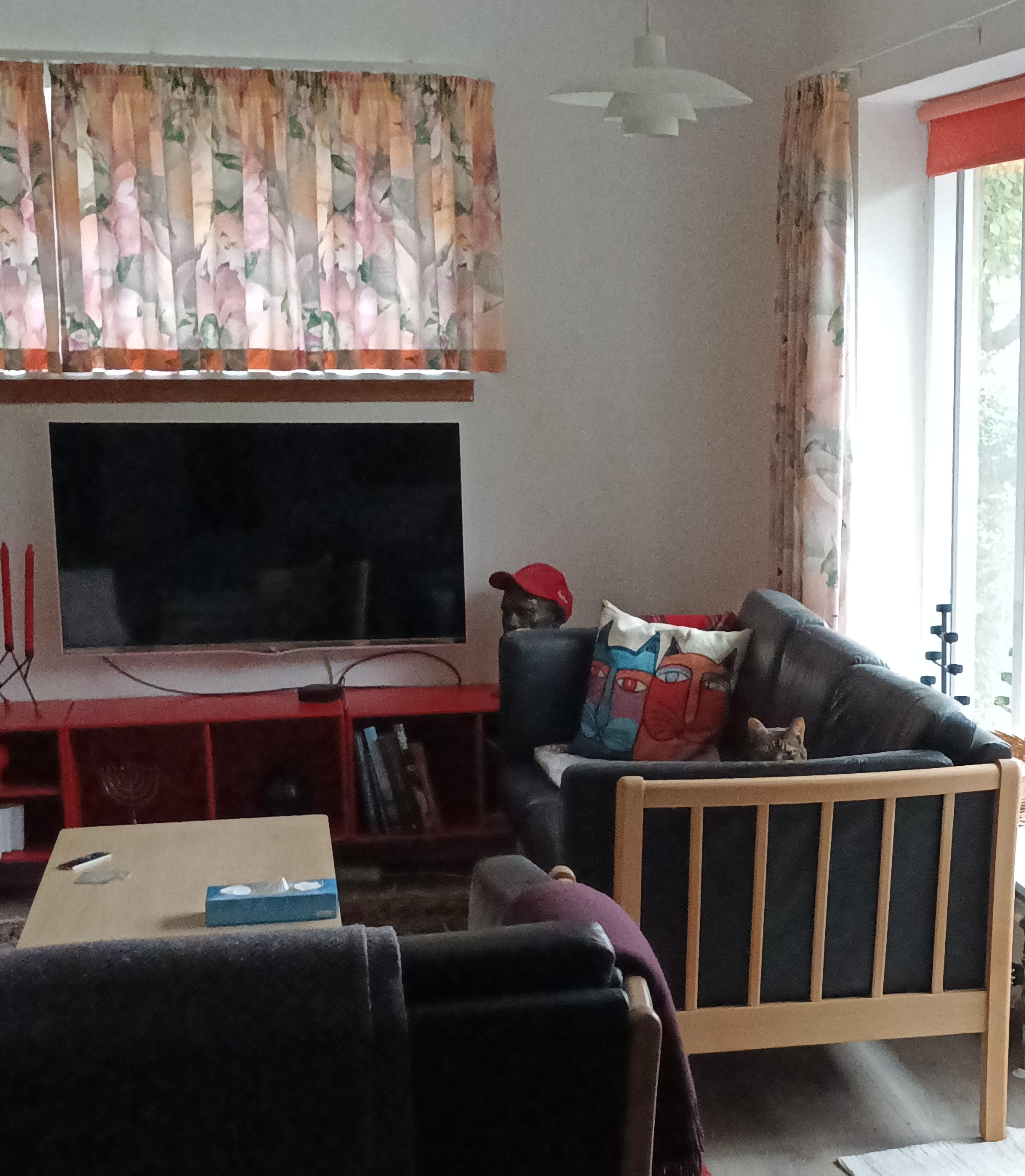
She doesn't know I am playing with Go tui on #netbsd. If she did, she would walk on the keyboard.
Alt...
Ceci n'est pas une chat
I now have a #NetBSD 11 VPS on TierHive that only costs $5 a year. Thanks @bt for the tip.
I'm looking forward to learning.
![[?]](https://mastodon.zergy.net/system/accounts/avatars/000/000/130/original/93cfc04b55d2457c.png)

Oh? NetBSD doesn't have an /etc/os-release file? Is that normal? :dragn_confuse:
Too bad as I use it in some personnal scripts to check the OS and it version. 
Well, just quickly made a little script to generate one at boot time. 
![[?]](https://media.bsd.cafe/bsdmmedia01/accounts/avatars/116/471/183/944/748/373/original/15cea23f36b87106.jpg)
Someone over on #XMPP told me: why don't you just use #NetBSD but hardened? Well, it's 2026 by now and NetBSD have promised nothing about bringing pledge and unveil, and I would assume it's not trivial to patch Firefox with them. If I had all the free time in the world, then surely I could try, but as it stands I'm still making baby steps away from being just a FOSS freeloader...
![[?]](https://mastodon.clitheroe.ca/system/accounts/avatars/114/441/807/466/803/214/original/94ade8d5ba444135.jpg)
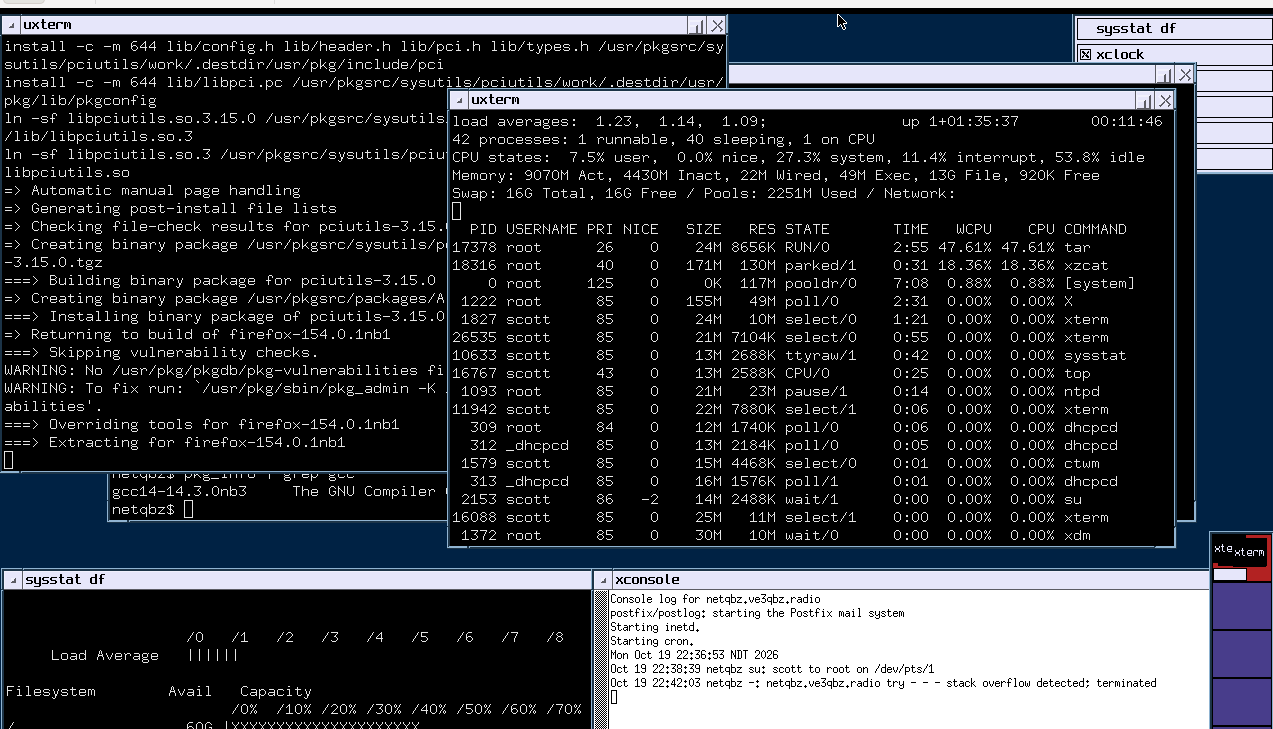
24 hours later, the little #netbsd learning/experimentation VM has finished building all the tools and libraries needed, and is finally starting on firefox
Alt...
A screenshot of NetBSD running CTWM. Multiple xterms show firefox starting to build, top, and systat, keeping tabs on things.
![[?]](https://media.bsd.cafe/bsdmmedia01/accounts/avatars/115/138/278/314/458/705/original/14801851e6f000f4.png)
Installed #NetBSD/amd64 11.0 on a 2012 Mac Mini. Now I'm waiting for packages to build.
![[?]](https://snac.bsd.cafe/r1w1s1/s/avatar-f4bb891519b2dd4faaf0697b384c3c6f.png)
and an experimental optional colour feature for brackets and operators.
To try it:
make clean && make DBG='-DNDEBUG -DCOLOUR'
Press Ctrl+] to toggle the colours.
Feedback is welcome: useful, harmless, or distracting? I’ll collect the responses and add them to issue #44:
https://codeberg.org/SirWumpus/eh/issues/44
Please reply here with your experience if you try it.
![[?]](https://media.hachyderm.io/accounts/avatars/112/675/591/398/918/893/original/3f530b45903d3837.jpg)
#Tech #Mastodon I have a question, does #NetBSD have binary forward compatibility (or whatever that would be called)?
Like, if I build something using a shared libc and generally using dlopen() or other careful methods for external libraries, will that binary typicall continue to work on future releases of NetBSD as-is?
I've heard FreeBSD tends to have that, OpenBSD apparently less so...
Asking since I'm tempted to try #NetBSD due to the general #Linux #ensloppification situation  stop the #slop etc. by putting my money where my mouth is, at least if this turns out to be feasible...
![[?]](https://mastodon.sdf.org/system/accounts/avatars/108/233/134/134/174/252/original/75cf6c02b16edbb2.png)
Hello, please immediately run the following commands on your #NetBSD installations:
# certctl untrust /usr/share/certs/mozilla/all/emSign_Root_CA_-_C1.pem
# certctl untrust /usr/share/certs/mozilla/all/emSign_ECC_Root_CA_-_C3.pem
Context: https://groups.google.com/a/mozilla.org/g/dev-security-policy/c/0R3XLJL6FuE/m/0XofdebrAAAJ
![[?]](https://cdn.masto.host/mastodongamedevplace/accounts/avatars/109/468/716/907/475/199/original/a972069d81771dea.jpeg)
Okay, you switch to #netbsd … but what about Python, Rust, Ruby, Godot, VS Codium, most other software one uses???
![[?]](https://justfollow.me.uk/system/accounts/avatars/109/320/306/219/107/803/original/abdeb1bbb89e40f5.jpg)
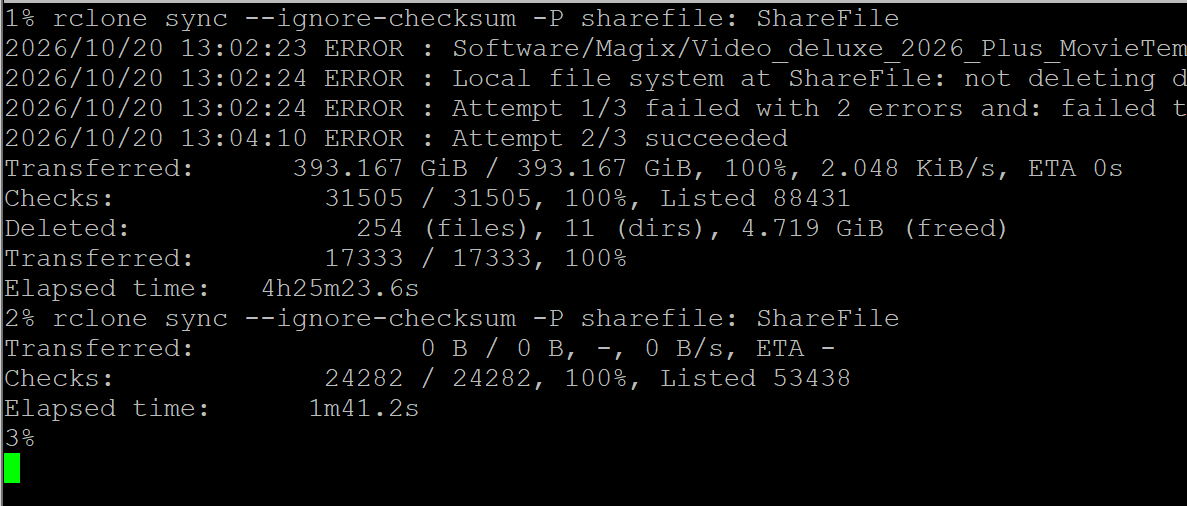
To be fair, I'm very impressed with the final result. A second run after a 400GiB sync from cloud storage to local #ZFS on #NetBSD took less than 2 minutes.
Alt...
Two runs of a program called rclone. The first copied nearly 400GiB in 4 hours and 25 minutes. The second took less than two minutes as everything had already been copied.
1% rclone sync --ignore-checksum -P sharefile: ShareFile
Transferred: 393.167 GiB / 393.167 GiB, 100%, 2.048 KiB/s, ETA 0s
Checks: 31505 / 31505, 100%, Listed 88431
Deleted: 254 (files), 11 (dirs), 4.719 GiB (freed)
Transferred: 17333 / 17333, 100%
Elapsed time: 4h25m23.6s
2% rclone sync --ignore-checksum -P sharefile: ShareFile
Transferred: 0 B / 0 B, -, 0 B/s, ETA -
Checks: 24282 / 24282, 100%, Listed 53438
Elapsed time: 1m41.2s
Not as straightforward as on FreeBSD, but you can make your own read only NetBSD device quite easily. I've been doing it for years, and it works perfectly.
Make your own Read-Only Device with NetBSD
https://it-notes.dragas.net/2024/09/10/make-your-own-readonly-device-with-netbsd/
![[?]](https://mastodon.sdf.org/system/accounts/avatars/112/080/807/459/487/475/original/57e09cba2a837708.jpg)
yeah. i am enthusiastic about #NetBSD and the no-AI slop policy.
but i think i am done with this. i haven't got the time.
db{0}>

Alt...
my laptop monitor, after "panic() at netbsd:panic+0x3c" and a bunch of other garbled jargon. i am dropped to a prompt: db{0}>
![[?]](https://tooting.ch/system/accounts/avatars/110/705/971/614/171/519/original/dd338a09a8776027.png)
@peachfiend Yes, unfortunately, it is not like people are suddenly looking for alternatives to Linux, and #NetBSD was ready to catch them. Netbsd had little funding for years, and modern hardware support is not that good. In case you wanna have it improved in a couple of years, support netbsd now.
![[?]](https://f2.tchncs.de/accounts/avatars/106/703/427/390/715/004/original/b18ef6d5ee8ab5fc.png)
![[?]](https://media.mastodon.scot/accounts/avatars/109/252/274/874/045/781/original/172e8f7530627e87.png)
@chadmccullough @netbsd I have downloaded the #NetBSD installer and am proposing to test it under #QEMU. I know I should switch, but it's going to be a complex process.
![[?]](https://mastodon.sdf.org/system/accounts/avatars/000/005/463/original/a54b1acc2e3ae4b1.jpg)
#NetBSD works great under qemu, I have been running little VMs for ages with it.
The one thing that's a little bit annoying under qemu is that its DHCP server will present both IPv6 and IPv4 leases to the VM by default.
Which is a pain in the neck, since NetBSD will use IPv6 by default... If your ISP is IPv4, NetBSD will time out trying to contact pkgin repositories through IPv6. The solution is simple (disable IPv6 in system configuration).
![[?]](https://cdn2.miau.pub/accounts/avatars/111/077/294/997/712/881/original/e466d91ac7b69254.png)
RE: https://mastodon.bsd.cafe/@dianea/117471549323589711
I made a new account to focus on my new major project, installing #NetBSD ...well, installing was easy, but now I can get my life back and take control with the UNIX Philosophy. There's even a wikipedia page on it, and you should read it and make it part of your daily life! It is the very opposite of AI Slop:
https://en.wikipedia.org/wiki/Unix_philosophy
AodeRelay boostedThis is what I have been missing until this last week when I installed #NetBSD
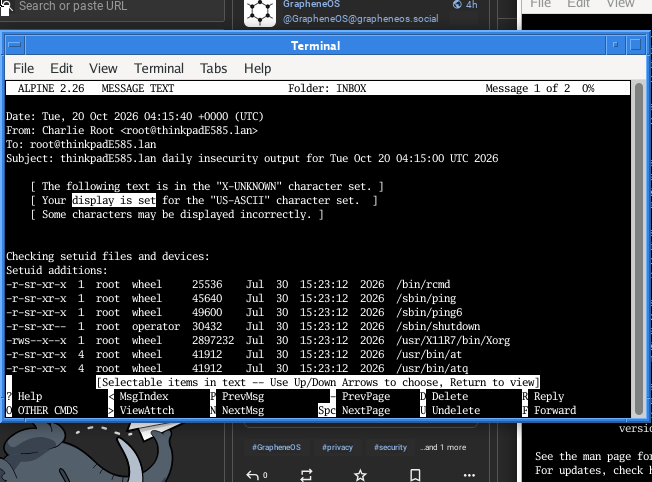
Daily mail reports from the system on my own mailserver. This is what they took from us. Now I am getting it back. This network is mine once again. #RUNBSD #security
Alt...
Screen capture of X11 terminal window with the Alpine (Pine) mail client viewing mail from the local mail spool, showing security risks to be considered.
![[?]](https://media.bsd.cafe/bsdmmedia01/accounts/avatars/117/449/223/768/395/817/original/604e806bdb3817af.png)
This is what I have been missing until this last week when I installed #NetBSD
Daily mail reports from the system on my own mailserver. This is what they took from us. Now I am getting it back. This network is mine once again. #RUNBSD #security
Alt...
Screen capture of X11 terminal window with the Alpine (Pine) mail client viewing mail from the local mail spool, showing security risks to be considered.
![[?]](https://media.bsd.cafe/bsdmmedia01/accounts/avatars/113/581/189/138/915/857/original/dce4579d1cca5c22.jpeg)
it's been heartwarming hearing people are installing #NetBSD. i just put it on my main desktop too! #NoAI #humanemacs
![[?]](https://media.mstdn.social/accounts/avatars/109/521/442/245/107/734/original/9303ae5bd9aebaa5.jpeg)
Advanced Programming in the #UNIX Environment
In this class, we use #NetBSD as our reference platform. In addition to our shared shell server, here are some ways you can install NetBSD:
- put it on e.g., your laptop: https://netbsd.org/docs/guide/en/chap-exinst.html
- use VirtualBox: https://stevens.netmeister.org/631/virtualbox/
- use UTM: https://stevens.netmeister.org/631/utm/ (Video instructions: https://youtu.be/hCqfmuG5Acc )
- use or create an AWS image: https://stevens.netmeister.org/615/netbsd-amis.html
- create your own NetBSD #Linode: https://www.netmeister.org/blog/netbsd-on-linode.html
Advanced Programming in the #UNIX Environment
Week 2: File Sharing
In this final video lecture segment for our week 2 materials, we take a look at what it means when multiple processes access the same files and what the implications of that are on the syscalls we know. We conclude with a look at /dev/fd on different operating systems, including #NetBSD, #macOS, and #Linux.
Advanced Programming in the #UNIX Environment
Week 3: stat(2) intro
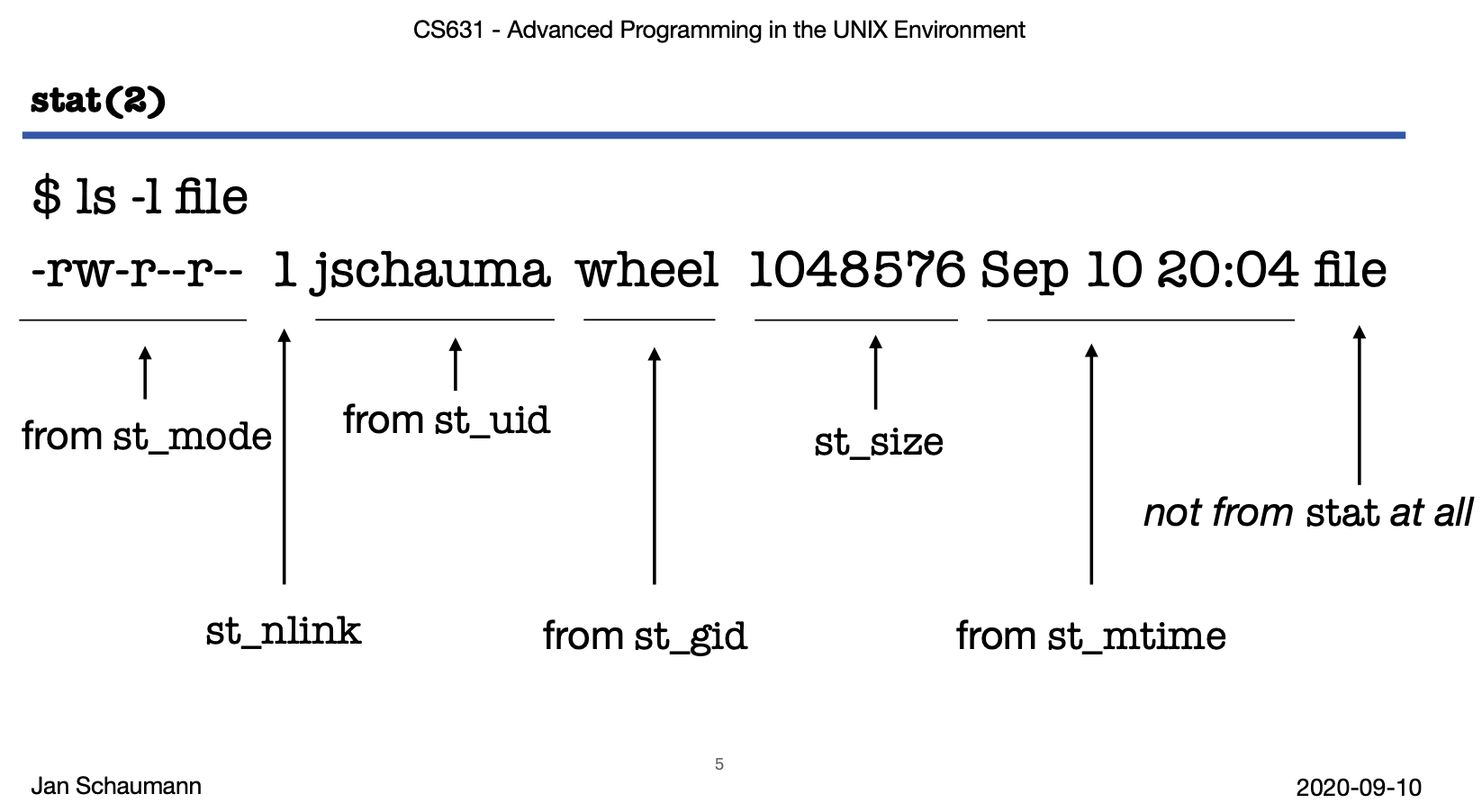
In this video lecture, we meet our new best friend, the 'struct stat'. We'll cover the stat(2) system calls and begin discussing each of the fields in the struct, often by example of the ls(1) and stat(1) commands. In this way, we begin learning more about how the Unix File System is implemented.
(Note that the output of stat(1) on #NetBSD is different from that on #Linux.)
Alt...
$ ls -l file
-rw-r--r-- 1 jschauma wheel 1048576 Sep 10 20:04 file
"-rw-r-r-" from st_mode
1 st_nlink
"jschauma" from st_uid
"wheel" from st_gid
1048576 st_size
Sep 10 20:04 from st_mtime
file not from stat at all
Alt...
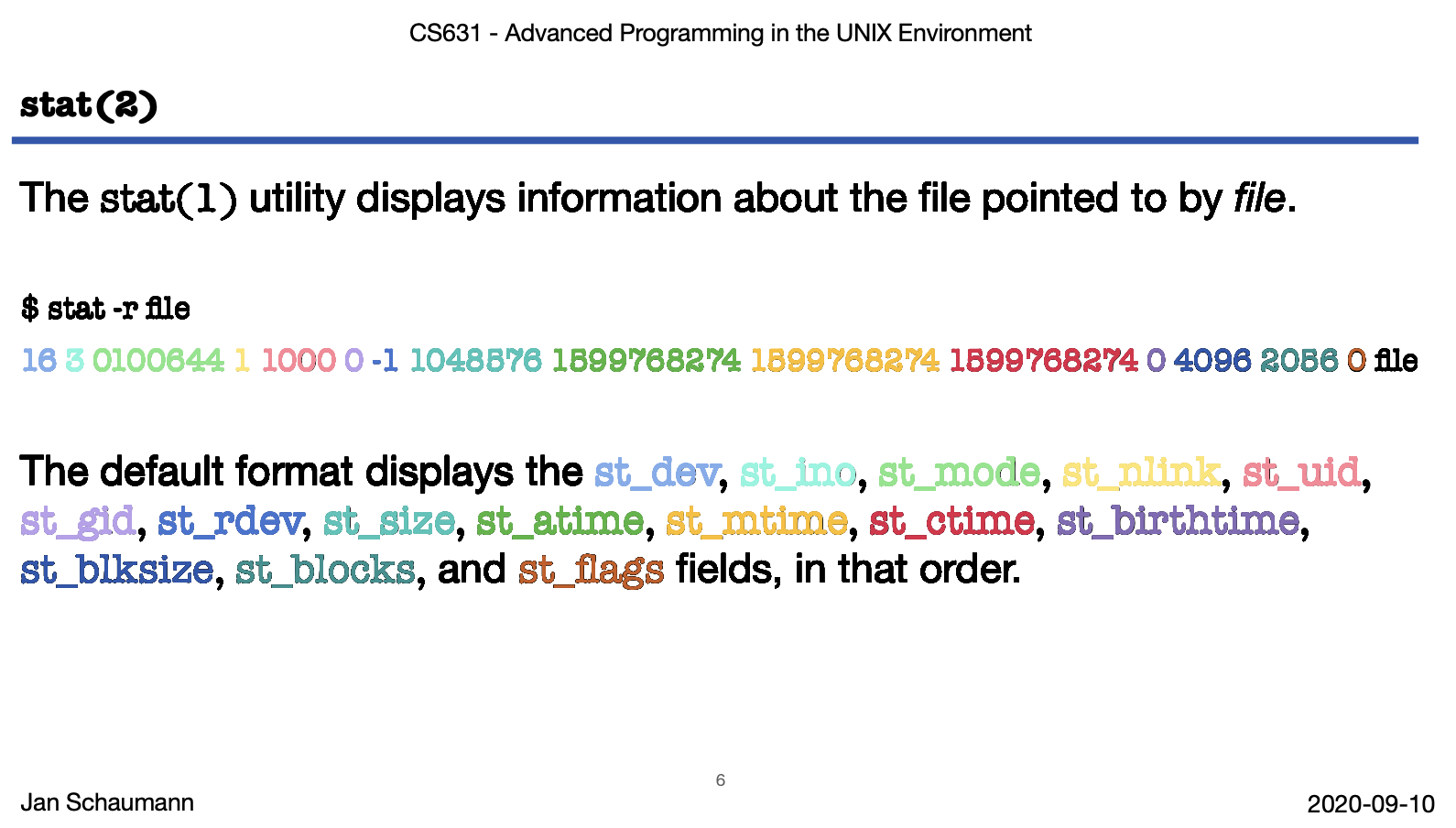
The stat(1) utility displays information about the file pointed to by file.
$ stat -r file
16 3 0100644 1 1000 0 -1 1048576 1599768274 1599768274 1599768274 0 4096 2056 0 file
The default format displays the st_dev, st_ino, st_mode, st_nlink, st_uid,
st_gid, st_rdev, st_size, st_atime, st_mtime, st_ctime, st_birthtime,
st_blksize, st_blocks, and st_flags fields, in that order.
If you create a symlink to a symlink to a symlink ... at some point your system will return ELOOP.
A reasonable system has that value defined in sys/param.h as MAXSYMLINKS or as sysconf(_SC_SYMLOOP_MAX).
On Linux, the value of MAXSYMLINKS in sys/param.h is 20, but the kernel actually uses 40:
https://elixir.bootlin.com/linux/v7.2.8/source/include/linux/namei.h#L14
The sysconf(3) man page on Linux documents _SC_SYMLOOP_MAX, but then fails to actually retrieve that value.
Good job, Linux. You illustrate why I use #NetBSD to teach this class.
Advanced Programming in the #UNIX Environment
Week 5: make(1)
Let's take a look at how the make(1) utility can be used to help us selectively build our code project. You don't need much to get started -- built-in default suffix rules make this easy -- but with time you can build complex build frameworks (see, e.g., #NetBSD's #pkgsrc system). We'll leave the question whether or not make(1) is Turing-complete for another day...
![[?]](https://media.mstdn.social/accounts/avatars/109/696/860/885/494/817/original/835eb175bbf72dc8.png)
Contributing code to the BSDs.
OpenBSD uses CVS. Like git but from yestercentury. You type out diffs by hand & when they hear the noise of your typewriter they send someone around to check. It better be good this time.
With NetBSD it’s the same but different. You have to join a telephone tree first, but not on a Thursday because Martha leaves early to pick up the kids then.
Oh, & C only. But K&R C, not that modern Borland stuff.
![[?]](https://media.bsd.cafe/bsdmmedia01/accounts/avatars/110/753/691/400/011/788/original/7decba5a2514dda4.png)
Latest 𝗩𝗮𝗹𝘂𝗮𝗯𝗹𝗲 𝗡𝗲𝘄𝘀 - 𝟮𝟬𝟮𝟲/𝟭𝟬/𝟭𝟵 (Valuable News - 2026/10/19) available.
https://vermaden.wordpress.com/2026/10/19/valuable-news-2026-10-19/
Past releases: https://vermaden.wordpress.com/news/
#verblog #vernews #news #bsd #freebsd #openbsd #netbsd #linux #unix #zfs #opnsense #ghostbsd #solaris #vermadenday
![[?]](https://mastodon.sdf.org/system/accounts/avatars/113/059/004/569/382/369/original/1b5ae86850d2461a.png)
RE: https://mammut.moe/@gemelen/117321162964550753
I am profoundly horrified.
The last thing I need is for my #fileSystem to randomly glitch out and trash all my files because it was written by the same bot that generated the reams of meaningless slop my coworker emails me every day.
And some of those AI commits are non-trivial enough that this is now a totally plausible scenario. See quoted post.
#ZFS #OpenZFS #NetBSD #FreeBSD
https://slopscan.ava.pet/repo/https%3A%2F%2Fgithub%2Ecom%2Fopenzfs%2Fzfs/master
- https://github.com/openzfs/zfs/commit/44aa82a6ce91
- https://github.com/openzfs/zfs/commit/3800525cd2cc
- https://github.com/openzfs/zfs/commit/ddf19dcbe166
- https://github.com/openzfs/zfs/commit/c214a3ae9f03
- https://github.com/openzfs/zfs/commit/6495dafd58b9
![[?]](https://media.bsd.cafe/bsdmmedia01/accounts/avatars/117/230/143/862/280/275/original/a62dee3e69e032a8.jpg)
![[?]](https://files.mastodon.social/accounts/avatars/111/838/915/768/386/587/original/8da101fecc96eeb3.png)
Now that NetBSD is booting (totally my fault that it didn't at first): the entire install procedure was incredibly painless so far. Old-school tty interface with menus, brief but helpful explanations, the whole system was installed in a couple of minutes. I already like it. Will conduct more experiments tomorrow.
#NetBSD
![[?]](https://fediscience.org/system/accounts/avatars/115/955/195/361/363/519/original/bcabb74ad3842ec3.png)

![[?]](https://masto.bike/system/accounts/avatars/109/298/328/498/155/315/original/70dbdf0cef9f4ef2.png)
I have this little project that has been waiting for years. I finally found the charger, no more excuses.
anytime soon this machine will be running NetBSD.
(it's a steep learning curve, I managed to install Linux 10 years ago, but I haven't been able to make it boot a NetBSD USB installer, time to start reading the documentation)
#NetBSD #franSNetBSDJourney #retroComputing

Alt...
iBook G4

Alt...
iBook G4 charger.