MeshXFS is a new open-source, POSIX-compatible clustered filesystem built on top of XFS. It aims to solve a common challenge in virtualization environments: allowing multiple nodes to access the same shared block device concurrently in read-write mode.
The project is available on GitHub and is licensed under GPL-2.0. It builds on the upstream Linux kernel XFS implementation and adds clustering, distributed locking, fencing, and journal recovery mechanisms. This is required as there are no real options compared to vmfs on Linux. GFS, OCFS2 which have been used in the past are not recommended for performance, other clusterfilesystems like beegfs are a way too complex for smaller setups. Therefore, the goto solution was based on LVM, lacking a feature or thin-provisioning which I also solved recently.
MeshXFS supports shared iSCSI SAN storage and dual-primary DRBD configurations. According to the project documentation, shared iSCSI configurations have been validated with 2, 4, 8, and 16 nodes. It supports network-based locking as well as SCSI COMPARE AND WRITE. The project provides DKMS packages for Proxmox VE 9, RHEL 9, Ubuntu 24.04 and 26.04, Debian 12 and 13. A dedicated Proxmox VE storage plugin is also available for integration with the web interface.
One particularly interesting aspect of MeshXFS is its development approach. The project's clustering, coordination, distributed locking, fencing, and on-disk-envelope code was written by AI agents. The underlying XFS code originates from the upstream Linux kernel project.
In this article, we'll take a first look at MeshXFS and integrate it with Proxmox VE using shared iSCSI storage.
Why this is important
Shared storage is a fundamental building block in many Proxmox VE clusters. It allows virtual machine disks to remain accessible across multiple nodes and is particularly useful for migration and high-availability scenarios.
Traditional XFS filesystems are not designed to be mounted read-write simultaneously by multiple independent hosts. MeshXFS aims to address this limitation by introducing the coordination and recovery mechanisms required for concurrent access to a shared block device.
Some of the key features include:
- Concurrent read-write access from multiple nodes.
- Support for shared iSCSI SAN and dual-primary DRBD storage.
- Network-based or on-disk locking.
- Fencing and survivor-led journal recovery.
- A DKMS-based kernel module.
- A dedicated Proxmox VE storage plugin.
MeshXFS could provide an interesting alternative for Proxmox VE environments that require filesystem-based shared storage on top of iSCSI SANs or DRBD.
However, MeshXFS is a relatively new project. Its performance, recovery behavior, operational reliability, and suitability for production workloads still need to be evaluated carefully. For now, it is an interesting candidate for lab environments and further testing.
Installation
For this walkthrough, we'll use MeshXFS version 0.90.130 and a shared 100 GiB iSCSI LUN.
The following steps must be performed on every Proxmox VE node that should access the shared filesystem.
Installing MeshXFS
Download the Debian package from the GitHub releases:
wget https://github.com/sshoecraft/meshxfs/releases/download/v0.90.130/mxfs_0.90.130_amd64.debInstall the matching Proxmox kernel headers and the downloaded package:
apt install proxmox-headers-$(uname -r) ./mxfs_0.90.130_amd64.deb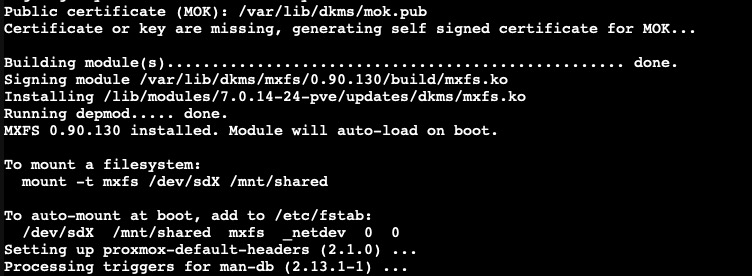
The package installs the MeshXFS kernel module and associated utilities. Make sure the module builds successfully for your running kernel on every node.
Installing the Proxmox VE storage plugin
The additional storage plugin is optional, but it provides integration with the Proxmox VE web interface.
wget https://github.com/sshoecraft/meshxfs/releases/download/v0.90.130/pve-storage-mxfs_0.90.130_all.deb

apt install ./pve-storage-mxfs_0.90.130_all.deb
Repeat the installation on all nodes where the plugin should be available.
Configuration
Preparing the shared iSCSI device
First, configure your iSCSI storage using the usual Proxmox VE procedures. In this example, we use a 100 GiB LUN exposed as /dev/sdc.
Disk /dev/sdc: 100 GiB, 107374182400 bytes, 26214400 sectors
Disk model: iSCSI Disk
Sector size (logical/physical): 4096 bytes / 16384 bytes
I/O size (minimum/optimal): 16384 bytes / 8388608 bytes
For this quick integration test, we'll use the device directly rather than configuring multipath. In the Proxmox VE storage configuration, make sure the iSCSI device is configured with Use LUNs directly.
Important: Verify the device identity on every
node before proceeding. Device names such as /dev/sdc
can differ between hosts. Formatting the wrong device will
destroy its existing contents.
Creating the filesystem
The filesystem must be created only once on the shared device. Run the following command on a single node before mounting the filesystem anywhere:
/usr/sbin/mkfs.mxfs /dev/sdcMeshXFS initializes its metadata and locking structures before creating the underlying XFS filesystem. The formatter reports several regions, including the journal, disk-lock area, recovery manifests, authority ledger, and XFS data area.
In this example, the resulting filesystem provides approximately 99.37 GiB of usable space.
Formatting journal...
Zeroing disklock region...
Zeroing recovery manifest region...
Formatting TCP authority ledger region...
Formatting PR registrant ledger region...
Formatting bootstrap record region...
Formatting slice lifecycle region...
Formatting XFS (99.37 GB at offset 672296960)...
Writing MXFS superblock...

/dev/sdc formatted successfully (99.37 GB usable)
Do not run mkfs.mxfs independently on each node.
All nodes must access the same initialized filesystem.
Mounting the filesystem
Once formatting is complete, create a mount point and mount the filesystem on each participating node:
mkdir -p /mnt/pve/meshxfs01
mount -t mxfs /dev/sdc /mnt/pve/meshxfs01
Repeat this step on every node that should access the filesystem. Verify that all nodes see the same shared filesystem and follow the project's guidance for cluster identity, locking, fencing, and recovery before testing concurrent workloads.
Adding the storage to Proxmox VE
The mounted filesystem can now be registered as shared directory storage in Proxmox VE:
pvesm add dir meshxfs01 \
 --path /mnt/pve/meshxfs01 \
 --shared 1 \
 --is_mountpoint yes \
 --content images
This registers the storage with the ID meshxfs01,
marks it as shared, and enables virtual machine and container
disk images as content.
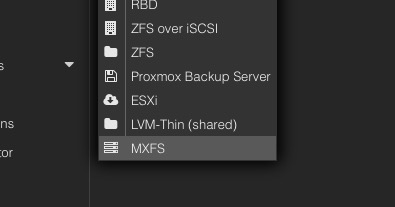
If you installed the optional MeshXFS storage plugin, you can also add the storage through the web interface under Datacenter → Storage.
For further discussion, testing reports, and community feedback, see the MeshXFS discussion in the Proxmox VE forums .
TL;DR
MeshXFS is an interesting new clustered filesystem that extends XFS with concurrent read-write access from multiple nodes. With support for shared iSCSI storage, DRBD, and a dedicated Proxmox VE storage plugin, it offers a new approach to shared filesystem storage in virtualization clusters.
The initial integration with Proxmox VE 9 is straightforward: install the packages on every node, format the shared LUN once, mount it on the participating nodes, and register it as shared storage.
However, MeshXFS still needs further validation. Before considering it for production, test failure scenarios, fencing, recovery, and concurrent access in an isolated environment.
Next up: I'll benchmark MeshXFS soon to investigate its performance and compare how it behaves under typical Proxmox VE storage workloads.
If you're interested in the project, check out MeshXFS on GitHub and join the discussion in the Proxmox VE forums .