Search results for tag #netbsd
![[?]](https://justfollow.me.uk/system/accounts/avatars/109/320/306/219/107/803/original/abdeb1bbb89e40f5.jpg)
Really pleased to have helped the test framework for compat_linux for #NetBSD land in #pkgsrc today:
https://pkgsrc.se/emulators/compat_linux_test_project
So get testing and fixing those low-hanging fruit!
![[?]](https://cdn.masto.host/topspicysocial/accounts/avatars/109/279/799/788/906/711/original/1f988542ffa577c2.png)
Or hmmm… I could try to dual-boot the one with CachyOS, stick a partition with #NetBSD.
Anyone here doing the dual-boot thing? Anything to watch out for with GRUB stuff?
![[?]](https://mastodon.zergy.net/system/accounts/avatars/000/000/130/original/93cfc04b55d2457c.png)

Well, look like NetBSD is the new cool kid of the block.
Let's hope it will help them gain maintainers, programmers and new hardware support. 
Quickly checked but it look like my hardware isn't supported for now, maybe I should give it a try in a VM in the meantime. 
![[?]](https://snac.bsd.cafe/evgandr/s/avatar-4a301072dec6b6a49050e5b294cd7983.png)
And that people, involved in OS development, suddenly really developing the OS, not performing KYC and investigations for every money transaction surprised_pikachu_face.gif
Love those "first world problems" 😀. At least there is a sign that somewhere exists a peaceful enough place, without burning oil-refineries, bombed datacenters and military drones flying over your home, so people in such places became so tired of peaceful and comfy life that they started to invent a "great enemies of humanity" and prosecuting everyone with the "best" traditions of witch hunting.
@netbsd@mastodon.sdf.org Wishing you the best luck and enough resistance to deal with all this shitstorm ❤️ Hope, you'll continue to develop this cool operating system 🙂
![[?]](https://media.meemu.org/accounts/avatars/112/695/325/384/048/933/original/53df8135055fa40e.gif)
 FAG WOLF SIPH
Are there any blog posts or anything that gives you a guide/recommendations on how to set up a daily-driver desktop environment on #NetBSD?
Sure I could just install it and go pkgin install xfce4 and just stumble around and figure out something that works for me, it’s very much within my abilities (I've done it before), but if somebody has done that legwork I’ll happily take it, especially if it can help me avoid getting into pitfalls and bad habits and practices without knowing and having people ask "what the fuck are you even doing" when I need to ask for help for something
boosts wecome 
![[?]](data:image/png;base64, iVBORw0KGgoAAAANSUhEUgAAAEAAAABAAQAAAACCEkxzAAAAUUlEQVQoz43R0QkAMQwCUDdw/y3dwEvsvzlL4X1IoQkAisKmwfAFT3RgJHbQezpSRoXEqeqCL9BJBf7h3QbOCCxV5EVWMEMwG7K1/WODtlvxAYTtEsDU9F34AAAAAElFTkSuQmCC)
I might need to consider switching my OS running my littlefedi instance, to a BSD!
Currently its running on alpine linux.
Maybe NetBSD 🤔
I feel a lot of research about to commence.
![[?]](https://media.bsd.cafe/bsdmmedia01/accounts/avatars/113/698/673/569/488/272/original/1fc827cf6cff37d6.png)
![[?]](https://media.bsd.cafe/bsdmmedia01/accounts/avatars/110/740/169/477/916/693/original/dfa8f1b9beefa405.png)
Many of you are starting to explore NetBSD, and it's a great idea.
Why don't you also consider to use it for your online presence?
Make Your Own Internet Presence with NetBSD and a 1 euro VPS - Part 1: Your Blog
![[?]](https://media.mstdn.social/accounts/avatars/109/287/431/436/273/223/original/550d8d6162cf1a22.png)
Single-partition encrypted NetBSD 11 root
What if a regular, normal NetBSD installation is too plebeian for you?
This is a quick overview which attempts to synthesize DW Armstrong's tutorial on NetBSD encryption with the cgdroot page from the NetBSD wiki in a single MBR partition, divided into multiple disklabel slices to preserve MBR entries.
↫ indigoparadox Web Zone
What if you need thi
https://www.osnews.com/story/146193/single-partition-encrypted-netbsd-11-root/
![[?]](https://mastodon.sdf.org/system/accounts/avatars/109/564/857/456/913/094/original/651ab60302ce5d82.png)
I doubt it is fully Linus, in the Old Days I could see him avoiding #ai
But the Linux Foundation (LF) is owned by the Large Corporations pushing #ai and the LF Pays Linus and some #Linux Developers. Since that is the case, I would expect this decision came directly from LF via the corporations.
But I agree, #linux + #ai is bothering me a lot. FWIW, posted using #NetBSD 11.0 via #firefox on a Thinkpad T430 :)
![[?]](https://media.bsd.cafe/bsdmmedia01/accounts/avatars/115/138/278/314/458/705/original/14801851e6f000f4.png)
![[?]](https://media.bsd.cafe/bsdmmedia01/accounts/avatars/117/006/199/875/207/359/original/dfd5a542d6917324.jpeg)
![[?]](https://media.hachyderm.io/accounts/avatars/109/334/849/122/085/613/original/8fa76bd801bc4cf1.jpg)
Is there a live image of #NetBSD? How can I test if it will work with my hardware before repartitioning the disk?
I found Jibbed NetBSD, but it hasn't been updated since 2015, and https://github.com/tsutsui/netbsd-teokureliveimage, which may work but is likely localized to Japanese
![[?]](https://media.infosec.exchange/infosec.exchange/accounts/avatars/109/327/540/940/053/921/original/7e894651f5312787.png)
I finishing reshuffling os's and hw.
The oldest, X240 has the latest #alpinelinux.
The X270 has #netbsd 11, and the T480s has #OpenBSD 7.9
There's Go, Python and Postgresql on all, so now I can play with programming gui on all 3.
My Thinkcentre is serving as host for the repos.
I try to run the recommended basics on all:
Ksh, and X with fvwm on the #openbsd, Sh, and X with #ctw on #netbsd. On #alpine its busybox, X and #openbox. Xterm on all. All coding is done in vi/nvi.
![[?]](https://m.f-h.co/cosocial-ca/accounts/avatars/116/682/718/868/936/793/original/b1e94fcc192299f4.jpeg)
@mjdxp I am/was lucky enough to have been given a Ubuntu Hardy Heron CD in 2008 and now competent enough to have switched to Debian (Trixie). I have tried to look at BSD and managed to get Nomad and Ghost to boot. But always back to Debian because... probably just used to it. But! Watching your posts about #netbsd with great interest. You will see a follow request at some time. Unfortunately I'm not really good at navigating social media. Well, Mastodon. No social media other.
![[?]](https://s3.us-east-005.backblazeb2.com/LZMedia/4607454907f0c027e51d70ca858314666f32c4ff9bfd8f726c7d4a7ce2d35061.gif)
![[?]](https://media.bsd.cafe/bsdmmedia01/accounts/avatars/117/229/469/256/862/649/original/1f7e21b86b7a3a7f.jpeg)
![[?]](https://files.mastodon.social/accounts/avatars/108/319/157/409/975/618/original/e6886ed3948ef9d4.jpeg)
![[?]](https://cannot.understand.computer/kunev/s/avatar-65999931a6a066390559fd4274303df5.png)


Alt...
initial NetBSD install screen on a Thinkpad T460s with a "never slop kito" holo sticker propped on the monitor
#netbsd #analognowhere #unix_surrealism

@BoydStephenSmithJr My company provides #NetBSD VPS as our first choice (and other #BSD and #Linux if needed). Plenty of IPv4 addresses available
![[?]](https://pxscdn.com/cache/avatars/789980589548961657/avatar_4v14.jpg)
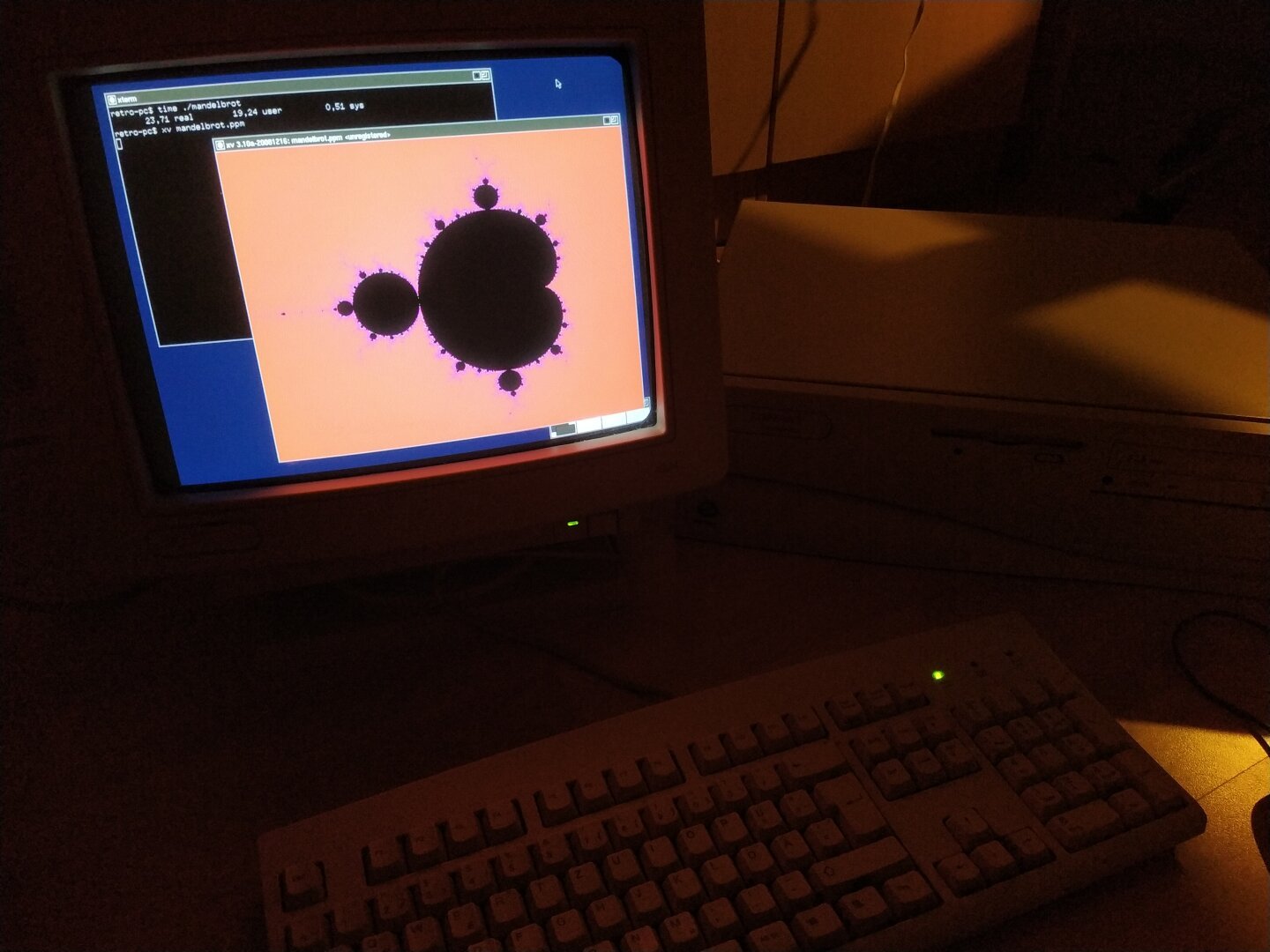
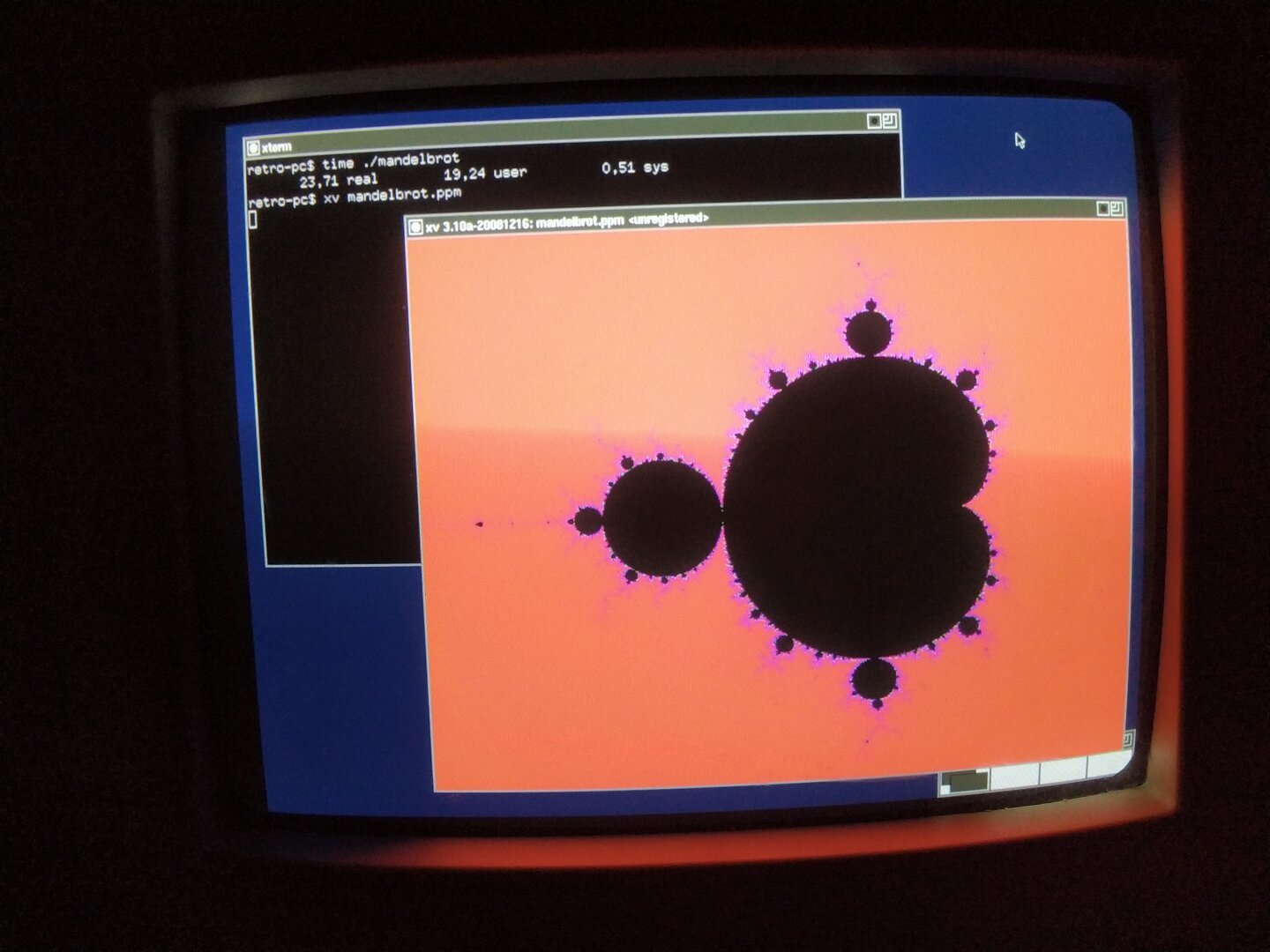
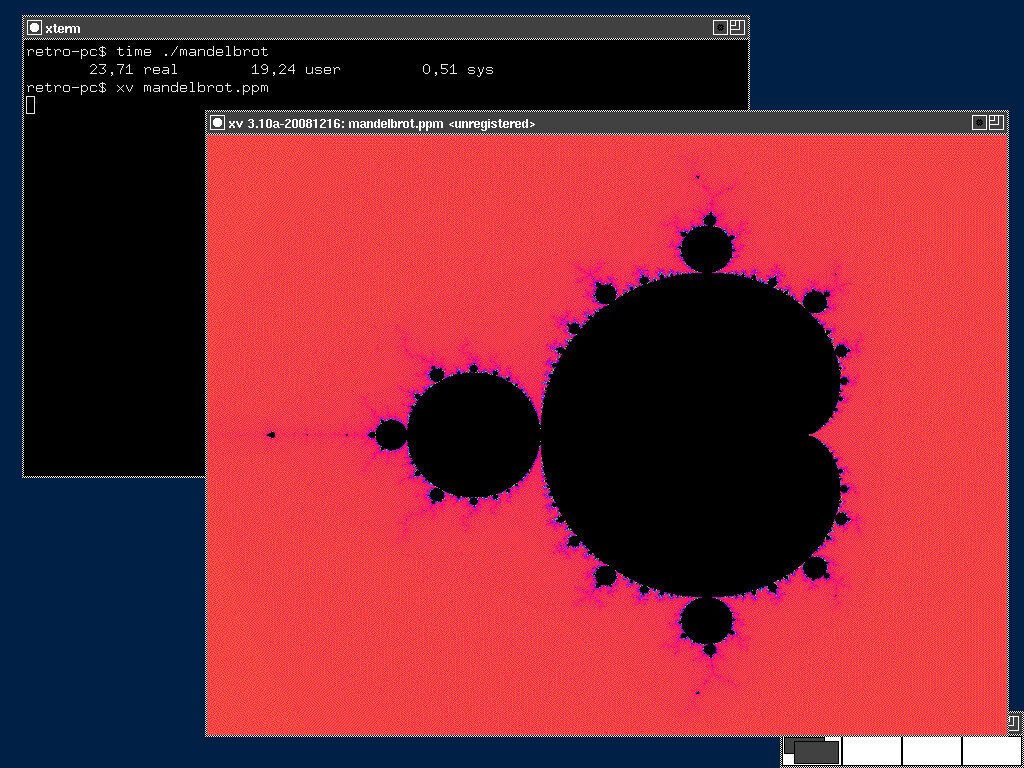
The Mandelbrot set is a great fit for this: it is generated entirely from a simple mathematical iteration, but produces a surprisingly complex and colorful result.
I wrote a small C program using only the standard library and double-precision floating-point arithmetic. For every pixel, the program iterates the Mandelbrot equation and counts how many iterations are needed for the sequence to escape. This iteration count is then mapped to a color.
The result is written as a PPM image and displayed directly on the Pentium using XV, an old X11 image viewer. I could have used feh, which was already available, but I wanted to build something myself. Since no binary package was available for XV, I built it from pkgsrc in a NetBSD build VM and then transferred the resulting package to the Pentium.
Rendering at 800×600 with 500 iterations per pixel took 23.71 seconds.
#RetroComputing #RetroPC #Pentium #Pentium1 #Pentium166 #NetBSD #NetBSD11 #BSD #i386 #X11 #XOrg #CProgramming #C #Fractals #Mandelbrot #MandelbrotSet #NumericalComputing #ScientificComputing #OpenSource #FOSS #FreeSoftware #VintageComputing #OldComputers #RetroTechnology #ComputerHistory #CPU #SoftwareRendering

![[?]](https://media.hachyderm.io/accounts/avatars/109/498/573/053/367/436/original/72c5c6d63e4b8cd0.png)
Anyone have an #NetBSD VPS provider? I've done a few searches myself, but each time I get to the configuration stage, there's no NetBSD option.
I don't need it for much, but I would like to get my personal email and web hosting off of LInux. It has to be a VPS (or something equivalent) with IPv4 access, because neither static IPs nor IPv6 access are available from my Internet provider, and unless I want to throw in with Starlink, they are the only provider in the area.
I am not confident I could install NetBSD remotely, as I've only installed NetBSD once, and even then I messed up the networking during that process. I am fairly sure I can migrate my existing dovecot+exim+spamassassin and apache setups once I have ssh+su root access to a system with working network configuration.
![[?]](https://files.sueden.social/accounts/avatars/110/215/853/631/484/521/original/054991cf7a6d1691.png)
Dear BSD community,
I've got to reduce my number of books so here are some BSD related books I'd like to give away for free.
If you're in the EU and would like to have one, please reply. Can send them to you if you pay the shipping costs
#OpenBSD #BSD #FreeBSD #NetBSD

Alt...
The book of PF
Absolute OpenBSD
![[?]](https://media.bsd.cafe/bsdmmedia01/accounts/avatars/115/259/277/430/803/651/original/4b70dbf4edf35875.jpg)
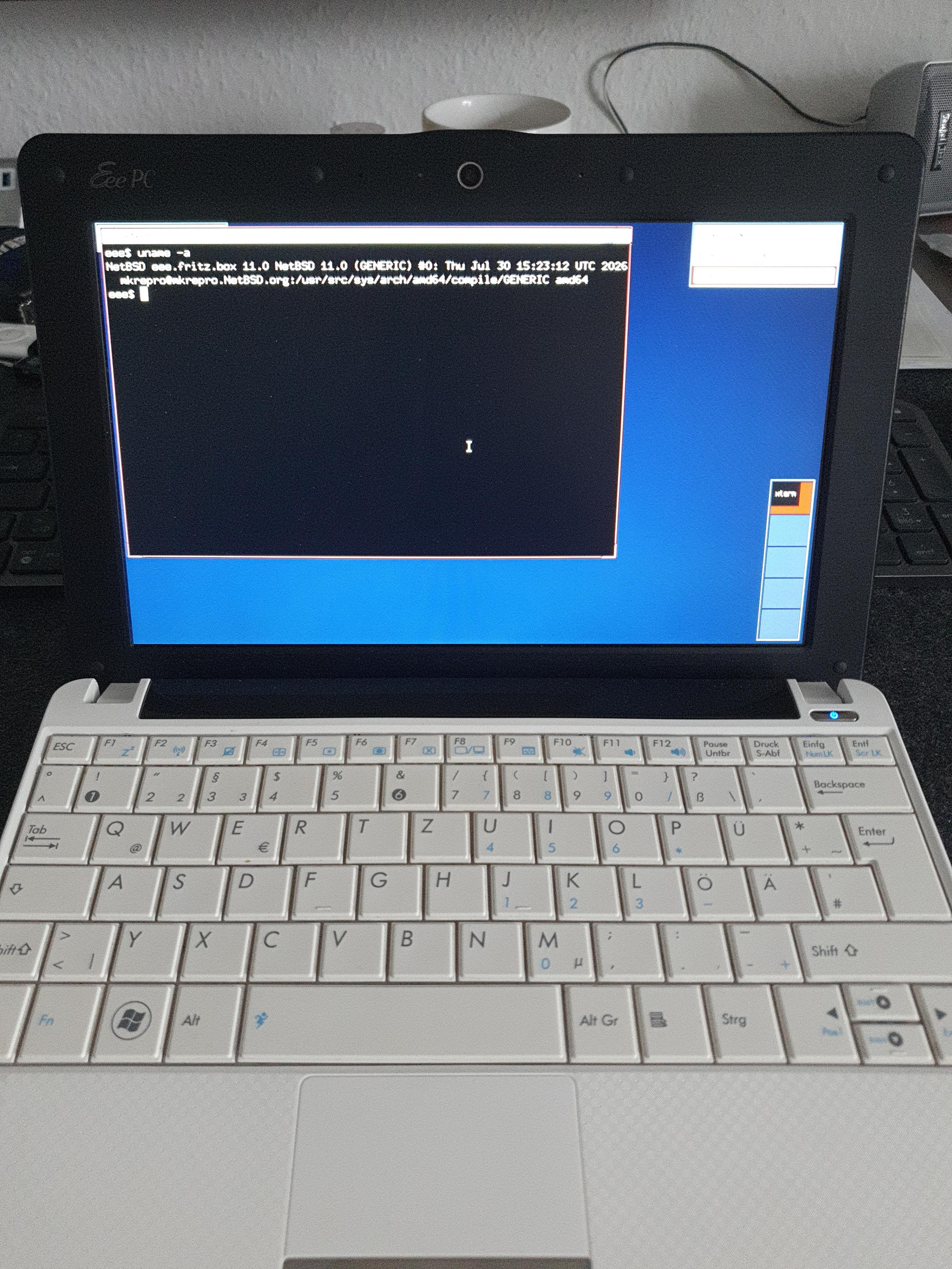
Oh look what found its way onto my Eee PC :)
Took my first baby steps into #netbsd today :)
Alt...
An Asus Eee PC running a fresh NetBSD installation
![[?]](https://mastodon.uy/system/accounts/avatars/000/000/003/original/f5baa4af59d10487.jpg)
Yo solo quiero saber si Slackware Linux va a tomar una postura definida en contra de la IA o si va a terminar siendo NetBSD la última reserva moral de los sistemas operativos tipo Unix... veremos #linux #slackware #netbsd #bsd #IA
![[?]](https://drive.nya.social/files12/webpublic-a2647278-0bb5-442b-9b98-743a825b8510.png)
NetBSD 11.0 runs about equally as well on my Sega Dreamcast or a 30 year old Pentium II PC as it does on any modern computer that i have. this goes both ways.
to know whether your modern gaming pc will be able to do something, you should first ask yourself: "could i do this on a Sega Dreamcast or a 30 year old Pentium II PC?". if the answer is yes, you will probably succeed! if the answer is no, it still might be possible, but here be daemons.
for example:
- can i ssh into it and edit files and compile little programs?
yes! absolutely! definitely.
- can i run a webserver?
indeed you can.
- can i install Steam?
hahahahaha no.
- can i run X11?
yep! may need to do some tweaking depending on your hardware though.
- can i run KDE plasma?
outlook not so good.
![[?]](https://cdn2.miau.pub/accounts/avatars/111/077/294/997/712/881/original/e466d91ac7b69254.png)
![[?]](https://r6xjcr4byvoci6cdmbon2u3vtqlxlfwsfd2dpae7zpqfql5quqmq.mesh.yrabbit.cyou/media/01a1259e-4672-7728-9c04-8c958da3ade7/image.jpg)
I’m back online after experimenting with the NPF packet filter on #NetBSD. It works great (aside from that JIT-related message) on my router, and it looks like it’s going to stay there - the SD card is now set to full read-only mode, and everything is running smoothly.😜
The one thing I couldn’t get NPF to do was act as a transparent proxy for applications running on the same machine; it simply refuses to perform a route-to (lo0 127.0.0.1)🤣
It’s a good thing PF is still included in the base system.
@klausman Xen support in #NetBSD both as a host and guest is very mature; it got support not much after Linux and predates KVM by a number of years. It supports UVC with the uvideo driver. USB audio also generally OK. You can do kernel USB development entirely in userland using rump kernels, so the actual kernel code is used but cannot panic the machine and you can debug with gdb.
![[?]](https://media.mas.to/accounts/avatars/109/847/676/999/751/988/original/3a816be6aca6f251.png)
The current hot thing in alternative OSes is NetBSD because they have rejected any LLM-generated submissions.
Thing is, Linux has a few features that I have grown to depend on, and that I plain ol' don't know if NetBSD provides them:
1. support for virtualization that is comparable to KVM.
2. support of AMD GPUs (no, not for AI stuff, but for gaming), also: Steam?
3. support of UVC devices (USB webcams, basically)
4. support for USB audio devices (e.g. the Scarlett 4i4)
5. Wayland support (ties in with #2)
6. Decent support for USB hacking and rev'enging, similar to Linux's USBmon.
I know I have at least one NetBSD aficionado in my followers, but I don't want single them out by pinging them specifically ;)
Also, tangentially, have OpenBSD and FreeBSD said anything about LLM contributions?
If you know the answers to (any of) 1-6 above, I'd be thankful, will also try and find out myself. TIA!
Comments about "it's GNU/Linux" or "use nix!" should be shouted into /dev/null.
![[?]](https://sfo3.digitaloceanspaces.com/solarpunk/accounts/avatars/108/861/517/727/656/545/original/34d9478a5ffc861b.png)
Terrible news: All of my laptop's important hardware seems to work under #NetBSD 11.0 /except/ for the wireless NIC, which appears to call itself an "Intel Wireless AC 9560". The iwm driver man page looks like it supports the immediately prior generation but not the one I happen to have. I suppose I have a spare USB port so I could go out and buy a USB dongle that I know there's a working driver for…
![[?]](https://media.bsd.network/accounts/avatars/000/006/949/original/9592eac6e5018e39.png)


![[?]](https://media.tech.lgbt/accounts/avatars/116/115/244/974/045/364/original/387986d9db12f4d4.png)
![[?]](https://todon.nl/system/accounts/avatars/000/097/458/original/1091d28f4b15d077.png)
crikey people. I know I _used_ to be a BSD and Mac sysadmin, back when I was saving up the money to turn into an academic, and learned how to use TeX in four Himalayan languages, and eventually became a real professor, and then not, and dumped Macs, and then became a gov't anthropologist, and I'm cleaning the Linux stains off everything now. So I kept the habit of running my own servers and all that, though with attitudes that are about 30 years out of date, and I would much rather learn a new script than scripting language these days. And I wrote and thought a lot about ethics, sentient beings, and technology along the way.
But seriously, I wake up and find that #NetBSD is now the only safe harbour? Whaaat? I really hope the idiots who are trying to poison FreeBSD go find their personal Epstein island or whatever they want really; it would be good to have a choice. Thank goodness for NetBSD at least but ungggh it's going to be a lot of work moving all the tools over.
![[?]](https://assets.chaos.social/accounts/avatars/000/015/762/original/f9c6ca2f286b5d22.png)
»The #OpenSourceSummit gives the overall impression that Linux is the only general-purpose FOSS OS. We saw no mention at all of any of the BSDs; indeed, when we mentioned #NetBSD, some of the folks from Let’s Encrypt looked puzzled and asked us “What’s ‘net bee ess dee’?” Sadly, this is probably a reasonably fair representation of its presence at the event and in the FOSS mainstream. …
![[?]](https://media.tilde.zone/accounts/avatars/000/131/507/original/28fa127e28d45fc4.png)
Out of curiosity, I wanted to see how much of my usual desktop setup (all home-grown) works on #NetBSD 11: katriawm and bevelbar needed some small patches; nhkd, swall, and xpointerbarrier work unmodified. 🥳 My fonts and keyboard layout work anyway (no surprise).
infogfx (the thing that produces the system info graphics) hardly works, because it uses Linux’s /proc all over the place. Maybe I’ll port that when/if I fully switch OS’es some day.
I won’t keep using this setup on the netbook, though. katriawm is way too slow here, due to design choices (unrelated to NetBSD). ctwm works much better.

Alt...
Photo of the screen of my netbook, running NetBSD 11: Two terminals, katriawm and bevelbar. The background shows some random photo, which was set by swall.
@chadmccullough @netbsd
I'm facing the same decision, if and when to leave the #AI slopified linux for greener pastures. I started with version 1.1.59 that we got by downloading 60 floppies over a dialup connection.. My last usoft OS install was NT4.0
AI is the herpes virus for software. It might be fun while getting it but it will bring a lifetime of misery.
as a starter question: what is the differences between #netBSD and #openBSD?
RE: https://mastodon.sdf.org/@netbsd/117455748417638482
During episode 132 of Linux After Dark from @latenightlinux, the hosts talked about how they could recapture the passion they once had for computers and technology. This episode got me thinking quite a lot. I've been a Linux user for more than 30 years and, admittedly, my excitement for tech was dying. Actually, it had been dying for a few years. Shitty comments from Torvalds, many projects embracing AI, and maybe even the fact that I had been using Linux for so many years, contributed to my, well, less that excited feelings about all of it. I know that I needed a change.
I may have found something that has rekindled my love and excitement. And that something is BSD. After a few months of struggling to get a BSD installed on my hardware (laptop and desktop), with the help of many here in the Fediverse over the past month or so, I finally got NetBSD installed on my laptop and desktop. It was exciting! I'm actually feeling the way I did when I first started using Linux all those years ago. I have to work a bit to get some hardware working, I have to do a lot of reading and research, and I've even joined some IRC channels and forums. Forums. Remember those?
I'm leaving Linux behind and moving on after more than 30 years. This isn't a decision that I take lightly. Quite the contrary. It's one of the hardest decisions that I've ever had to make. I spent those 30+ years preaching about how great Linux was and even moved a lot of people away from Windows to Linux and Open Source software over the years. And for a lack of a better description, I feel betrayed by the Linux kernel project and all of the open source projects who have decided to embrace AI, even with all of terrible ethical issues.
Well, anyway, I didn't write this to bash on Linux. I wrote this because I'm starting to feel excited about tech again. I may even start writing about my move from Linux BSD and how it's all going. The good things. The struggles. And everything in between.
Okay, I've put enough people to sleep with this post. I have a long road ahead of me before I feel as comfortable with BSD as I do with Linux, but I think that is where all the excitement is.
#bsd #netbsd #freebsd #openbsd #linux #noAI
Some #NetBSD questions that keep coming up.
We don't use modules for HW drivers in the default install. All baked into the kernel. If you're curious about desktop hardware, for x86 there are lists https://wiki.netbsd.org/laptops/ https://wiki.netbsd.org/gpus/ (and the pci/usb manual pages)
x86 virtual machines. https://www.netbsd.org/docs/guide/en/chap-virt.html#chap-virt-guest
For disk encryption there's different options, such as creating a small root with the installer, then adding encrypted partitions later (see man cgdconfig). Also: cgdroot.
![[?]](https://mastodon.sdf.org/system/accounts/avatars/108/233/134/134/174/252/original/75cf6c02b16edbb2.png)
![[?]](https://files.mastodon.social/accounts/avatars/115/033/912/889/256/727/original/5762f30d49ae6df1.jpeg)
For those with install and usage issues on #netbsd, try https://www.unitedbsd.com/
I got helpful answers within 10-15 minutes there.
![[?]](https://hj.9fs.net/p/s/avatar-dea0df353fcc369128b6bd7ae161bec5.jpg)

![[?]](https://awesome.garden/system/accounts/avatars/109/593/993/412/791/963/original/212c784db254e278.png)
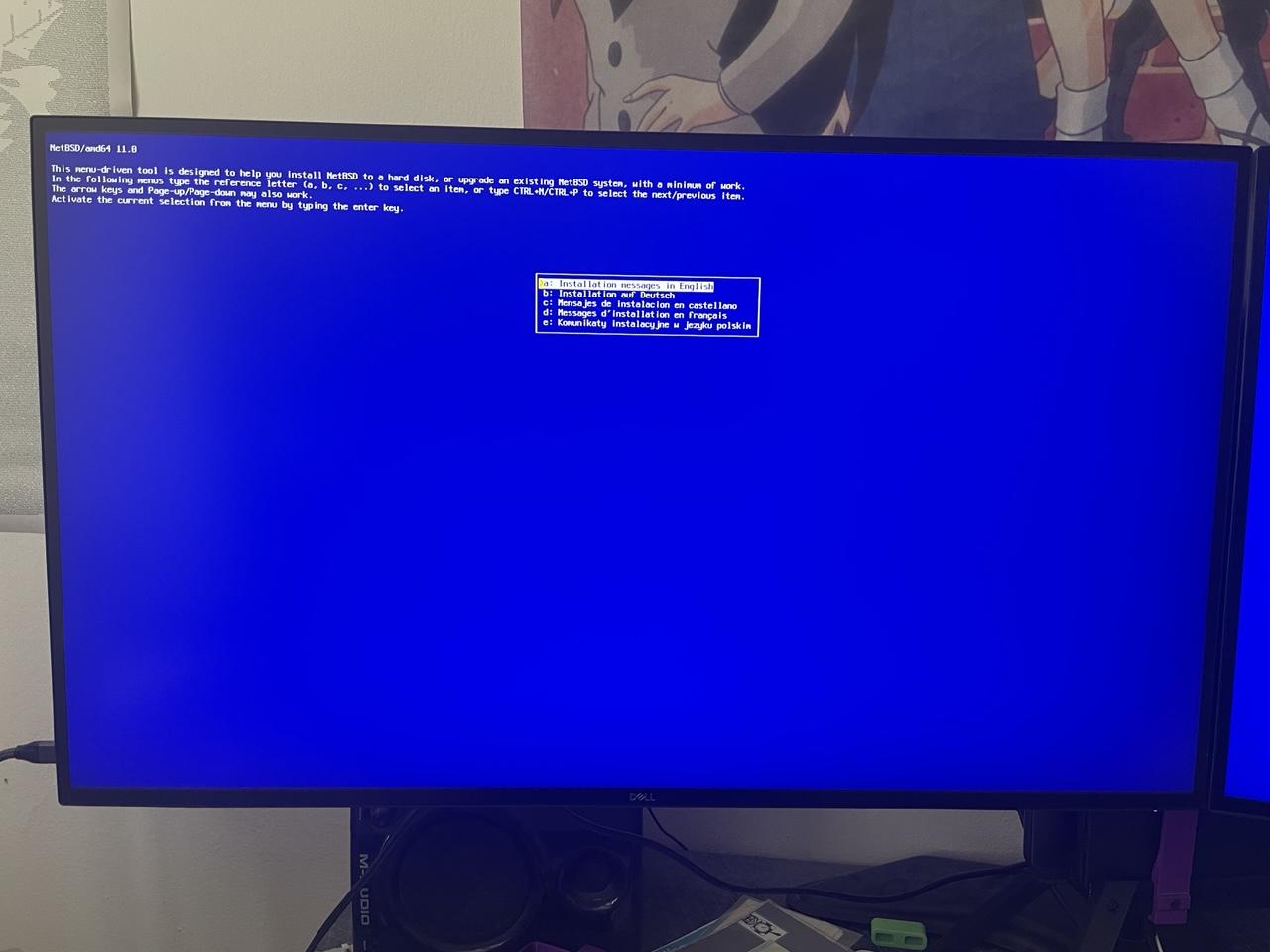
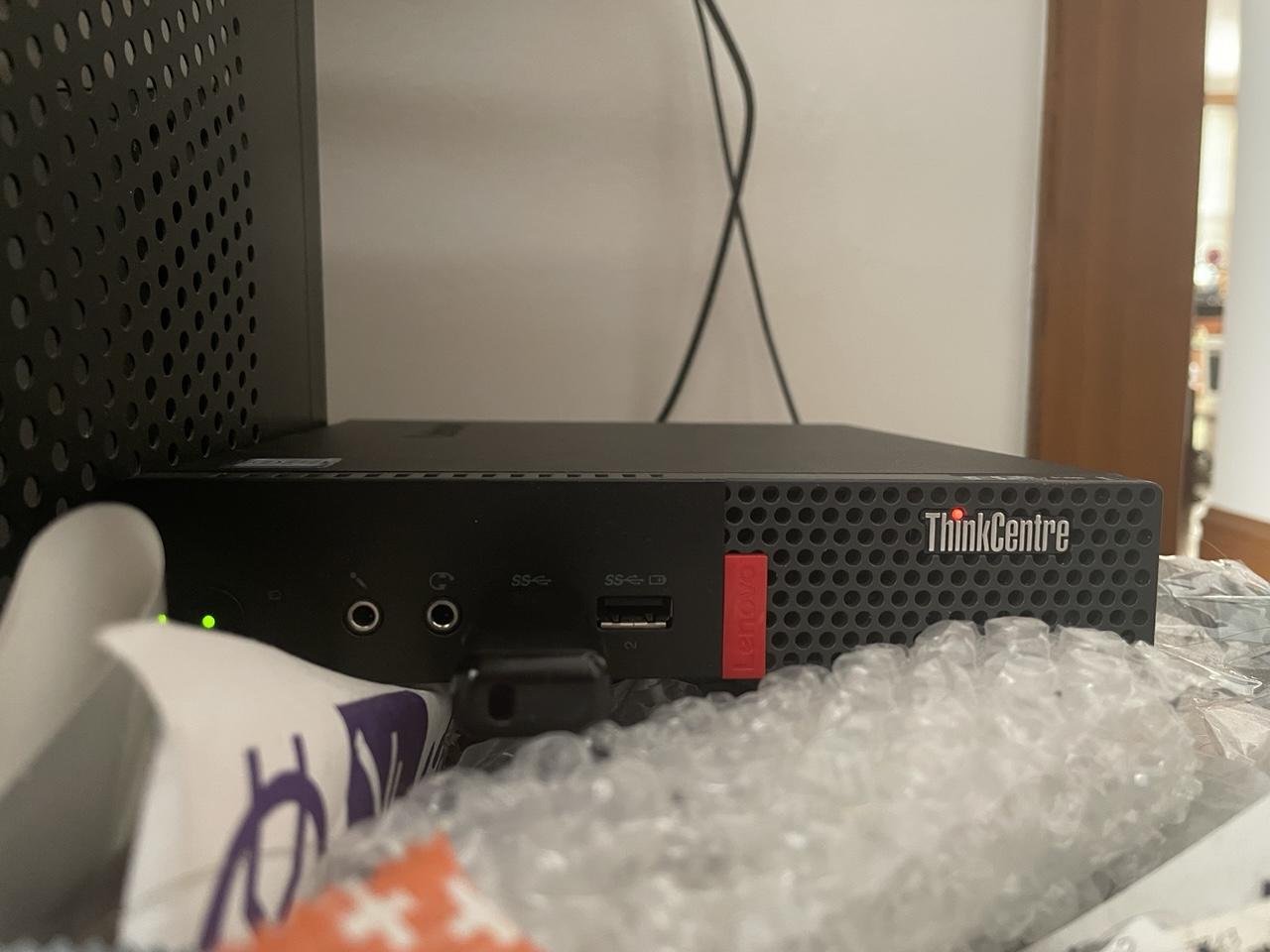
Trying out #NetBSD on a little Lenovo M910q SFF PC (which it literally sitting on top of my overflowing trash can). Gonna just YOLO this installation and see how far I get.
Alt...
Starting install screen for NetBSD 11.
Alt...
A small computer comfortably nestled into a pile of garbage.
![[?]](https://media.tech.lgbt/accounts/avatars/109/093/165/028/047/640/original/7463f84b80dc117a.jpg)
#netbsd weekend installation party for me has three goals:
- get KDE working (there's quite a few people out there who like it more than the alternatives),
- get screen reader working (I want to try it out),
- try AlpineBSD in Qemu
I start with my experimental install of NetBSD (running jwm, alacritty and rox), and proceed with installing kde (pkgin in kde). There are lots of things to download, and I think the NetBSD CDN might be experiencing more load than usual due to, well, news.
I'll report in this very 🧵 thread with updates when I'll have them.
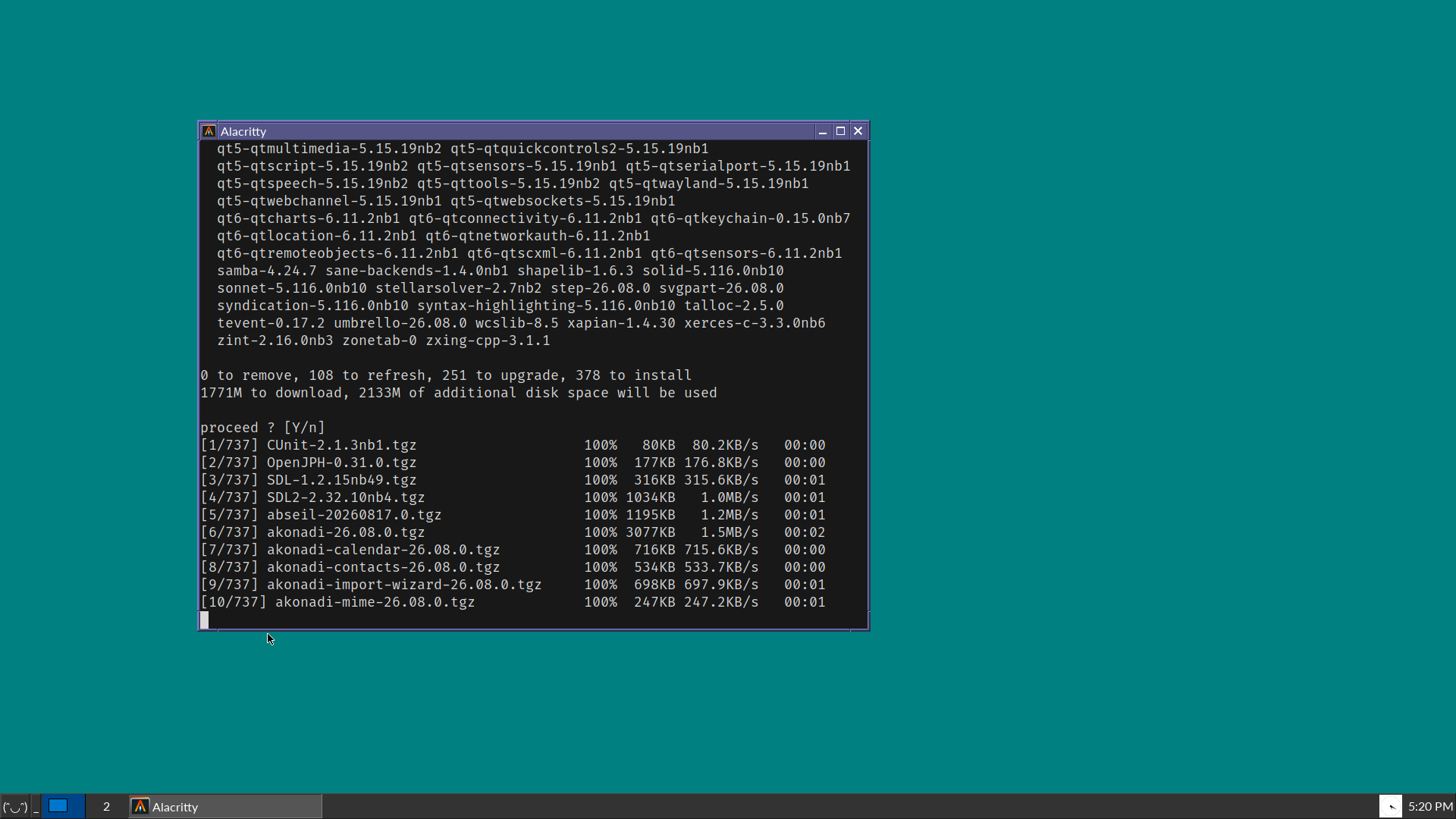
Alt...
A vintage-looking screenshot of a desktop OS, showing blue-green background, a Windows 95-style taskbar in dark grey, and a terminal window that is about to install many packages for KDE.
![[?]](https://media.bsd.cafe/bsdmmedia01/accounts/avatars/114/932/322/584/208/816/original/e8177168b64868c0.jpeg)
Updating NetBSD system files on a Raspberry Pi Zero W with the 'sysupgrade' utility requires a small edit to /usr/pkg/etc/sysupgrade.conf:
RELEASEDIR="https://nycdn.netbsd.org/pub/NetBSD-daily/netbsd-$(uname -r | cut -d. -f1)/latest/$(uname -m)-$(uname -p)"
This changes part of the subdir from "evbarm" (which doesn't exist) to "evbarm-earmv6hf" (which does).
Please note that I might not know what I'm doing, being quite new to NetBSD.
![[?]](https://media.bsd.cafe/bsdmmedia01/accounts/avatars/111/360/189/352/809/556/original/c41657304ba422ab.png)


I know it's still very much a WIP, but I'm excited to eventually try out AlpineBSD
https://sr.ht/~sircmpwn/alpinebsd/
(NetBSD base + Alpine pkgs)
With the help from some great folks here in the Fediverse, I was finally able to get @netbsd installed on both my desktop (Dell Optiplex) and laptop (Lenovo ThinkPad T14). I'm posting this from the desktop! Still unable to to get wireless working on the laptop but I am sure a USB wireless adapter will resolve this. I'm going to give this a try later today.
My move away from my beloved Linux is moving forward. Thank you to Torvalds and other projects who have ruined it for me after 30+ years. It's sad that I'm moving away, but I know it's the right decision (for me, anyway).
Updates coming, and will probably bore you to death.
![[?]](https://cdn.fosstodon.org/accounts/avatars/109/302/571/045/121/750/original/9cbcc385f5bd638e.jpg)
@netbsd Thanks for providing a gentle intro before I jump in and try #NetBSD.
I'm starting to think I will have to wait until my kit is old enough  but note that there are benefits to an OS that favours those with older kit, or who can only afford s/h.
It's good for inclusion and recycling which is good in itself, will educate some and annoy the fuck out of tech fascists. 👍
Good chance it will run on my #HomeLab although expect I'd have to ditch #Proxmox which I like. #Incus?