Search results for tag #proxmox
![[?]](https://files.mastodon.social/accounts/avatars/114/434/182/937/791/007/original/8f5af732c20665e1.png)
Proxmox SDN: Multi-Node Cluster Networking — hands-on guide for sysadmins. #Proxmox #SDN #VXLAN
https://www.valtersit.com/guides/proxmox/proxmox-sdn-multi-node-cluster-networking/
![[?]](https://media.infosec.exchange/infosec.exchange/accounts/avatars/109/309/173/297/578/448/original/5689c30c6e4d3bc4.png)
"Nine in 10 VMware customers eye the exit as licensing bills bite."
Anecdotally, multiple client have recently moved to production on Proxmox having moved away from VMWare due to cost.
![[?]](https://assets.hometech.social/accounts/avatars/116/261/033/382/356/276/original/f4060cc4ec5f5f21.jpg)
A #Proxmox guest list is a useful map, not proof that every workload is healthy.
Runtime state and recovery readiness are separate questions: one asks what is running now; the other needs its own backup and restore evidence.
A green-looking inventory should be the start of the check, not the end. #Homelab
Proxmox resource pools are accounting boundaries, not security boundaries. If you sell them as tenant isolation, you're wrong. ACL, network, storage layering: https://www.valtersit.com/guides/proxmox/proxmox-resource-pools-multi-tenant-isolation-guide/ #proxmox #multitenant #rbac
One wrong bond mode took down a 12-node Proxmox cluster in 47 seconds. Bridges, LACP bonds and VLANs done right, with debug commands:
valtersit.com/guides/proxmox/proxmox-network-configuration-bridges-bonds-and-vlans/
#Proxmox #LinuxNetworking #VLAN
![[?]](https://mastodon.sayzard.org/system/accounts/avatars/115/823/033/418/578/765/original/83212247d4b1644a.jpeg)
TrueNAS Open Storage (@TrueNAS)
VMware 라이선스 비용 상승으로 다수 사용자가 대안을 검토하는 가운데, Proxmox VE가 주요 이전 대상이 되고 TrueNAS가 해당 클러스터의 스토리지 계층으로 활용되고 있다는 내용이다. 새 TrueNAS Proxmox 플러그인은 두 플랫폼의 통합·운영을 단순화하려는 업데이트로, 가상화 및 온프레미스 인프라 이전을 검토하는 팀에 참고할 만하다.
![[?]](https://media.bsd.network/accounts/avatars/000/017/286/original/62d6026d07202579.jpg)
@emaste Also note the bhyve wish list. With save/restore/CPU ID in motion, the remaining big ones are dynamic MAC handling in SR-IOV, and Spice or RDP for the UEFI GOP framebuffer, which currently only offers VNC.
Nested virtualization is working in a proof-of-concept state and is currently being refactored.
I joked with @hayzam after the call that with all these features and @crests’s kernel work queues, #Proxmox will need to move to FreeBSD to stay competitive.
![[?]](https://media.mas.to/accounts/avatars/115/463/926/174/894/442/original/3469dea253fa53f5.png)
[Blog Archive] Nakivo v11.2.1 with #Proxmox VE 9.1 full support
The new Nakivo v11.2.1 has been released, providing full support for Proxmox VE 9.1 and Real-time Replication in #vSphere 9,
This update expands platform compatibility and boosts operational efficiency for customers, unlocking fresh upgrade and cross-sell opportunities for your business.
What's new in Nakivo v11.2.1 http://rviv.ly/WOqoYd

Stop letting your ZimaBoard sit in a drawer. Push its Celeron N3450 to the limit with Proxmox VM density, PCIe storage, and tuned WireGuard VPN performance. #Homelab #Proxmox #Linux
https://www.valtersit.com/guides/zima/zimaboard-as-a-home-server-n3450-pushed-to-its-limits/
![[?]](https://assets.chaos.social/accounts/avatars/106/988/380/500/919/750/original/0e4d8a3682af2622.jpg)
Das Wochenende mit einem #QDevice und #OpenVAS verbracht. #Linux macht nicht immer Spaß. Ohne KI-Unterstützung hätte ich das jedenfalls nicht zuwege gebracht. Jetzt hat mein #Proxmox 2-Node-Cluster endlich eine dritte Stimme und mein alter Arbeitslaptop scannt mein Netz mit ca. 50 Geräten jede Nacht nach Schwachstellen. Der Proxmox Cluster hatte leider nicht mehr genug Ressourcen für sowas.
![[?]](https://www.urbanmind.net/photo/profile/hackaday.png?ts=1741950956)
My original infrastructure is three bare-metal Proxmox machines clustered together. The clustering just makes administration a bit easier. Those run the VMs that hold my k3s nodes and other lab systems like an Ansible Automation Platform. All of it was hand-configured.
My goal is to have the foundation infrastructure come up from code too, the same way the cluster does, so I can add machines or spin everything down and back up without clicking through a UI. It's also a good exercise on its own. This piece is the DNS setup using Technitium.
Why an LXC Container for DNS
The plan for DNS is to spin up an LXC container, provision it, and back it up. I chose an LXC container because it's lighter than a full VM while keeping the features I care about.
The reason it's not just the containerized (Docker) version of Technitium: in that version the logs show every request coming from the bridge, so you can't tell who actually asked. A real OS install fixes that, but I don't want to hand a whole VM's worth of resources to one small service.
I also don't want all my services on one VM. If that VM goes down, that's one big blast surface, so I'd rather have a bunch of small machines. LXC containers act like smaller VMs for services you treat like pets instead of cattle. I can run them on Proxmox, on bare metal with systemd-nspawn, or on another hypervisor through Incus. I still get backups, and if I ever need to pull a service out, the migration path is easier because the backup is just the filesystem, so I can mount it somewhere else later.
Centralizing the Common Values
I worked in a strange order, doing things as they came to me. One was centralizing the important values, so I made a common-outputs folder that just exports the things every foundation system needs.
The thing that pushed me to it was upstream DNS versus the DNS server. Most machines need to use the dns_server, and then the DNS server itself needs to use the upstream_dns_server. Keeping those in one place beat redefining them in every repo.
output "proxmox_endpoint" { value = "https://10.0.0.10:8006/" }
output "gateway" { value = "10.0.0.1" }
output "dns_server" { value = "10.0.0.31" } # Technitium, guests resolve here
output "upstream_dns_server" { value = "10.0.0.1" } # router, what the resolver forwards to
output "provider_ssh_user" { value = "terraform" }
output "machine_ssh_user" { value = "jon" }
output "ssh_keys" { value = [trimspace(file("~/.ssh/id_ed25519.pub"))] }
The Code I Kept Copying
I wanted to stop copying the same block of Terraform around. This resource has spun up VMs across at least three of my repos, probably more, and every copy was one more place to fix when something changed. Here's the block that was living in every repo, reaching into a common module for the shared values:
resource "proxmox_virtual_environment_vm" "vms" {
for_each = local.vms
name = each.key
node_name = each.value.node_name
clone { vm_id = each.value.template_vm_id }
agent { enabled = true }
cpu { cores = each.value.cores }
memory { dedicated = each.value.memory }
initialization {
dns { servers = [module.common.dns_server] }
ip_config {
ipv4 {
address = each.value.ip_address
gateway = module.common.gateway
}
}
user_account {
username = "jon"
keys = [trimspace(file("~/.ssh/id_ed25519.pub"))]
}
}
disk {
interface = each.value.disk.interface
size = each.value.disk.size
}
}
Making It a Module
A module is just a few files: main.tf for the resource, variables.tf for the inputs, outputs.tf for what it returns, a versions.tf to pin the provider, and a README. The resource itself barely changes. Every hardcoded or module.common.* value becomes a var.*, so the block stops knowing anything about my specific setup. The real edits:
- for_each = local.vms
+ for_each = var.input_vms
- dns { servers = [module.common.dns_server] }
+ dns { servers = [var.dns_server] }
- gateway = module.common.gateway
+ gateway = var.gateway
- username = "jon"
- keys = [trimspace(file("~/.ssh/id_ed25519.pub"))]
+ username = var.ssh_user
+ keys = var.ssh_keys
Then the inputs those vars come from. ssh_user and gateway get defaults so a caller only overrides them when they differ. dns_server has no default on purpose, because the whole point was that some machines get the resolver and the resolver gets upstream, so the caller must say which. input_vms is the typed shape of the machine map:
variable "dns_server" {
type = string
description = "the dns server to use, can be upstream or downstream"
}
variable "input_vms" {
type = map(object({
node_name = string
template_vm_id = number
cores = number
memory = number
ip_address = string
disk = object({
interface = string
size = number
})
}))
description = "The list of vms to be created"
}
One output change worth calling out: the old version grabbed ipv4_addresses[1][0], which assumes the second NIC entry is the real one and the first is loopback. That's fragile. I changed it to filter loopback out explicitly instead of trusting the index:
- value = { for k, v in proxmox_virtual_environment_vm.vms : k => v.ipv4_addresses[1][0] }
+ value = {
+ for k, v in proxmox_virtual_environment_vm.vms :
+ k => [for addr in flatten(v.ipv4_addresses) : addr if addr != "127.0.0.1"]
[0]+ }
The LXC Version
Once the VM module existed, the container version was only a few changes off it. The resource type changes, a hostname shows up, there's no agent block, the VM has a name the container doesn't, and the disk loses its interface:
-resource "proxmox_virtual_environment_vm" "vms" {
+resource "proxmox_virtual_environment_container" "containers" {
- for_each = var.input_vms
- name = each.key
+ for_each = var.input_containers
node_name = each.value.node_name
- agent { enabled = true }
initialization {
+ hostname = each.key
dns { servers = [var.dns_server] }
user_account {
- username = var.ssh_user
keys = var.ssh_keys
}
disk {
- interface = each.value.disk.interface
size = each.value.disk.size
}
The input_containers variable is the same shape as input_vms minus the disk interface, and the output reads .ipv4 off the container instead of filtering the VM's address list:
- value = {
- for k, v in proxmox_virtual_environment_vm.vms :
- k => [for addr in flatten(v.ipv4_addresses) : addr if addr != "127.0.0.1"]
[0]- }
+ value = { for k, v in proxmox_virtual_environment_container.containers : k => v.ipv4 }
Using the Module in the Foundation Repo
With the module written, each foundation system just describes its machines and calls it. Here's the DNS one, 2-dns/terraform/technitium.tf. It pulls shared values from common, defines the one VM, and hands it to the module:
module "common" {
source = "../../common-outputs/"
}
locals {
vms = {
technitium = {
node_name = "nibbler"
template_vm_id = 9000
cores = 4
memory = 8192
ip_address = "10.0.0.31/24"
disk = {
interface = "scsi0"
size = 60
}
}
}
}
module "proxmox_create_vms" {
source = "../../terraform-common/proxmox_create_vms"
input_vms = local.vms
ssh_user = module.common.machine_ssh_user
ssh_keys = module.common.ssh_keys
dns_server = module.common.upstream_dns_server
gateway = module.common.gateway
}
output "vm_ipv4_address" {
value = module.proxmox_create_vms.vm_ipv4_address
}
The provider block is tiny too, since it also reads from common:
provider "proxmox" {
endpoint = module.common.proxmox_endpoint
insecure = true
ssh {
agent = true
username = module.common.provider_ssh_user
}
}
The Forgejo system (3-git/terraform/forgejo.tf) is the same file with a different machine map, pointing at the same module. That's the whole payoff. Adding a new foundation service is now a locals block and a module call, not another copy of the resource.
Why Git Subtree Instead of a Submodule or a Registry
One decision I made about how the module actually lives in the foundation repo: the module code is its own thing, but I pulled it into the foundation repo with git subtree rather than referencing it as a submodule or a remote source.
The reason is backups. This foundation repo, state included, is going on a USB stick as a recovery copy. It also lives in Forgejo, but I want to be able to rebuild foundation infra from just the USB, with nothing else reachable. A submodule or a remote module source would mean the USB copy is incomplete without pulling from somewhere. A subtree copies the module's files directly into this repo, so the one repo on the stick has everything.
The state going on the stick is a nice-to-have, not critical. If I lost it I could terraform import my way back, but that's work I'd rather avoid, so it rides along.#terraform #proxmox #devops #infrastructure #software #coding #development #engineering #inclusive #community
Phase 0, Part 1: Turning Copy-Pasted Terraform Into a Reusable Proxmox Module
![[?]](https://files.mastodon.social/accounts/avatars/000/591/004/original/ac811ab5e9b1fa55.png)
Im Programm des #Proxday 2026: Carsten Feuls mit „Geo-redundante Virtualisierung mit Proxmox VE, Ceph und RBD-Mirror".
Mit RBD-Mirroring repliziert Ceph Block-Devices zwischen zwei Clustern. Carsten zeigt, wie daraus Disaster Recovery zwischen Standorten wird: Journal oder Snapshot, Cluster-Design, Failover und Failback.
15. Oktober, 14:40 Uhr.
https://www.proxday.de/talks/carsten-feuls-ceph/

Der #Proxday 2026 ist ausverkauft. Danke an alle, die sich einen Platz gesichert haben.
Wer noch dabei sein möchte, kommt auf die Warteliste: eine Mail an vertrieb(at)credativ(.de) mit Name, Firma und Anzahl der Plätze. Ob Plätze zurückgegeben werden, wissen wir selbst nicht.
Wir sehen uns am 15. Oktober in Mönchengladbach.
https://www.proxday.de/#tickets

![[?]](https://files.mastodon.social/accounts/avatars/108/134/926/159/990/526/original/06fc87e04d2390bb.png)
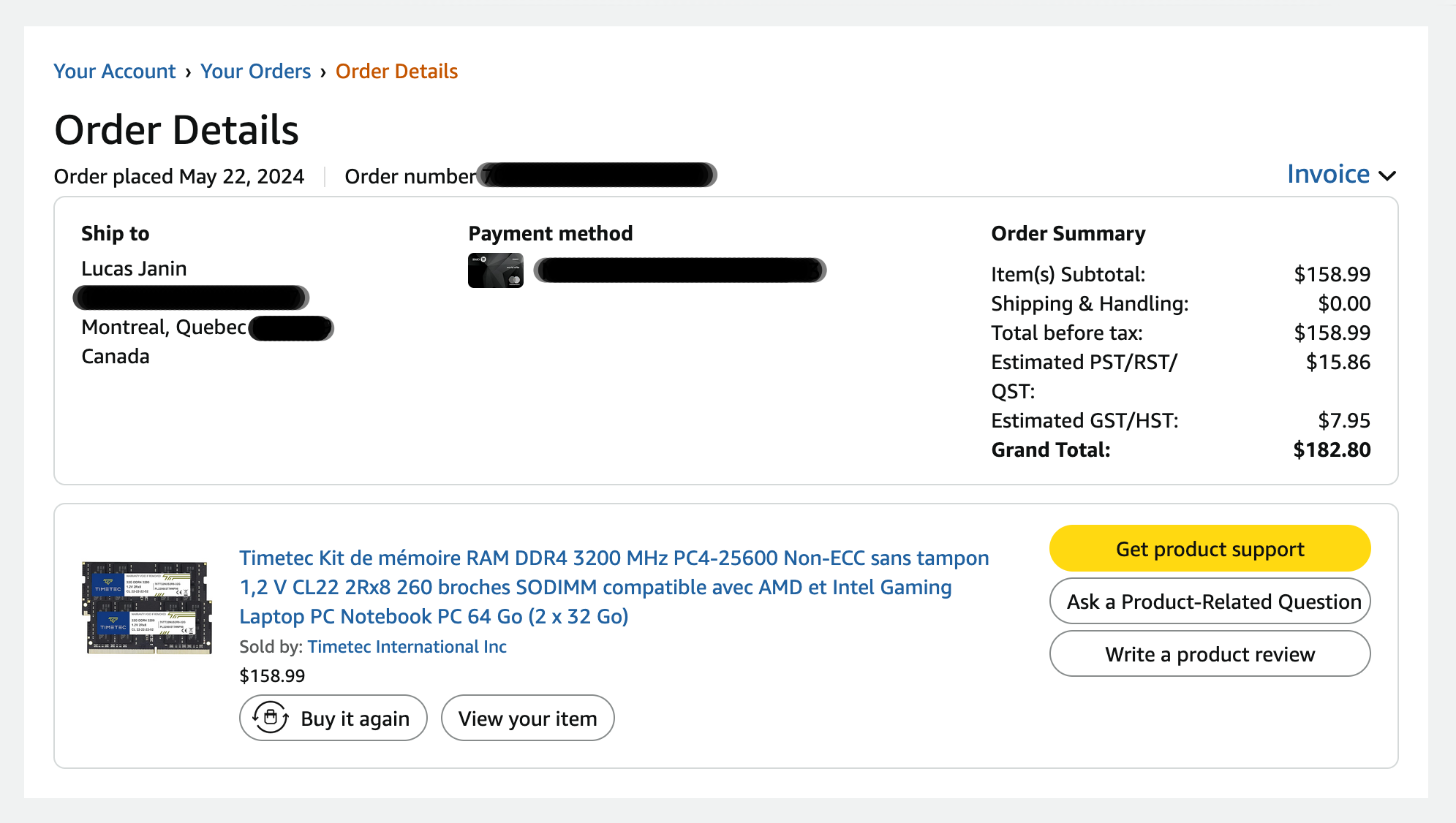
I was looking to add a new node to my #Proxmox cluster, but memory is crazy expensive.
I checked how much I paid for 64 GB of DDR4 SO-DIMM two and a half years ago: 183 CAD, or 114 €! Now, it costs almost six times as much. I should have ordered more…
By the way, it’s less expensive in Canada than in Europe…
So I’ve put off adding my new node… 😢
Maybe that’s better for the environment 🌍 😉
Alt...
Timetec 64GB KIT(2x32GB) DDR4 3200MHz PC4-25600 Non-ECC Unbuffered 1.2V CL22 2Rx8 Dual Rank 260 Pin SODIMM Compatible with AMD and Intel Gaming Laptop Notebook PC Computer Memory RAM Module Upgrade
Timetec Kit de mémoire RAM DDR4 3200 MHz PC4-25600 Non-ECC sans tampon 1,2 V CL22 2Rx8 260 broches SODIMM compatible avec AMD et Intel Gaming Laptop PC Notebook PC 64 Go (2 x 32 Go)
159 CAD without taxe 2 year ago
![[?]](https://media.pubeurope.com/accounts/avatars/115/421/523/262/371/772/original/2942b54df4db0a78.png)
https://www.europesays.com/ro/322275/ QNAP transformă NAS-ul într-un centru de backup anti-ransomware cu verificare automată a restaurării #backup #HDPForBusiness #MicrosoftHyperV #NAS #Proxmox #QNAP #QuTSHero #ransomware #RO #Română #Romania #Romanian #SecuritateEnterprise #Technology #tehnologie #VirtualizationStation #VMware #Windows

Alt...
QNAP transformă NAS-ul într-un centru de backup anti-ransomware cu verificare automată a restaurării
[Blog Archive] Setup a ZFS Pool #replication in a #Proxmox Two-Node #cluster
Because a ZFS datastore in a Proxmox Two-Node cluster operates locally rather than as a shared storage pool, ZFS Pool replication is required to synchronize data between nodes.
To protect running virtual machines against unexpected hardware failures, implementing automated ZFS Pool replication is the key http://rviv.ly/SOgvac #ZFSPool

![[?]](https://fedi.sndr.uk/system/accounts/avatars/113/900/962/937/400/374/original/de83bdbf349e93e9.jpeg)
How terrible is the idea of #selhosting single user #Vaultwarden on #proxmox or #truenas?
I know I need to take care of domains, backups, etc. - like with anything self-hosted really - I can do it. But is there anything else ahead that I can’t see and is problematic and different from self-hosting things like Jellyfins, Nextclouds etc?
Any suggestions and insights welcomed 🙏
ZimaBoard 2 review: x86 SBC with PCIe and dual SATA, benched against Raspberry Pi 5 and Orange Pi 5 Plus. Thermals, throttling, and where the hype dies. https://www.valtersit.com/guides/zima/zimaboard-2-review/ #homelab #sbc #proxmox
![[?]](data:image/png;base64, iVBORw0KGgoAAAANSUhEUgAAAEAAAABAAQAAAACCEkxzAAAAUUlEQVQoz43R0QkAMQwCUDdw/y3dwEvsvzlL4X1IoQkAisKmwfAFT3RgJHbQezpSRoXEqeqCL9BJBf7h3QbOCCxV5EVWMEMwG7K1/WODtlvxAYTtEsDU9F34AAAAAElFTkSuQmCC)
Access to backup (trigger/restore) from inside the VM
I’m running a fediverse instance in a Cloud VM. I would like to migrate the instance into my homelab, but there’s another admin involved who needs to be able to create and restore from backups/snapshots. I would keep a cloud VM to tunnel to my local VM so I don’t need to use my resident IP for the instance and some other reasons. That would also allow to give the other admin ssh from the cloud vm into the local vm without being able to touch my other stuff.
My initial thougt was to create some wrapper tool that can be triggered from inside the VM, just create a snapshot and restore from the latest, but I’d have to develop and run that one somewhere. Maybe there’s a better solution like creating an actual Proxmox user for the other admin with permissions just for that vm? I don’t want to expose Proxmox publicly of course, but there could be a solution via the cloud vm.
Looking for ideas here, keeping the hassle for the other admin low, while minimizing security risks.
![[?]](https://mastodon.infra.de/system/accounts/avatars/000/000/001/original/d01ecbccdc4d75ff.png)
Turns out that the block level statistics for Proxmox kernels 7.0.14-6 and up are strangely broken: There's sudden jumps in some of the reported values, posted an example to the proxmox forums...
![[?]](https://media.mstdn.social/accounts/avatars/112/100/709/556/488/107/original/22005d4d50f96bc5.jpg)
I use #OpnSense (as a #FireWall) behind my router with dedicated hardware, and it has been working without interruptions since three years ago.
In addition, behind the FW I have the rest of my infrastructure including two servers with #Proxmox.
Hosting a FW inside a Proxmox or any other virtualization system is not the right solution for me, becasue every time you need to mantain your server you are going to lose the Internet connection...
![[?]](https://f2.tchncs.de/accounts/avatars/000/208/111/original/560a5a6a7bfa6d1a.png)
Hallo Dirk, #umbrel funktioniert bei mir sehr gut und ist einfach zu bedienen.
Es läuft bei mir auf einem Shuttle PC Typ XPC slim DH410S mit 24H Zulassung
https://www.shuttle.eu/de/products/slim/dh410s
Ich kenne mich mit #proxmox nicht so gut aus, aber es hat nach meiner Kenntnis einen guten Ruf.

![[?]](https://cdn.masto.host/appdotnet/accounts/avatars/109/910/489/579/146/831/original/f3eb640de3019e25.jpg)
Another big reason I'd like to move #OpnSense to a dedicated piece of hardware is, since I only have a single #Proxmox host, upgrading from 8 to 9 is proving to be a bit of a pain here.
It looks like I have 2 options, setup a temporary router solution so I can shutdown the OpnSense VM and do an in place upgrade.
Or I need to do an ISO re-install of Proxmox and restore VMs.
Both of these are giving me anxiety.
One of the reasons I'm asking is I've been considering purchasing a dedicated mini-pc/firewall hardware device to move #OpnSense off my #Proxmox host, and a lot of the guides I'm looking at talk about needing a more powerful device if you're going to run IPS/IDS. I've had #CrowdSec configured for a while now though and it doesn't seem to be that heavy on my host.
![[?]](https://mastodon.blablalinux.be/system/accounts/avatars/113/675/429/104/963/472/original/6baf4240c1614c5a.jpg)
![[?]](https://assets.chaos.social/accounts/avatars/000/086/780/original/7699ff6b67e4070f.jpg)
Aaahrgh, das mit den VM-IDs ist ja ein richtiger Clusterfuck in #Proxmox
Aber eins kann das auch für seine Zwecke ausnutzen ;)
Ooookay, ich hätte #Proxmox nicht loben dürfen, bevor es fertig war -.-
Ich muss alle VMs aus dem Backup wiederherstellen, weil die Config der VMs offensichtlich nicht auf den SSDs sondern in irgendeiner DB liegt, die ich jetzt nicht mehr habe.
Na toll.
Kannte es von VMware halt anders...
Keine 15 Minuten später läuft die neue Installation schon und ist quasi auch schon fertig...

Alt...
der PVE Post Installer
Meee, neue Hardware für heimischen #Proxmox bootet nur im UEFI-Mode...
Die Installation ist so alt, dass das erste System zwar schon UEFI konnte aber noch "experimental" war, also muss ich jetzt echt auf ne weitere SSD neu installieren -.-
Upgrade von i7-7700 auf i7-9700.
Von 4 CPUs mit HT auf 8 CPUs ohne HT, dafür lohnt sich der Aufwand!
![[?]](https://media.infosec.exchange/infosec.exchange/accounts/avatars/116/094/913/903/247/721/original/3605ed6929991ef0.png)
![[?]](https://cyberplace.social/system/accounts/avatars/113/248/128/208/032/328/original/4085526b45d070a2.jpeg)
In a conversation the other evening about #proxmox, a few of us noted that we didn’t fully understand the differences between the storage types on the system. I did some searching and found this handy primer on the subject:
![[?]](https://files.mastodon.social/accounts/avatars/109/983/254/166/037/579/original/b8292dbb7f11ba81.png)
🔑 **5 Recursos-Chave do Proxmox!** 🖥️🚀 Descubra como otimizar sua infraestrutura de TI com o Proxmox! 👉 Leia mais: https://linuxsolutions.com.br/5-recursos-chave-do-proxmox-para-uma-infraestrutura-ti/?utm_source=dlvr.it&utm_medium=mastodon #Proxmox #Virtualização #Tecnologia

![[?]](https://files.mastodon.social/accounts/avatars/115/441/002/234/832/165/original/5d7211f17dd308b2.png)
pvetui v1.4.4 is out!
Highlights:
• CLI now accepts guest names, TUI adds quit confirm & startup options, version tag typo fi...
Full notes: https://github.com/devnullvoid/pvetui/releases/tag/v1.4.4 #proxmox #linux #homelab
This is not a good resource for me.. there goes my weekend out of the window!
#selfhosting #homelab #linux #hosting #proxmox #provisioning
![[?]](https://files.mastodon.social/accounts/avatars/114/392/857/915/197/171/original/047c015740f623d3.png)
Proxmox SDN: the 'missing source .../interfaces.d/sdn' warning.
It's one line. Where it comes from and the source directive that fixes it.
📖 https://devopstales.github.io/virtualization/proxmox-sdn-missing-source-directive/?utm_source=bluesky&utm_medium=social
#Proxmox #SDN
Copy-pasted bridge configs took down a 12-node Proxmox cluster for 4 hours. This guide covers SDN VXLAN zones, VLAN gotchas and migration fixes from real failures: https://www.valtersit.com/guides/proxmox/proxmox-sdn-multi-node-cluster-networking/
So @computer.bringyourown.computer@bsky.brid.gy didn't manage to wipe over the network, but back office + Mac dock with Ethernet got it up and running. TinyHome lives! On to a 2-node proxmox cluster, just because!
Alt...
An extremely messy desk - a Lenovo m900 tiny is plugged into an Ethernet jack on a Mac dock into a Macbook Air and it only has displayport into a big monitor behind it. There is detritus on the desktop.
The recording of the October 1st, 2026 #bhyve Production User Call is up:
We discussed ZFS in #Proxmox vs. LVM, Glen Barber's https://Apiary.work bhyve and Jail manager, seven quality of life fixes from #Sylve, contribution friction, the new Sylve installer and Zen mode, bridging challenges, routed vmnet interfaces, and more!
"Don't forget to slam those Like and Subscribe buttons."
You can support all Call For Testing efforts via BSD Fund: https://bsdfund.org
This content is not AI generated
![[?]](https://misskey-taube.s3.eu-central-1.wasabisys.com/files/8db30b80-7988-4687-8c8e-4ed0d6ef9b7d.gif)
![[?]](https://bizzfed.de/media/bizzfed-media/avatars/r9T7pCpIrZ-lKfZm.webp?v=1790598574471)
Der Edge lief. Eigentlich hätte ich ihn einfach in Ruhe lassen können. Auf dem
PROXMOX-LXC lief mein Edge-Hosting seit Monaten stabil: #DEBIAN als Basis, verwaltet mit #ANSIBLE, davor #OPENRESTY mit nativem HTTP/3 und dahinter getrennte PHP-8.4-FPM-Pools pro Domain. Die VHosts wurden sauber aus group_vars/sites_php.yml und group_vars/sites_proxy.yml generiert.
Also ein funktionierendes Setup. Aber beim routinemäßigen Aufräumen bin ich dann über ein paar Dinge gestolpert.
-> https://palencsar.de/de/infrastruktur-architektur/nixos-edge-hosting.shtml
![[?]](https://zhub.link/system/accounts/avatars/110/831/462/547/346/560/original/a3319d783179a343.png) Habr » 🤖 🌐
Habr » 🤖 🌐
@habr@zhub.link
Купил мини‑ПК с приставкой «AI» ради локальной LLM. Что может NPU на самом деле
TL;DR. Я купил мини‑ПК с Ryzen AI 9 365, чтобы гонять большую локальную модель на NPU. Начал с Windows ради гибрида NPU+iGPU, который так и не заработал, прошёл квест с драйвером NPU, выяснил, что NPU видит только половину оперативки, переехал на Proxmox и в итоге запустил Qwen3.6–35B‑A3B через FastFlowLM прямо на хосте. Модель работает 24/7: prefill около 200 ток/с, decode 13–17 ток/с. По дороге выяснилось, что NPU обслуживает один запрос за раз, падает с double free , если клиент не дождался ответа, и умеет выгнать из памяти большую модель ради маленькой embedding‑модели. Ниже вся дорога по порядку, мини‑гайд и цифры.
https://habr.com/ru/articles/1089040/
#npu #amd_ryzen_ai #локальные_llm #fastflowlm #qwen #proxmox #xdna #litellm #selfhosted #инференс
![[?]](https://cdn.fosstodon.org/accounts/avatars/111/053/785/256/933/995/original/9c04fd20de10ec56.png)
🖥️ Proxmox VE jako pełnoprawny klaster produkcyjny. Funkcje o których nie słyszałeś.
Denis Kaczor opowie o ekosystemie Proxmox VE, obejmującym backupy, klastry HA, Ceph, SD-WAN i narzędzia do szybkich wdrożeń. Prelekcja będzie skierowana zarówno do początkujących, jak i zaawansowanych użytkowników.
📍 Gdzie? Hotel KOLNA, Kraków
📅 Kiedy? 23–25 października 2026
🔗 Zapisy: https://jesien.org/2026
#JesieńLinuksowa #Linux #Proxmox #Virtualization

Alt...
Grafika promuje wystąpienie jednego z prelegentów konferencji Jesień Linuksowa. U góry znajduje się logo wydarzenia — pomarańczowy liść z napisem „Jesień Linuksowa”. Poniżej widoczne jest zdjęcie prelegenta oraz jego dane: Denis Kaczor, Administrator IT. Pod nim, na pomarańczowym polu, umieszczono tytuł prezentacji: Proxmox VE jako pełnoprawny klaster produkcyjny. Funkcje o których nie słyszałeś.. Na dole grafiki podano termin i miejsce konferencji: 23–25 października 2026, Hotel Kolna, Kraków.
![[?]](https://cdn.fosstodon.org/accounts/avatars/109/302/571/045/121/750/original/9cbcc385f5bd638e.jpg)
TIL: https://community-scripts.org now supports both #Proxmox and #Incus!
How feasible is it to migrate containers between Proxmox and Incus? Asking for myself 🤣
Read a bit o about #Incus, an alternative to #Proxmox for running VMs and containers on your own cluster.
Tl;Dr: Incus is more CLI -> REST API with optional, maybe less complete web UIs. Proxmox has excellent capable web UI, plus CLI if you want that.
Something I like very much are #Proxmox helpers which will set any number of services up for you, creating and configuring the container and installing the service.
Incus expects you to automate more things yourself.
One deleted VNet dropped five production VMs offline at 2:47 AM. Proxmox SDN with VXLAN and VLAN zones, production-tested configs and firewall patterns:
https://www.valtersit.com/guides/proxmox/proxmox-sdn-software-defined-networking-for-multi-node-clusters/
#Proxmox #SDN #VXLAN
![[?]](https://cdn.masto.host/socialchiefgyk3dcom/accounts/avatars/109/268/597/379/110/484/original/2a1dbefce11b4c4d.png)
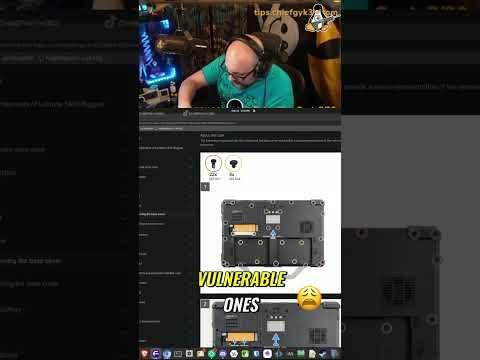
Ready to build a proper sandbox? I'm breaking down how to set up isolated Proxmox clusters to safely analyze malware and monitor network threats. Perfect for anyone looking to level up their security lab. 💻
Check out the new video to see the setup in action.
#Cybersecurity #Proxmox #MalwareAnalysis
https://www.youtube.com/watch?v=js54MScd6h8
Alt...
🔴 LIVE